---
title: "Guide to Concurrency in Python with Asyncio"
date: 2019-11-30
description: "A guide to Python's asyncio module covering async/await, event loops, tasks, and when to use asyncio vs threading or multiprocessing."
tags: [python, performance]
---
This is a _quick_ guide to Python's `asyncio` module and is based on Python
version 3.8.
## Introduction
So let's start by addressing the elephant in the room: there are _many_ modules
provided by the Python standard library for handling
asynchronous/concurrent/multiprocess code...
- [`_thread`](https://docs.python.org/3.8/library/_thread.html)
- [`threading`](https://docs.python.org/3.8/library/threading.html)
- [`multiprocessing`](https://docs.python.org/3.8/library/multiprocessing.html)
- [`asyncio`](https://docs.python.org/3.8/library/asyncio.html)
- [`concurrent.futures`](https://docs.python.org/3.8/library/concurrent.futures.html)
In this post we're going to focus on the last two. Primarily we will be focusing
on `asyncio`, before wrapping up with a look at some useful features of
`concurrent.futures`.
The motivation for this post is to understand why you will most likely want to
use `asyncio` over the other available modules (e.g. `_thread` and `threading`)
and when it's actually more appropriate to use either `multiprocessing` or
`concurrent.futures`.
## Why focus on asyncio?
One of the issues with writing concurrent code (using either the `_thread` or
`threading` modules) is that you suffer the cost of 'CPU context switching' (as
a CPU core can only run one thread at a time) which although quick, isn't free.
Multi-threaded code also has to deal with issues such as 'race conditions',
'dead/live locks' and 'resource starvation' (where some threads are over
utilized and others are under utilized).
Asyncio avoids these issues, so let's see how...
## A quick `asyncio` summary
> [!CITE]
> asyncio is a library to write concurrent code using the `async`/`await` syntax. -- [docs.python.org/3.8/library/asyncio.html](https://docs.python.org/3.8/library/asyncio.html)
The asyncio module provides both high-level and low-level APIs. Library and
Framework developers will be expected to use the low-level APIs, while all other
users are encouraged to use the high-level APIs.
It differs conceptually from the more traditional `threading` or `multiprocess`
approach to asynchronous code execution in that it utilizes something called an
[event loop](#event-loop) to handle the scheduling of asynchronous 'tasks'
instead of using more traditional threads or subprocesses.
Importantly, asyncio is designed to solve I/O network performance, _not_ CPU
bound operations (which is where multiprocessing should be used). So asyncio is
not a replacement for all types of asynchronous execution.
Asyncio is designed around the concept of 'cooperative multitasking', so you
have complete control over when a CPU 'context switch' occurs (i.e. context
switching happens at the application level and not the hardware level).
When using threads the Python scheduler is responsible for this, and so your
application may context switch at any moment (i.e. it becomes
non-deterministic).
This means when using threads you'll need to also use some form of 'lock'
mechanism to prevent multiple threads from accessing/mutating shared memory
(which would otherwise subsequently cause your program to become non-thread
safe).
## A quick `concurrent.futures` summary
> [!CITE]
> The concurrent.futures module provides a high-level interface for
> asynchronously executing callables. --
> [docs.python.org/3.8/library/concurrent.futures.html](https://docs.python.org/3.8/library/concurrent.futures.html)
The `concurrent.futures` provides a high-level abstraction for the `threading`
and `multiprocessing` modules, which is why we won't discuss those modules in
detail within this post. In fact the `_thread` module is a very low-level API
that the `threading` module is itself built on top of (again, this is why we
won't be covering that either).
Now we've already mentioned that asyncio helps us avoid using threads so why
would we want to use `concurrent.futures` if it's just an abstraction on top of
threads (and multiprocessing)? Well, because not all libraries/modules/APIs
support the asyncio model.
For example, if you use `boto3` and interact with AWS S3, then you'll find those
are synchronous operations. You can wrap those calls in multi-threaded code, but
it would be better to use `concurrent.futures` as it means you not only benefit
from traditional threads but an asyncio friendly package.
The `concurrent.futures` module is also designed to interop with the asyncio
event loop, making it easier to work with a pool of threads/subprocesses within
an otherwise asyncio driven application.
Additionally you'll also want to utilize `concurrent.futures` when you require a
pool of threads or a pool of subprocesses, while also using a clean and modern
Python API (as apposed to the more flexible but low-level `threading` or
`multiprocessing` modules).
## Green threads?
There are many ways to achieve asynchronous programming. There's the event loop
approach (which asyncio implements), a 'callback' style historically favoured by
single-threaded languages such as JavaScript, and more traditionally there has
been a concept known as 'green threads'.
In essence a green thread looks and feels exactly like a normal thread, except
that the threads are scheduled by application code rather than by hardware (so
effectively working around the same issue of deterministic context switching as
an event loop does). But the problem of handling shared memory still exists.
So let's take a quick look now at what the 'event loop' is, as it's the
foundation of what makes asyncio work and why we can avoid 'callback hell' and
the problems inherent with 'green threads'...
## Event Loop
The core element of all asyncio applications is the 'event loop'. The event loop
is what schedules and runs asynchronous tasks.
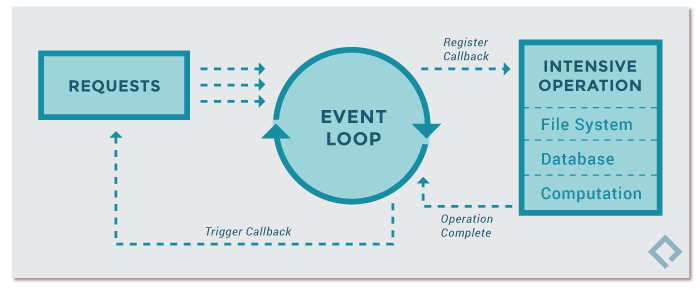
What makes the asyncio event loop so effective is the fact that Python
implements it around [generators](/posts/python-generators/). A generator
enables a function to be partially executed, then halt its execution at a
specific point, maintaining a stack of objects and exceptions, before resuming
again.
I've written about [iterators, generators and
coroutines](/posts/python-generators/) recently, so if you're interested in
those concepts, then I'll refer you to that post.
> [!TIP]
> for more API information on the event loop, please refer to [the
> official Python
> documentation](https://docs.python.org/3.8/library/asyncio-eventloop.html).
## Awaitables
The driving force behind asyncio is the ability to schedule asynchronous
'tasks'. There are a few different types of objects in Python that help support
this, and they are generally grouped by the term 'awaitable'.
Ultimately, something is _awaitable_ if it can be used in an `await` expression.
There are three main types of awaitables:
1. Coroutines
1. Tasks
1. Futures
> [!INFO]
> Futures is a _low-level_ type and so you shouldn't need to worry about
> it too much if you're not a library/framework developer (as you should be
> using the higher-level abstraction APIs instead).
### Coroutines
There are two closely related terms used here:
- a _coroutine function_: an `async def` function.
- a _coroutine object_: an object returned by calling a coroutine function.
> [!INFO]
> Generator based coroutine functions (e.g. those defined by decorating a
> function with `@asyncio.coroutine`) are superseded by the `async`/`await`
> syntax, but will continue to be supported _until_ Python 3.10 --
> [docs.python.org/3.8/library/asyncio-task.html](https://docs.python.org/3.8/library/asyncio-task.html#asyncio-generator-based-coro).
>
> Refer to my post "[iterators, generators,
> coroutines](/posts/python-generators/)" for more details about generator based
> coroutines and their asyncio history.
### Tasks
[Tasks](https://docs.python.org/3.8/library/asyncio-task.html#asyncio.Task) are
used to schedule coroutines _concurrently_.
All asyncio applications will typically have (at least) a single 'main'
entrypoint task that will be scheduled to run immediately on the event loop.
This is done using the `asyncio.run` function (see '[Running an asyncio
program](#running-an-asyncio-program)').
A coroutine function is expected to be passed to `asyncio.run`, while
_internally_ asyncio will check this using the helper function
`coroutines.iscoroutine` (see: [source
code](https://github.com/python/cpython/blob/master/Lib/asyncio/runners.py#L8)).
If not a coroutine, then an error is raised, otherwise the coroutine will be
passed to `loop.run_until_complete` (see: [source
code](https://github.com/python/cpython/blob/master/Lib/asyncio/base_events.py#L599)).
The `run_until_complete` function expects a [Future](#futures) (see below
section for what a Future is) and uses another helper function
`futures.isfuture` to check the type provided. If not a Future, then the
low-level API `ensure_future` is used to convert the coroutine into a Future
(see [source
code](https://github.com/python/cpython/blob/master/Lib/asyncio/tasks.py#L653)).
> [!INFO]
> [here](https://gist.github.com/1efc8dcfc0b1e9e8e8b89a4b2019f3af) is a
> comparison of the various methods for validating if a function is a coroutine.
> The results aren't necessarily what you might expect.
In older versions of Python, if you were going to manually create your own
Future and schedule it onto the event loop, then you would have used
`asyncio.ensure_future` (now considered to be a low-level API), but with Python
3.7+ this has been superseded by `asyncio.create_task`.
Additionally with Python 3.7, the idea of interacting with the event loop
directly (e.g. getting the event loop, creating a task with `create_task` and
then passing it to the event loop) has been replaced with `asyncio.run`, which
abstracts it all away for you (see '[Running an asyncio
program](#running-an-asyncio-program)' to understand what that means).
The following APIs let you see the state of the tasks running on the event loop:
- `asyncio.current_task`
- `asyncio.all_tasks`
> [!TIP]
> for other available methods on a Task object please refer to [the
> documentation](https://docs.python.org/3.8/library/asyncio-task.html#asyncio.Task).
### Futures
A Future is a low-level awaitable object that represents an eventual result of
an asynchronous operation.
To use an analogy: it's like an empty postbox. At _some point_ in the future the
postman will arrive and stick a letter into the postbox.
This API exists to enable callback-based code to be used with `async`/`await`,
while
[`loop.run_in_executor`](https://docs.python.org/3.8/library/asyncio-eventloop.html#asyncio.loop.run_in_executor)
is an example of an asyncio low-level API function that returns a Future (see
also some of the APIs listed in [Concurrent Functions](#concurrent-functions)).
> [!TIP]
> for other available methods on a Future please refer to [the
> documentation](https://docs.python.org/3.8/library/asyncio-future.html#asyncio.Future).
## Running an asyncio program
The high-level API (as per Python 3.7+) is:
```python
import asyncio
async def foo():
print("Foo!")
async def hello_world():
await foo() # waits for `foo()` to complete
print("Hello World!")
asyncio.run(hello_world())
```
The `.run` function always creates a _new_ event loop and _closes_ it at the
end. If you were using the lower-level APIs, then this would be something you'd
have to handle manually (as demonstrated below).
```python
loop = asyncio.get_event_loop()
loop.run_until_complete(hello_world())
loop.close()
```
### Running Async Code in the REPL
Prior to Python 3.8 you couldn't execute async code within the standard Python
REPL (it would have required you to use the IPython REPL instead).
To do this with the latest version of Python you would run `python -m asyncio`.
Once the REPL has started you don't need to use `asyncio.run()`, but just use
the `await` statement directly.
```
asyncio REPL 3.8.0+ (heads/3.8:5f234538ab, Dec 1 2019, 11:05:25)
[Clang 10.0.1 (clang-1001.0.46.4)] on darwin
Use "await" directly instead of "asyncio.run()".
Type "help", "copyright", "credits" or "license" for more information.
> [!EXAMPLE]
>>> import asyncio
>>> async def foo():
... await asyncio.sleep(5)
... print("done")
...
>>> await foo()
done
```
> [!INFO]
> Notice the REPL automatically executes `import asyncio` when starting up so
> we're able to use any `asyncio` functions (such as the `.sleep` function)
> without having to manually type that import statement ourselves.
### Use another Event Loop
If for some reason you didn't want to use the event loop provided by `asyncio`
(which is a pure Python implementation), you can swap it out for another event
loop such as [uvloop](https://github.com/MagicStack/uvloop/).
> [!CITE]
> uvloop is a fast, drop-in replacement of the built-in asyncio event loop.
> uvloop is implemented in [Cython](https://cython.org/) and uses
> [libuv](https://libuv.org/) under the hood.
According to the authors of uvloop, it is comparible in speed to that of
[Go](https://golang.org/) programs! I recommend reading their [blog
post](https://magic.io/blog/uvloop-blazing-fast-python-networking/) about its
initial release.
If you want to utilize uvloop then first install it with `pip install uvloop`,
then add a call to `uvloop.install()` like so:
```
import asyncio
import uvloop
async def foo():
print("Foo!")
async def hello_world():
await foo()
print("Hello World!")
uvloop.install()
asyncio.run(hello_world())
```
## Concurrent Functions
The following functions help to co-ordinate the running of functions
concurrently, and offer varying degrees of control dependant on the needs of
your application.
- `asyncio.gather`: takes a sequence of awaitables, returns an aggregate list of successfully awaited values.
- `asyncio.shield`: prevent an awaitable object from being cancelled.
- `asyncio.wait`: wait for a sequence of awaitables, until the given 'condition' is met.
- `asyncio.wait_for`: wait for a single awaitable, until the given 'timeout' is reached.
- `asyncio.as_completed`: similar to `gather` but returns Futures that are populated when results are ready.
> [!IMPORTANT]
> `gather` has specific options for handling errors and cancellations. For
> example, if `return_exceptions: False` then the first exception raised by one
> of the awaitables is returned to the caller of `gather`, where as if set to
> `True` then the exceptions are aggregated in the list alongside successful
> results. If `gather()` is cancelled, all submitted awaitables (that have not
> completed yet) are also cancelled.
## Deprecated functions
- `@asyncio.coroutine`: removed in favour of `async def` in Python 3.10
- `asyncio.sleep`: the `loop` parameter will be removed in Python 3.10
> [!INFO]
> you'll find in most of these APIs a `loop` argument can be provided to
> enable you to indicate the specific event loop you want to utilize). It seems
> Python has deprecated this argument in 3.8, and will remove it completely in
> 3.10.
## Examples
### `gather`
The following example demonstrates how to wait for multiple asynchronous tasks
to complete.
```
import asyncio
async def foo(n):
await asyncio.sleep(5) # wait 5s before continuing
print(f"n: {n}!")
async def main():
tasks = [foo(1), foo(2), foo(3)]
await asyncio.gather(*tasks)
asyncio.run(main())
```
### `wait`
The following example uses the `FIRST_COMPLETED` option, meaning whichever task
finishes first is what will be returned.
```
import asyncio
from random import randrange
async def foo(n):
s = randrange(5)
print(f"{n} will sleep for: {s} seconds")
await asyncio.sleep(s)
print(f"n: {n}!")
async def main():
tasks = [foo(1), foo(2), foo(3)]
result = await asyncio.wait(tasks, return_when=asyncio.FIRST_COMPLETED)
print(result)
asyncio.run(main())
```
An example output of this program would be:
```
1 will sleep for: 4 seconds
2 will sleep for: 2 seconds
3 will sleep for: 1 seconds
n: 3!
(
{ result=None>},
{
wait_for=()]>>,
wait_for=()]>>
}
)
```
### `wait_for`
The following example demonstrates how we can utilize a timeout to prevent
waiting endlessly for an asynchronous task to finish.
```
import asyncio
async def foo(n):
await asyncio.sleep(10)
print(f"n: {n}!")
async def main():
try:
await asyncio.wait_for(foo(1), timeout=5)
except asyncio.TimeoutError:
print("timeout!")
asyncio.run(main())
```
> [!INFO]
> the `asyncio.TimeoutError` doesn't provide any extra information so
> there's no point in trying to use it in your output (e.g. `except asyncio.TimeoutError as err: print(err)`).
### `as_completed`
The following example demonstrates how `as_complete` will yield the first task
to complete, followed by the next quickest, and the next until all tasks are
completed.
```
import asyncio
from random import randrange
async def foo(n):
s = randrange(10)
print(f"{n} will sleep for: {s} seconds")
await asyncio.sleep(s)
return f"{n}!"
async def main():
counter = 0
tasks = [foo("a"), foo("b"), foo("c")]
for future in asyncio.as_completed(tasks):
n = "quickest" if counter == 0 else "next quickest"
counter += 1
result = await future
print(f"the {n} result was: {result}")
asyncio.run(main())
```
An example output of this program would be:
```
c will sleep for: 9 seconds
a will sleep for: 1 seconds
b will sleep for: 0 seconds
the quickest result was: b!
the next quickest result was: a!
the next quickest result was: c!
```
### `create_task`
The following example demonstrates how to convert a coroutine into a Task and
schedule it onto the event loop.
```
import asyncio
async def foo():
await asyncio.sleep(10)
print("Foo!")
async def hello_world():
task = asyncio.create_task(foo())
print(task)
await asyncio.sleep(5)
print("Hello World!")
await asyncio.sleep(10)
print(task)
asyncio.run(hello_world())
```
We can see from the above program that we use `create_task` to convert our
coroutine function into a Task. This automatically schedules the Task to be run
on the event loop at the next available tick.
This is in contrast to the lower-level API `ensure_future` (which is the
preferred way of creating new Tasks). The `ensure_future` function has specific
logic branches that make it useful for more input types than `create_task` which
only supports scheduling a coroutine onto the event loop and wrapping it inside
a Task (see: [`ensure_future` source
code](https://github.com/python/cpython/blob/master/Lib/asyncio/tasks.py#L653)).
The output of this program would be:
```
>
Hello World!
Foo!
result=None>
```
Let's review the code and compare to the above output we can see...
We convert `foo()` into a Task and then print the returned Task immediately
after it is created. So when we print the Task we can see that its status is
shown as 'pending' (as it hasn't been executed yet).
Next we'll sleep for five seconds, as this will cause the `foo` Task to now be
run (as the current Task `hello_world` will be considered busy).
Within the `foo` Task we also sleep, but for a _longer_ period of time than
`hello_world`, and so the event loop will now context switch _back_ to the
`hello_world` Task, where upon the sleep will pass and we'll print the output
string `Hello World`.
Finally, we sleep again for ten seconds. This is just so we can give the `foo`
Task enough time to complete and print its own output. If we didn't do that then
the `hello_world` task would finish and close down the event loop. The last line
of `hello_world` is printing the `foo` Task, where we'll see the status of the
`foo` Task will now show as 'finished'.
## Callbacks
When dealing with a Task, which really is a Future, then you have the ability to
execute a 'callback' function once the Future has a value set on it.
The following example demonstrates this by modifying the previous
[`create_task`](#create_task) example code:
```
import asyncio
async def foo():
await asyncio.sleep(10)
return "Foo!"
def got_result(future):
print(f"got the result! {future.result()}")
async def hello_world():
task = asyncio.create_task(foo())
task.add_done_callback(got_result)
print(task)
await asyncio.sleep(5)
print("Hello World!")
await asyncio.sleep(10)
print(task)
asyncio.run(hello_world())
```
Notice in the above program we add a new `got_result` function that expects to
receive a Future type, and thus calls `.result()` on the Future.
Also notice that to get this function to be called, we pass it to
`.add_done_callback()` which is called on the Task returned by `create_task`.
The output of this program is:
```
cb=[got_result() at gather.py:9]>
Hello World!
got the result! Foo!
result='Foo!'>
```
## Pools
When dealing with lots of concurrent operations it might be wise to utilize a
'pool' of threads (and/or subprocesses) to prevent exhausting your application's
host resources.
This is where the `concurrent.futures` module comes in. It provides a concept
referred to as an Executor to help with this and which can be run standalone or
be integrated into an existing asyncio event loop (see: [Executor
documentation](https://docs.python.org/3.8/library/concurrent.futures.html#concurrent.futures.Executor)).
### Executors
There are two types of 'executors':
- [`ThreadPoolExecutor`](https://docs.python.org/3.8/library/concurrent.futures.html#threadpoolexecutor)
- [`ProcessPoolExecutor`](https://docs.python.org/3.8/library/concurrent.futures.html#processpoolexecutor)
Let's look at the first way to execute code within one of these executors, by
using an asyncio event loop to schedule the running of the executor.
To do this you need to call the event loop's `.run_in_executor()` function and
pass in the executor type as the first argument. If `None` is provided, then the
_default_ executor is used (which is the `ThreadPoolExecutor`).
The following example is copied verbatim from the [Python
documentation](https://docs.python.org/3.8/library/asyncio-eventloop.html#executing-code-in-thread-or-process-pools):
```
import asyncio
import concurrent.futures
def blocking_io():
# File operations (such as logging) can block the
# event loop: run them in a thread pool.
with open("/dev/urandom", "rb") as f:
return f.read(100)
def cpu_bound():
# CPU-bound operations will block the event loop:
# in general it is preferable to run them in a
# process pool.
return sum(i * i for i in range(10 ** 7))
async def main():
loop = asyncio.get_running_loop()
# 1. Run in the default loop's executor:
result = await loop.run_in_executor(None, blocking_io)
print("default thread pool", result)
# 2. Run in a custom thread pool:
with concurrent.futures.ThreadPoolExecutor() as pool:
result = await loop.run_in_executor(pool, blocking_io)
print("custom thread pool", result)
# 3. Run in a custom process pool:
with concurrent.futures.ProcessPoolExecutor() as pool:
result = await loop.run_in_executor(pool, cpu_bound)
print("custom process pool", result)
asyncio.run(main())
```
The second way to execute code within one of these executors is to send the code
to be executed directly to the pool. This means we don't have to acquire the
current event loop to pass the pool into it (as the earlier example
demonstrated), but it comes with a caveat which is the parent program won't wait
for the task to be completed unless you explicitly tell it to (which I'll
demonstrate next).
With that in mind, let's take a look at this alternative approach. It involves
calling the executor's `submit()` method:
```
import concurrent.futures
import time
def slow_op(*args):
print(f"arguments: {args}")
time.sleep(5)
print("slow operation complete")
return 123
def do_something():
with concurrent.futures.ProcessPoolExecutor() as pool:
future = pool.submit(slow_op, "a", "b", "c")
for fut in concurrent.futures.as_completed([future]):
assert future.done() and not future.cancelled()
print(f"got the result from slow_op: {fut.result()}")
if __name__ == "__main__":
print("program started")
do_something()
print("program complete")
```
> [!WARNING]
> be careful with a global process executor (e.g. placing something like
> `PROCESS_POOL = concurrent.futures.ProcessPoolExecutor()` within the global
> scope and using that reference within our `do_something()` function) as this
> means when the program is copied into a _new_ process you'll get an error from
> the Python interpreter about a leaked semaphore. This is why I create the
> process pool executor within a function.
One thing worth noting here is that if we hadn't used the `with` statement (like
we do in the above example) it would mean we'd not be shutting down the pool
once it has finished its work, and so (depending on if your program continues
running) you may discover resources aren't being cleaned up.
To solve that problem you can call the `.shutdown()` method which is exposed to
both types of executors via its parent class `concurrent.futures.Executor`.
Below is an example that does that, but now using the threadpool executor:
```
import concurrent.futures
THREAD_POOL = concurrent.futures.ThreadPoolExecutor(max_workers=5)
def slow_op(*args):
with open("/dev/urandom", "rb") as f:
return f.read(100000)
def do_something():
future = THREAD_POOL.submit(slow_op, "a", "b", "c")
THREAD_POOL.shutdown()
assert future.done() and not future.cancelled()
print(f"got the result from slow_op: {len(future.result())}")
if __name__ == "__main__":
print("program started")
do_something()
print("program complete")
```
Pay attention to the placement of the call to `.shutdown()`. We no longer have
any code to handle waiting for the task to complete. You might have expected
calling `.shutdown()` and then immediately checking if the task is complete
(e.g. `assert future.done()`) to cause an error to be raised as the future is
unlikely to be finished.
> [!WARNING]
> remember also if you call `.done()` on a future when a value has not yet
> been set, then you'll see an exception such as `asyncio.InvalidStateError`.
But no error is raised, and the future is indeed considered 'done' by the time
we check it. This is because the shutdown method has a single argument defined
called `wait` and its default value is set to `True`, which means it would wait
for all scheduled tasks to complete before shutting down the executor pool.
Thus the `.shutdown()` method is a synchronization call (i.e. it ensures all
tasks are complete before shutting down, and thus we can guarantee all results
will be available).
Now if we had passed `.shutdown(wait=False)` instead, then the call to
`future.done()` would have raised an exception (as the scheduled task would
still be running as the threadpool was being closed), and so in that case we'd
need to ensure that we use another mechanism for acquiring the results of the
scheduled tasks (such as `concurrent.futures.as_completed` or
`concurrent.futures.wait`).
### `asyncio.Future` vs `concurrent.futures.Future`
One final thing to mention is that a `concurrent.futures.Future` object is
_different_ from an `asyncio.Future`.
An `asyncio.Future` is intended to be used with the asyncio's event loop, and is
[_awaitable_](#awaitables). A `concurrent.futures.Future` is _not_ awaitable.
Using the `.run_in_executor()` method of an event loop will provide the
necessary interoperability between the two future types by wrapping the
`concurrent.futures.Future` type in a call to
[`asyncio.wrap_future`](#asyncio-wrap-future) (see next section for details).
### `asyncio.wrap_future`
Since Python 3.5 we can use `asyncio.wrap_future` to convert a
`concurrent.futures.Future` to an `asyncio.Future`. An example of this can be
seen below...
```
import asyncio
import random
from concurrent.futures import ThreadPoolExecutor
from time import sleep
def return_after_5_secs(message):
sleep(5)
return message
pool = ThreadPoolExecutor(3)
async def doit():
identify = random.randint(1, 100)
future = pool.submit(return_after_5_secs, (f"result: {identify}"))
awaitable = asyncio.wrap_future(future)
print(f"waiting result: {identify}")
return await awaitable
async def app():
# run some stuff multiple times
tasks = [doit(), doit()]
result = await asyncio.gather(*tasks)
print(result)
print("waiting app")
asyncio.run(app())
```
The output of this program would be:
```
waiting app
waiting result: 62
waiting result: 83
# ...five seconds pass by...
['result: 62', 'result: 83']
```