---
title: Fastly Varnish
date: 2017-11-02
description: A deep dive into how Fastly's CDN works, covering Varnish internals, clustering, shielding, and edge programming gotchas.
tags: [fastly, networking, performance]
---
## UPDATE
As of October 2020 I joined the Fastly team to help improve Developer Relations
🎉
This means one of my many responsibilities will be to make this blog post
redundant by ensuring the [developer.fastly.com](https://developer.fastly.com/)
content is as relevant and valuable as possible.
But until that time, remember that this post was written (and updated), from the
perspective of a long time customer, over many years and so the tone and
personality of this blog post doesn't represent the opinions of Fastly in any
way.
If you have any questions, then feel free to reach out to me.
______________________________________________________________________
In this post I'm going to be explaining how the [Fastly
CDN](https://www.fastly.com/) works, with regards to their 'programmatic edge'
feature (i.e. the ability to execute code on cache servers nearest to your
users).
We will be digging into quite a few different areas of their implementation,
such as their clustering solution, shielding, and various gotchas and caveats to
their service offering.
**Be warned: this post is a monster! It'll take a long time to digest this
information...**

## Introduction
Fastly utilizes 'free' software (Varnish) and extends it to fit their purposes,
but this extending of existing software can make things confusing when it comes
to understanding what underlying features work and how they work.
In short: [Varnish](https://varnish-cache.org/) is an HTTP accelerator.\\ More
concretely it is a web application that acts like a [HTTP
reverse-proxy](https://en.wikipedia.org/wiki/Reverse_proxy).
You place Varnish in front of your application servers (those that are serving
HTTP content) and it will cache that content for you. If you want more
information on what Varnish cache can do for you, then I recommend reading
through their [introduction article](https://varnish-cache.org/intro/index.html)
(and watching the video linked there as well).
[Fastly](https://www.fastly.com/) is many things, but for most people they are a
CDN provider who utilise a highly customised version of Varnish. This post is
about Varnish and explaining a couple of specific features (such as hit-for-pass
and serving stale) and how they work in relation to Fastly's implementation of
Varnish.
One stumbling block for Varnish is the fact that it only accelerates HTTP, not
HTTPS. In order to handle HTTPS you would need a TLS/SSL termination process
sitting in front of Varnish to convert HTTPS to HTTP. Alternatively you could
use a termination process (such as nginx) _behind_ Varnish to fetch the content
from your origins over HTTPS and to return it as HTTP for Varnish to then
process and cache.
**Simple, right?**

> [!INFO]
> Fastly helps both with the HTTPS problem, and also with scaling Varnish
> in general.
The reason for this post is because when dealing with Varnish and VCL it gets
very confusing having to jump between official documentation for VCL and
Fastly's specific implementation of it. Even more so because the version of
Varnish Fastly are using is now quite old and yet they've also implemented some
features from more recent Varnish versions. Meaning you end up getting in a
muddle about what should and should not be the expected behaviour (especially
around the general request flow cycle).
Ultimately this is not a "VCL 101". If you need help understanding anything
mentioned in this post, then I recommend reading:
- [Varnish Book](http://book.varnish-software.com/4.0/)
- [Varnish Blog](https://info.varnish-software.com/blog)
- [Fastly Blog](https://www.fastly.com/blog)
> [!TIP]
> Fastly also has a couple of _excellent_ articles on utilising the `Vary` HTTP
> header, which is highly recommended reading.
Lastly, as of May 2020, Fastly has started rolling out an updated developer
portal which hopes to address some of the 'documentation' issues I've noted in
this post.
Fastly reached out to me to review their updated developer portal (inc. the new
layout of their reference and API documentation) and requested my feedback. I
was happy to report that (other than a few minor comments) I found it to be a
good start and I'm very much looking forward to many future improvements.
OK, let's crack on...
### Varnish Basics
Varnish is a 'state machine' and it switches between these states via calls to a
`return` function (where you tell the `return` function which state to move to).
The various states are:
- `recv`: request is received and can be inspected/modified.
- `hash`: generate a hash key from host/path and lookup key in cache.
- `hit`: hash key was found in the cache.
- `miss`: hash key was not found in the cache.
- `pass`: content should be fetched from origin, regardless of if it exists in cache or not, and response will not be cached.
- `pipe`: content should be fetched from origin, and no other VCL will be executed.
- `fetch`: content has been fetched, we can now inspect/modify it before delivering it to the user.
- `deliver`: content has been cached (or not, depending on what you `return` in `vcl_fetch`) and ready to be delivered to the user.
For each state there is a corresponding subroutine that is executed. It has the
form `vcl_`, and so there is a `vcl_recv`, `vcl_hash`, `vcl_hit` etc.
As an example, in `vcl_recv` to change state to "pass" you would execute
`return(pass)`. If you were in `vcl_fetch` and wanted to avoid caching the
content (i.e. move to `vcl_pass` before moving to `vcl_deliver`), then you would
execute `return(pass)` otherwise executing `return(deliver)` from `vcl_fetch`
would cache the origin response and move you to `vcl_deliver` directly.
For a state such as `vcl_miss`, when that state function finishes executing it
will automatically trigger a request to the origin/backend service to acquire
the requested content. Once the content is requested, _then_ we end up at
`vcl_fetch` where we can then inspect the response from the origin.
This is why at the end of `vcl_miss` we change state by calling `return(fetch)`.
It looks like we're telling Varnish to 'fetch' data but really we're saying move
to the next logical state which is actually `vcl_fetch`.
Lastly, as Varnish is a state machine, we have the ability to 'restart' a
request (while also keeping any modifications you might have made to the request
intact). To do that you would call `return(restart)`.

^^ Varnish in action
### States vs Actions
According to Fastly `vcl_hash` is the only exception to the rule of
`return()` because the value you provide to the `return` function is not
a _state_ per se. The state function is called `vcl_hash` but you don't execute
`return(hash)`. Instead you execute `return(lookup)`.
Fastly suggests this is to help distinguish that we're performing an action and
not a state change (i.e. we're going to _lookup_ the requested resource within
the cache).
Although `vcl_miss`'s `return(fetch)` is a bit ambiguous considering we _could_
maybe argue it's also performing an 'action' rather than a state change. Let's
also not forget operations such as `return(restart)` which looks to be
triggering an 'action' rather than a state change (in that example you might
otherwise expect to execute something like `return(recv)`).
## Varnish Default VCL
When using the free version of Varnish, you'll typically implement your own
custom VCL logic (e.g. add code to `vcl_recv` or any of the other common VCL
subroutines). But it's important to be aware that if you don't `return` an
action (e.g. `return(pass)`, or trigger any of the other available Varnish
'states'), then Varnish will continue to execute its own built-in VCL logic
which sits beneath your custom VCL.
You can view the 'default' (or 'builtin') logic for each version of Varnish via
GitHub:
- [Varnish v2.1](https://github.com/varnishcache/varnish-cache/blob/2.1/bin/varnishd/default.vcl) (the version used by Fastly)
- [Varnish v3.0](https://github.com/varnishcache/varnish-cache/blob/3.0/bin/varnishd/default.vcl)
- [Varnish v4.0](https://github.com/varnishcache/varnish-cache/blob/4.0/bin/varnishd/builtin.vcl)
- [Varnish v5.0](https://github.com/varnishcache/varnish-cache/blob/5.0/bin/varnishd/builtin.vcl)
> [!INFO]
> after v3 Varnish renamed the file from `default.vcl` to `builtin.vcl`.
But things are slightly different with Fastly's Varnish implementation (which is
based off Varnish version 2.1.5).
Specifically:
- no `return(pipe)` in `vcl_recv`, they do `pass` there
- some modifications to the `synthetic` in `vcl_error`
- ...and God knows what else.
## Fastly Default VCL
On top of the built-in VCL the free version of Varnish uses, Fastly also
includes its own 'default' VCL logic alongside your custom VCL.
When creating a new Fastly 'service', this default VCL is added automatically to
your new service. You are then free to remove it completely and replace it with
your own custom VCL if you like.
See the link below for what this default VCL looks like, but in there you'll
notice code comments such as:
```
#--FASTLY RECV BEGIN
...code here...
#--FASTLY RECV END
```
> [!IMPORTANT]
> those specific portions of the default code define _critical_ behaviour
> that needs to be defined whenever you want to write [your own custom
> VCL](#3.0).
Fastly has some guidelines around the use (or removal) of their default VCL
which you can learn more about
[here](https://docs.fastly.com/guides/vcl/mixing-and-matching-fastly-vcl-with-custom-vcl).
Below are some useful links to see Fastly's default VCL:
- [Fastly's Default VCL (full service context)](https://gist.github.com/Integralist/2e4a78fe92ec70d2e2709ff7be660669)
- [Fastly's Default VCL (each state split into separate files)](https://gist.github.com/Integralist/56cf991ae97551583d5a2f0d69f37788)
> [!INFO]
> Fastly also has what they call a 'master' VCL which runs outside of what
> we (as customers) can see, and this VCL is used to help Fastly scale varnish
> (e.g. handle things like their custom clustering solution).

fastly's master VCL be all like ^^
## Custom VCL
When adding your own custom VCL code you'll need to ensure that you add Fastly's
critical default behaviours, otherwise things might not work as expected.
The way you add their defaults to your own custom VCL code is to add a specific
type of code comment, for example:
```
sub vcl_recv {
#FASTLY recv
}
```
See [their
documentation](https://docs.fastly.com/vcl/custom-vcl/creating-custom-vcl/) for
more details, but ultimately these code comments are 'macros' that get expanded
into the actual default VCL code at compile time.
It can be useful to know what the default VCL code does (see [links in previous
section](#3)) because it might affect where you place these macros within your
own custom code (e.g. do you place it in the middle of your custom sub routines
or at the start or the end).
This is important because, for example, the default behaviours Fastly defines
for `vcl_recv` is to set a backend for your service. Your custom VCL can of
course override that backend, but where you define your custom code that does
that overriding might not function correctly if placed in the wrong place.
**Here is an example of why it's important to know what is happening inside of
these macros**: we had a conditional comment that looked something like the
following...
```
if (req.restarts == 0) {
...set backend...
}
```
...later on in our VCL we would trigger a request restart (e.g.
`return(restart)`), but now `req.restarts` would be equal to `1` and not zero
and so when the request restarted we wouldn't set the backend.
Now, this of course is a bug in our code and has nothing to do with the default
Fastly VCL (yet). But what's important to now be aware of is that our requests
didn't just 'fail' but were sent to a different origin altogether (which was
extremely confusing to debug at the time).
Turns out what was happening was that the default Fastly VCL was selecting a
_default_ backend for us, and this selection was based on the _age_ of the
backend!
To quote Fastly directly...
> [!CITE]
> We choose the first backend that was created that doesn't have a conditional
> on it. If all of your backends have conditionals on them, I believe we then
> just use the first backend that was created. If a backend has a conditional on
> it, we assume it isn't a default. That backend is only set under the
> conditions defined, so then we look for the oldest backend defined that
> doesn’t have a conditional to make it the default.
### Be Careful!
We experienced a problem that broke our production site and it was related to
implementing our own `vcl_hash` subroutine.
The problem wasn't as obvious as you might think. We didn't implement `vcl_hash`
to change the hashing algorithm, but instead we wanted to add some debug log
calls into it.
We looked at the VCL that Fastly generated before we added our own `vcl_hash`
subroutine and that VCL looked like the following...
```
sub vcl_hash {
#--FASTLY HASH BEGIN
#if unspecified fall back to normal
{
set req.hash += req.url;
set req.hash += req.http.host;
set req.hash += "#####GENERATION#####";
return (hash);
}
#--FASTLY HASH END
}
```
We thought "OK, that's what Fastly is generating, so we'll just let them
continue generating that code, nothing special we need to do" ...wrong!
So we added the following code to our own VCL...
```
sub vcl_hash {
#FASTLY hash
call debug_info;
return(hash)
}
```
The expectation was that the `#FASTLY hash` macro would still include all the
code from inbetween `#--FASTLY HASH BEGIN` and `#--FASTLY HASH END` (see the
earlier code snippet).
What actually ended up happening was that the Fastly macro dynamically changed
itself to not include critical behaviours
Notice the `set req.hash += req.url;` and `set req.hash += req.http.host;` that
they originally were generating? Yup. They were no longer included. This caused
the system caching to blow up.
The code that was being generated now looked like the following...
```
#--FASTLY HASH BEGIN
# support purge all
set req.hash += req.vcl.generation;
#--FASTLY HASH END
```
So to fix the problem we had to put those missing settings manually back into
our own `vcl_hash` subroutine...
```
sub vcl_hash {
#FASTLY hash
set req.hash += req.url;
set req.hash += req.http.host;
call debug_info;
return(hash);
}
```
Interestingly Fastly's default VCL _doesn't_ require us to also set `set req.hash += "#####GENERATION#####";`, so they happily keep that part within
their generated code 🤦

### Example Boilerplate
Before we move on, while we're discussing custom VCL, I'd like to share with you
some VCL boilerplate I typically start out all new projects with (which I then
modify to suit the project's requirements, but ultimately this VCL consists of
all the standard stuff you'd typically would need):
```
#
# detailed blog post on fastly's implementation details:
# https://www.integralist.co.uk/posts/fastly-varnish/
#
# fastly custom vcl boilerplate:
# https://docs.fastly.com/vcl/custom-vcl/creating-custom-vcl/#fastlys-vcl-boilerplate
#
# states defined in this file:
# vcl_recv
# vcl_error
# vcl_hash
# vcl_pass
# vcl_miss
# vcl_hit
# vcl_fetch
# vcl_deliver
#
table deny_list {
"/bad-thing-1": "true",
"/bad-thing-2": "true",
}
sub set_backend {
set req.backend = F_httpbin;
if (req.http.Host == "example-stage.acme.com/") {
set req.backend = F_httpbin_stage;
}
}
sub vcl_recv {
#FASTLY recv
call set_backend;
# configure purges to require api authentication:
# https://docs.fastly.com/en/guides/authenticating-api-purge-requests
#
if (req.method == "FASTLYPURGE") {
set req.http.Fastly-Purge-Requires-Auth = "1";
}
# force HTTP to HTTPS
#
# related: req.http.Fastly-SSL
# https://docs.fastly.com/en/guides/tls-termination
#
if (req.protocol != "https") {
error 601 "Force SSL";
}
# fastly 'tables' are different to 'edge dictionaries':
# https://docs.fastly.com/en/guides/about-edge-dictionaries
#
if (table.lookup(deny_list, req.url.path)) {
error 600 "Not found";
}
# don't bother doing a cache lookup for a request type that isn't cacheable
if (req.method !~ "(GET|HEAD|FASTLYPURGE)") {
return(pass);
}
if (req.restarts == 0) {
# nagios/monitoring cache bypass
#
if (req.url ~ "123") {
set req.http.X-Monitoring = "true";
return(pass);
}
}
return(lookup);
}
sub vcl_error {
#FASTLY error
# fastly synthetic error responses:
# https://docs.fastly.com/en/guides/creating-error-pages-with-custom-responses
#
if (obj.status == 600) {
set obj.status = 404;
synthetic {"
Error
404 Not Found (varnish)
"};
return(deliver);
}
# fastly HTTP to HTTPS 301 redirect:
# https://docs.fastly.com/en/guides/generating-http-redirects-at-the-edge
#
# example:
# curl -sD - http://example.acme.com/
# curl -H Fastly-Debug:1 -sLD - -o /dev/null http://example.acme.com/?cachebust=$(uuidgen)
#
if (obj.status == 601 && obj.response == "Force SSL") {
set obj.status = 301;
set obj.response = "Moved Permanently";
set obj.http.Location = "https://" req.http.host req.url;
synthetic {""};
return (deliver);
}
}
sub vcl_hash {
#FASTLY hash
set req.hash += req.url;
set req.hash += req.http.host;
# call debug_info_hash;
return(hash);
}
sub vcl_pass {
#FASTLY pass
}
sub vcl_miss {
#FASTLY miss
return(fetch);
}
sub vcl_hit {
#FASTLY hit
}
sub vcl_fetch {
#FASTLY fetch
# fastly caching directive:
# https://docs.fastly.com/en/guides/cache-control-tutorial
#
# example:
# define stale behaviour if none provided by origin
#
if (beresp.http.Surrogate-Control !~ "(stale-while-revalidate|stale-if-error)") {
set beresp.stale_if_error = 31536000s; // 1 year
set beresp.stale_while_revalidate = 60s; // 1 minute
}
# fastly stale-if-error:
# https://docs.fastly.com/en/guides/serving-stale-content
#
if (beresp.status >= 500 && beresp.status < 600) {
if (stale.exists) {
return(deliver_stale);
}
}
# hit-for-pass:
# https://www.integralist.co.uk/posts/fastly-varnish/#hit-for-pass
#
if (beresp.http.Cache-Control ~ "private") {
return(pass);
}
return(deliver);
}
sub vcl_deliver {
#FASTLY deliver
# fastly internal state information:
# https://docs.fastly.com/en/guides/useful-variables-to-log
#
set resp.http.Fastly-State = fastly_info.state;
if (req.http.X-Monitoring == "true") {
set resp.http.X-Monitoring = req.http.X-Monitoring;
}
return(deliver);
}
```
> [!TIP]
> UPDATE 2020.02.25: Fastly have published a blog post that details what they
> consider to be VCL anti-patterns and offer solutions/alternative patterns:
> https://www.fastly.com/blog/maintainable-vcl
## Fastly TTLs
When Fastly caches your content, it of course only caches it for a set period of
time (known as the content's "Time To Live", or TTL). Fastly [has some
rules](https://docs.fastly.com/guides/performance-tuning/controlling-caching)
about how it determines a TTL for your content.
Their 'master' VCL sets a TTL of 120s ([this comes from
Varnish](https://github.com/varnishcache/varnish-cache/blob/5.0/bin/varnishd/builtin.vcl#L158-L172)
rather than Fastly) when no other VCL TTL has been defined and if no cache
headers were sent by the origin.
Fastly does a similar thing with its own default VCL which it uses when you
create a new service. It looks like the following and increases the default to
3600s (1hr):
```
if (beresp.http.Expires ||
beresp.http.Surrogate-Control ~ "max-age" ||
beresp.http.Cache-Control ~"(s-maxage|max-age)") {
# keep the ttl here
} else {
# apply the default ttl
set beresp.ttl = 3600s;
}
```
> [!WARNING]
> 3600 isn't long enough to persist your cached content to disk, it will
> exist in-memory only. See their documentation on ["Why serving stale content
> may not work as
> expected"](https://docs.fastly.com/guides/performance-tuning/serving-stale-content#why-serving-stale-content-may-not-work-as-expected)
> for more information.
You can override this VCL with your own custom VCL, but it's also worth being
aware of the priority ordering Fastly gives when presented with multiple ways to
determine your content's cache TTL...
1. `beresp.ttl = 10s`: caches for 10s
1. `Surrogate-Control: max-age=300` caches for 5 minutes
1. `Cache-Control: max-age=10` caches for 10s
1. `Expires: Fri, 28 June 2008 15:00:00 GMT` caches until this date has expired
As we can see from the above list, setting a TTL via VCL takes ultimate priority
even if caching headers are provided by the origin server.
### DNS TTL Caching
There are two fundamental pieces of information I'm about to describe...
1. Fastly only uses the first IP returned from a DNS lookup, and will cache it
until the DNS' TTL expires. A failed DNS lookup for a service without a
Fastly 'health check' (see
[docs](https://docs.fastly.com/en/guides/working-with-health-checks)) would lead
to 600 seconds (10 minutes!) of stale IP use before attempting to requery the
DNS.\\ **An example of why this is bad**: we had a 60s DNS TTL to align with that
of AWS load balancers, but we discovered we were getting Fastly errors for ten
minutes instead of just 1 minute.
1. Fastly does offer a 'High Availability' feature (on request) which allows for
traffic distribution across _multiple_ IPs returned from a DNS lookup, rather
than just using one until the next DNS lookup.
## Caching Priority List
Fastly [has some
rules](https://docs.fastly.com/guides/tutorials/cache-control-tutorial) about
the various caching response headers it respects and in what order this
behaviour is applied. The following is a summary of these rules:
- `Surrogate-Control` determines proxy caching behaviour (takes priority over `Cache-Control`) †.
- `Cache-Control` determines client caching behaviour.
- `Cache-Control` determines both client/proxy caching behaviour if no `Surrogate-Control` †.
- `Cache-Control` determines both client/proxy caching behaviour if it includes both `max-age` and `s-maxage`.
- `Expires` determines both client/proxy caching behaviour if no `Cache-Control` or `Surrogate-Control` headers.
- `Expires` ignored if `Cache-Control` is also set (recommended to avoid `Expires`).
- `Pragma` is a legacy cache header only recommended if you need to support older HTTP/1.0 protocol.
> [!IMPORTANT]
> † _except_ when `Cache-Control` contains `private`.
Next in line is `Surrogate-Control` (see [my post on HTTP
caching](/posts/http-caching-guide/) for more information on this cache header),
which takes priority over `Cache-Control`. The `Cache-Control` header itself
takes priority over `Expires`.
> [!TIP]
> if you ever want to debug Fastly and your custom VCL then it's
> recommended you create a 'reduced test case' using their [Fastly
> Fiddle](https://fiddle.fastlydemo.net/) tool. Be aware this tool shares code
> publicly so don't put secret codes or logic into it! Don't forget to add
> `return` statements to the functions in the Fiddle UI, otherwise the default
> Fastly boilerplate VCL will be executed and that can cause confusion if your
> service typically doesn't use it! e.g. httpbin origin was sending back a 500
> and `vcl_fetch` was triggering a restart and I didn't know why. I discovered I
> had to add `return(deliver)` in `vcl_fetch` to prevent Fastly boilerplate from
> executing!
## Fastly Default Cached Status Codes
The CDN (Fastly) [doesn't cache all
responses](https://docs.fastly.com/en/guides/http-status-codes-cached-by-default).
It will not cache any responses with a status code in the `5xx` range, and it
will only cache a tiny subset of responses with a status code in the `4xx` and
`3xx` range.
The status codes it will cache by default are:
- `200 OK`
- `203 Non-Authoritative Information`
- `300 Multiple Choices`
- `301 Moved Permanently`
- `302 Moved Temporarily`
- `404 Not Found`
- `410 Gone`
> [!TIP]
> in VCL you can allow _any_ response status code to be cached by
> executing `set beresp.cacheable = true;` within `vcl_fetch` (you can also
> change the status code if you like to _look_ like it was a different code with
> `set beresp.status = ;`).
## Fastly Request Flow Diagram
There are various request flow diagrams for Varnish
([example](http://book.varnish-software.com/4.0/_images/simplified_fsm.svg)) and
generally they separate the request flow into two sections: request and backend.
So handling the request, looking up the hash key in the cache, getting a hit or
miss, or opening a pipe to the origin are all considered part of the "request"
section. Whereas fetching of the content is considered part of the "backend"
section.
The purpose of the distinction is because Varnish likes to handle backend
fetches _asynchronously_. This means Varnish can serve stale data while a new
version of the cached object is being fetched. This means less request queuing
when the backend is slow.
But the issue with these diagrams is that they're not all the same. Changes
between Varnish versions and also the difference in Fastly's implementation make
identifying the right request flow tricky.
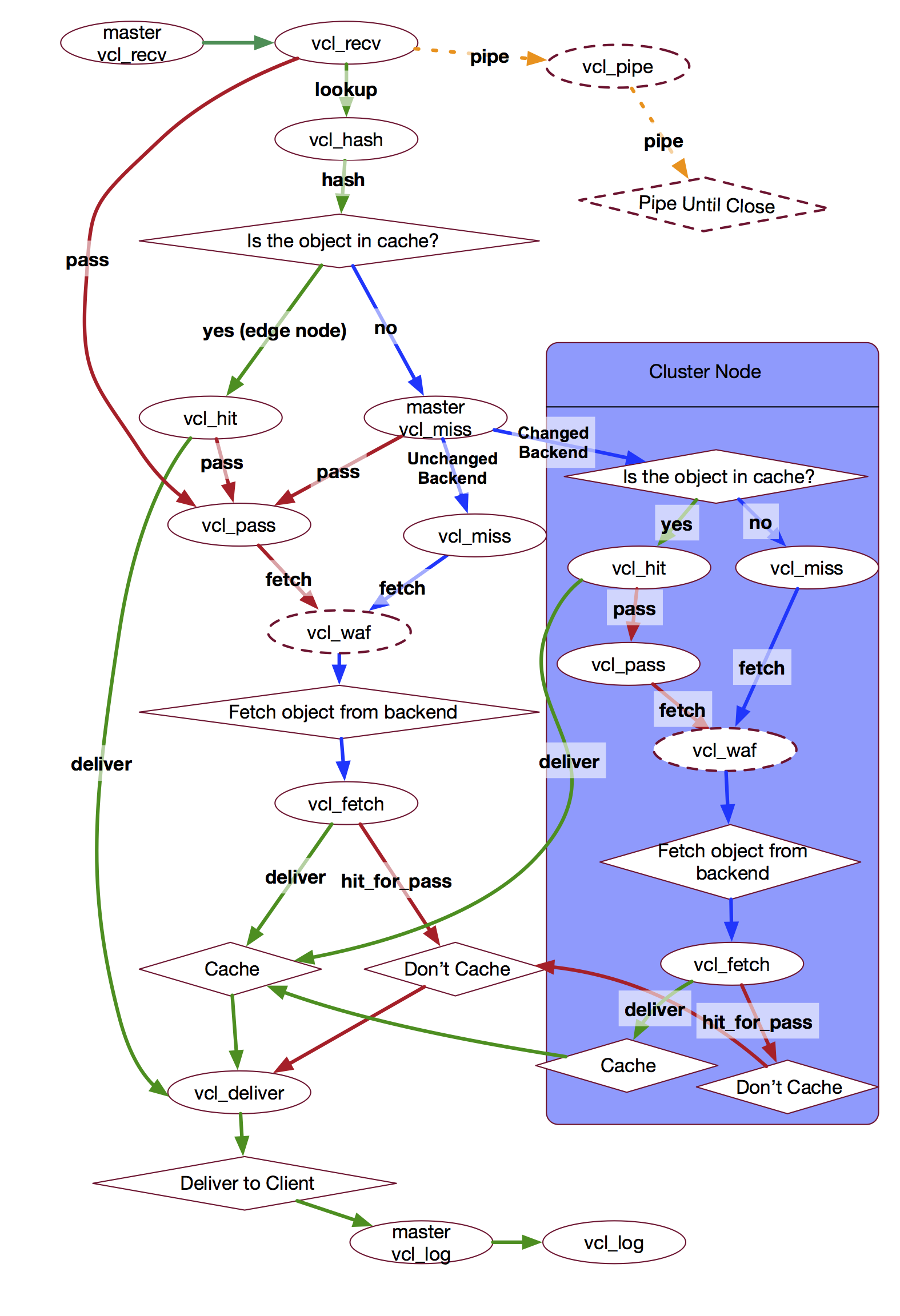
Below is a diagram of Fastly's VCL request flow (including its WAF and
Clustering logic). This is a great reference for confirming how your VCL logic
is expected to behave.
### Fastly-Debug
Fastly will display extra information about a request/response flow within its
HTTP response headers if the request was issued with a `Fastly-Debug` HTTP
request header (set with a value of `1`).
Some of the extra headers you'll find in the response are:
- `Fastly-Debug-Digest`
- `Fastly-Debug-Path`
- `Fastly-Debug-TTL`
- `Surrogate-Control`
- `Surrogate-Key`
- `X-Cache-Hits`
- `X-Cache`
- `X-Served-By` (reports fetching node, see [Clustering](#clustering))
> [!INFO]
> the `Surrogate-*` response headers are typically set by an origin server
> and are otherwise stripped by Fastly.
Some of the following information will make reference to 'delivery' and
'fetching' nodes. It's probably best you read ahead to the section on
[clustering](#clustering) to understand what these concepts mean in the scope of
Fastly's system design. Once you understand them, come back here and the next
few sentences will make more sense.
The quick summary is this:
- delivery node: the cache server your request is first routed to (and which
sends the response back to you).
- fetching node: the cache server that actually makes a request to your origin,
before returning the origin response back to the delivery node.
When using `Fastly-Debug:1` to inspect debug response headers, we might want to
look at `fastly-state`, `fastly-debug-path` and `fastly-debug-ttl`. These would
have values such as...
```
< fastly-state: HIT-STALE
< fastly-debug-path: (D cache-lhr6346-LHR 1563794040) (F cache-lhr6324-LHR 1563794019)
< fastly-debug-ttl: (H cache-lhr6346-LHR -10.999 31536000.000 20)
```
The `fastly-debug-path` suggests we delivered from the delivery node `lhr6346`,
while we fetched from the fetching node `lhr6324`.
The `fastly-debug-ttl` header suggests we got a HIT (`H`) from the delivery node
`lhr6346`, but this is a misleading header and one you need to be careful with.
> [!INFO]
> it may take a few requests to see numbers populating the
> `Fastly-Debug-TTL`, as the request needs to either land on the fetching node,
> or a delivery node where the content exists in temporary memory. If you see
> `-` it might be because you arrived at a delivery node that doesn't have it
> in-memory.
Why this header is misleading is actually quite a hard thing to explain, and
Fastly has discussed the reasoning for the confusion in at least a couple
different talks I've seen (one being:
https://vimeo.com/showcase/6623864/video/376921467 which I highly recommend
btw).
In essence, the HIT state is recorded at the fetching node. When the response
makes its way back to the delivery node, it will then set the
`fastly-debug-ttl`. But this doesn't mean that the cache HIT _happened_ at the
delivery node, only that the header was _set_ there.
The reason this is a concern is that you don't necessarily know if the request
did indeed go to the fetching node or whether the stale content actually came
from the delivery node's in-memory cache. The only way to be sure is to check
the `fastly-state` response header.
The `fastly-state` header is ultimately what I use to verify where something has
happened. If I see a `HIT` (or `HIT-STALE`), then I know I got a cache HIT from
the delivery node (e.g. myself or someone else has already requested the
resource via this delivery node).
> [!INFO]
> a reported `HIT` can in some cases be because the first cache server
> your request was routed to _was_ the primary node (again, see
> [clustering](#clustering) for details of what a 'primary' node is in relation
> to a 'fetching' node).
If I see instead a `HIT-CLUSTER` (or `HIT-STALE-CLUSTER`) it means I'm the first
person to reach this delivery node and request this resource, and so there was
nothing cached and thus we went to the fetching node and got a cache HIT there.
Another confusing aspect to `fastly-debug-ttl` is that with regards to
`stale-while-revalidate` you could end up seeing a `-` in the section where you
might otherwise expect to see the grace period of the object (i.e. how long can
it be served stale for while revalidating). This can occur when the origin
server hasn't sent back either an `ETag` header or `Last-Modified` header.
Fastly still serves stale content if the `stale-while-revalidate` TTL is still
valid but the output of the `fastly-debug-ttl` can be confusing and/or
misleading.
> [!WARNING]
> Something else to note, while I write this August 2019 update is that the
> `fastly-debug-ttl` only every displays the 'grace' value when it comes to
> `stale-if-error`, meaning if you're trying to check if you're serving
> `stale-while-revalidate` by looking at the grace period you might get confused
> when you see the `stale-if-error` grace period (or worse a `-` value), this is
> because the `fastly-debug-ttl` header isn't as granular as it should be.
> Fastly have indicated that they intend on making updates to this header in the
> future in order for the values to be much clearer.
Lastly, when dealing with shielding the `fastly-debug-ttl` can be misleading in
another sense which is: imagine the fetching node got a MISS (so it fetched
content from origin and returned it to the delivery node). The delivery node
will cache the response from the fetching node (including the MISS reported by
`fastly-debug-ttl`) and so even if another request reaches the name delivery
node, it will report a `MISS, HIT` combination.

thanks Fastly, for this totally not confusing setup ^^
### 304 Not Modified
Although not specifically mentioned in the above diagram it's worth noting that
Fastly doesn't execute `vcl_fetch` when it receives a `304 Not Modified` from
origin, but it will use any `Cache-Control` or `Surrogate-Control` values
defined on that response to determine how long the stale object should now be
kept in cache.
If no caching headers are sent with the `304 Not Modified` response, then the
stale object's TTL is _refreshed_. This means its age is set back to zero and
the original `max-age` TTL is enforced.
Ultimately this means if you were hoping to execute logic defined within
`vcl_fetch` whenever a `304 Not Modified` was returned (e.g. dynamically modify
the stale/cached object's TTL), then that isn't possible.
### UPDATE 2019.08.10
Fastly reached out to me to let me know that this diagram is now incorrect.
Specifically, the request flow for a hit-for-pass ([see below](#5) for details)
_was_:
```
RECV, HASH, HIT, PASS, DELIVER
```
Where `vcl_hit` would `return(pass)` once it had identified the cached object as
being a hit-for-pass object.
It is now:
```
RECV, HASH, PASS, DELIVER
```
Where after the object is returned from `vcl_hash`'s lookup, it's immediately
identified as being a HFP (hit-for-pass) and thus triggers `vcl_pass` as the
next state, and finally `vcl_deliver`.
What this ultimately means is there is some redundant code later on in this blog
post where I make reference to serving stale content. Specifically, I mention
that `vcl_hit` required some custom VCL for checking the cached object's
`cacheable` attribute for the purpose of identifying whether it's a hit-for-pass
object or not.
> [!INFO]
> this `vcl_hit` code logic is still part of the free Varnish software,
> but it has been made redundant by Fastly's version.
## Error Handling
In Varnish you can trigger an error using the `error` directive, like so:
```
error 900 "Not found";
```
> [!TIP]
> it's common to use the made-up `9xx` range for these error triggers
> (900, 901, 902 etc).
Once executed, Varnish will switch to the `vcl_error` state, where you can
construct a _synthetic_ error to be returned (or do some other action like set a
header and restart the request).
```
if (obj.status == 900) {
set obj.status = 500;
set obj.http.Content-Type = "text/html";
synthetic {"
Hmmm. Something went wrong.
"};
return(deliver);
}
```
In the above example we construct a synthetic error response where the status
code is a `500 Internal Server Error`, we set the content-type to HTML and then
we use the `synthetic` directive to manually construct some HTML to be the
'body' of our response. Finally we execute `return(deliver)` to jump over to the
`vcl_deliver` state.
If you want to send a synthetic JSON response (maybe your Fastly service is
fronting an API that returns JSON), then this is possible:
```
if (obj.status == 401) {
set obj.http.Content-Type = "application/json";
set obj.http.WWW-Authenticate = "Basic realm=Secured";
synthetic "{" +
"%22error%22: %22401 Unauthorized%22" +
"}";
return(deliver);
}
```
We discuss JSON generation in more detail [later](#logging-memory-exhaustion).
### Unexpected State Change
Now, I wanted to talk briefly about error handling because there are situations
where an error can occur, and it can cause Varnish to change to an _unexpected_
state. I'll give a real-life example of this...
We noticed that we were getting a raw `503 Backend Unavailable` error from
Varnish displayed to our customers. This is odd? We have VCL code in `vcl_fetch`
(the state that you move to once the response from the origin has been received
by Fastly/Varnish) which checks the response status code for a 5xx and handles
the error there. Why didn't that code run?
Well, it turns out that `vcl_fetch` is only executed if the backend/origin was
considered 'available' (i.e. Fastly could make a request to it). In this
scenario what happened was that our backend _was_ available but there was a
network issue with one of Fastly's POPs which meant it was unable to route
certain traffic, resulting in the backend appearing as 'unavailable'.
So what happens in those scenarios? In this case Varnish won't execute
`vcl_fetch` because of course no request was ever made (how could Varnish make a
request if it thinks the backend is unavailable), so instead Varnish jumps from
`vcl_miss` (where the request to the backend would be initiated from) to
`vcl_error`.
This means in order to handle that very specific error scenario, we'd need to
have similar code for checking the status code (and trying to serve stale, see
later in this article for more information on that) within `vcl_error`.
### UPDATE 2019.11.07
Fastly's Fiddle tool now shows a compiler error that suggests 8xx-9xx are codes
used internally by Fastly and that we should use the 6xx range instead.
According to Fastly the 900 code is often a dangeous code to use in custom VCL.
In 8xx territory, they have a special case attached to 801, which is used for
redirects to TLS in the case of requests coming in on HTTP. So if you manually
trigger an 801, weird stuff happens.
6xx and 7xx are clean. 600, 601 and 750 are by far the most popular codes used
in customer configs apparently. In the standards range, we have a special case
attached to 550, for some reason, lost in the mists of time, but otherwise
errors in the standards range are interpreted as specified in the IETF spec
## State Variables
Each Varnish 'state' has a set of built-in variables you can use.
Below is a list of available variables and which states they're available to:
> [!INFO]
> Based on Varnish 3.0 (which is the only explicit documentation I could find on
> this), although you can see in various request flow diagrams for different
> Varnish versions the variables listed next to each state. But
> [this](http://book.varnish-software.com/3.0/VCL_functions.html#variable-availability-in-vcl)
> was the first explicit list I found. Fastly themselves recommend [this Varnish
> reference](https://varnish-cache.org/docs/2.1/reference/vcl.html#variables)
> but that doesn't indicate which variables are read vs write.
______________________________________________________________________
### UPDATE 2020.12.11
The Fastly 'Developer Hub' now has an official reference 🎉
[developer.fastly.com/reference/vcl/variables/](https://developer.fastly.com/reference/vcl/variables/)
______________________________________________________________________
Here's a quick key for the various states:
- *R*: recv
- *F*: fetch
- *P*: pass
- *M*: miss
- *H*: hit
- *E*: error
- *D*: deliver
- *I*: pipe
- *#*: hash
| | R | F | P | M | H | E | D | I | # |
|:------------|-----|-----|-----|-----|-----|-----|-----|-----|-----|
| `req.*` | R/W | R/W | R/W | R/W | R/W | R/W | R/W | R/W | R/W |
| `bereq.*` | R/W | R/W | R/W | R/W |
| `obj.hits` | R | R |
| `obj.ttl` | R/W | R/W |
| `obj.grace` | R/W |
| `obj.*` | R | R/W |
| `beresp.*` | R/W |
| `resp.*` | R/W | R/W |
> [!INFO]
> For the values assigned to each variable:\
> `R/W` is "Read and Write",\
> and `R` is "Read"\
> and `W` is "Write"
It's important to realise that the above matrix is based on Varnish and not
Fastly's version of Varnish. But there's only one difference between them, which
is the response object `resp` isn't available within `vcl_error` when using
Fastly.
When you're dealing with `vcl_recv` you pretty much only ever interact with the
`req` object. You generally will want to manipulate the incoming request
_before_ doing anything else.
> [!TIP]
> the only other reason for setting data on the `req` object is when you
> want to keep track of things (because, as we can see from the above table
> matrix, the `req` object is available to R/W from _all_ available states).
Once a lookup in the cache is complete (i.e. `vcl_hash`) we'll end up in either
`vcl_miss` or `vcl_hit`. If you end up in `vcl_hit`, then generally you'll look
at and work with the `obj` object (this `obj` is what is pulled from the cache -
so you'll check properties such as `obj.cacheable` for dealing with things like
'hit-for-pass').
If you were to end up at `vcl_miss` instead, then you'll probably want to
manipulate the `bereq` object and not the `req` object because manipulating the
`req` object doesn't affect the request that will shortly be made to the origin.
If you decide at this last moment you want to send an additional header to the
origin, then you would set that header on the `bereq` and that would mean the
request to origin would include that header.
> [!TIP]
> this is where understanding the various state variables can be useful,
> as you might want to modify the `req` object for the sake of 'persisting' a
> change to another state, where as `bereq` modification will only live for the
> lifetime of the `vcl_miss` subroutine.
Once a request is made, the content is copied into the `beresp` variable and
made available within the `vcl_fetch` state. You would likely want to modify
this object in order to change its ttl or cache headers because this is the last
chance you have to do that before the content is stored in the cache.
Finally, the `beresp` object is copied into `resp` and that is what's made
available within the `vcl_deliver` state. This is the last chance you have for
manipulating the response that the client will receive. Changes you make to this
object doesn't affect what was stored in the cache (because that time,
`vcl_fetch`, has already passed).
### Anonymous Objects
There are two scenarios in which a `pass` occurs. One is that you `return(pass)`
from `vcl_recv` explicitly, and the other is that `vcl_recv` executes a
`return(lookup)` (which is the default behaviour) and the lookup results in a
hit-for-pass object.
In both cases, an anonymous object is created, and the next customer-accessible
VCL hook that will run is `vcl_pass`. Because the object is anonymous, any
changes you make to it in `vcl_fetch` are not persisted beyond that one client
request.
The only difference between the behaviour of a `return(pass)` from `vcl_recv`
and a `return(pass)` resulting from a hit-for-pass in the cache, is that
`req.digest` will be set. Fastly's internal varnish engineering team state that
`req.digest` is not an identifier for the object but rather a property of the
request, which has been set simply because the request went through the hash
process.
An early `return(pass)` from `vcl_recv` doesn't go through `vcl_hash` and so no
hash (`req.digest`) is added to the anonymous object. If there is a hash
(`req.digest`) available on the object inside of `vcl_pass`, it doesn't mean you
retain a reference to the cache object.
### Forcing Request to Origin
While we're discussing state variables, I recently (2020.03.04) discovered that
the `req` object has a set of properties exposed that will enable you to force a
request through to the origin while allowing the response to be cached.
These properties are:
- `req.hash_always_miss`
- `req.hash_ignore_busy`
You would need to set them to `true` in `vcl_recv`:
```
set req.hash_always_miss = true;
set req.hash_ignore_busy = true;
```
It's important to realize that getting a request through to the origin is a
_different_ scenario to using `return(pass)` in either `vcl_recv` and
`vcl_fetch` (as might have been your first thought).
In the case of `vcl_recv` a `return(pass)` would cause the request to not only
bypass a cache lookup (thus going to origin to fetch the content), but also the
primary/fetching node wouldn't have executed `vcl_fetch`! The fetching of
content would have happened on the delivery node and so another client (if they
reached a different delivery node, might end up at the fetching node and find no
cached content there).
In the case of `vcl_fetch` a `return(pass)` would mean the response isn't
cached. So you can see how both the `vcl_recv` and `vcl_fetch` states executing
`return(pass)` isn't the same thing as letting a request bypass the cache _but_
still having the origin response be cached!
When using `hash_always_miss` we're causing the cache lookup to think it got a
miss (rather than 'passing' it altogether). So this means features such as
[request collapsing](#request-collapsing) are still intact.
Where as the use of `hash_ignore_busy` _disables_ request collapsing and so this
will result in a 'last cached wins' scenario (e.g. if you have two requests now
going simultaneously to origin, whichever responds first will be cached but then
the one that responds last will overwrite the first cached response).

request collapsing in action ^^
## Clustering
Now that we know there are state variables available, and we understand
generally when and why we would use them, let's now consider the problem of
'clustering'. Because if you don't understand Fastly's clustering design, then
you'll end up in a situation where data you're setting on these variables are
being lost and you won't know why.
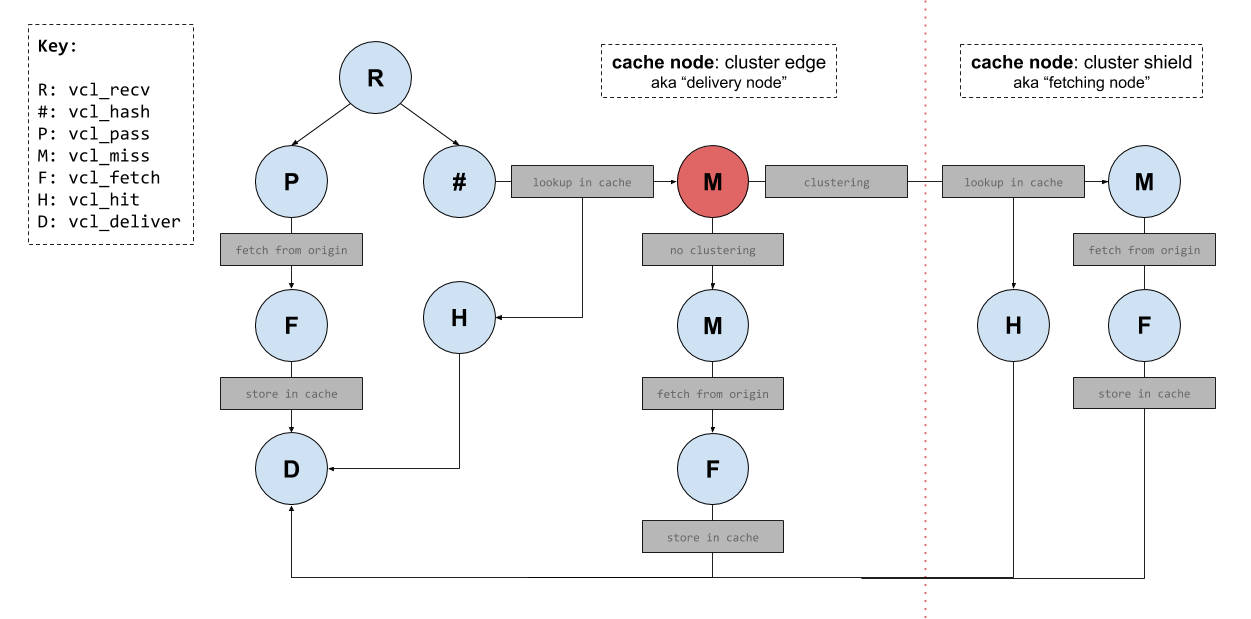
To help make clustering easier to understand I've created a diagram (below) of
some Varnish internal 'states'. In this diagram are two sections 'cluster edge'
and 'cluster shield'. Both represent individual cache servers running Varnish,
but for the sake of simplicity I've omitted most of the Varnish states from the
'cluster shield' node.
> [!INFO]
> this diagram does not cover _all_ the states available to Fastly's
> implementation of Varnish. There is also `vcl_log` which is executed after
> `vcl_deliver`. There is also `vcl_error` which can be triggered from multiple
> other state functions.
The directional lines drawn on the diagram represent various request flows you
_might_ see in a typical Varnish implementation (definitely in my case at any
rate). Of course these aren't the _only_ request flows you might see; there are
numerous ways for a request to flow through the Varnish state machine.
Before we jump into some request flow examples (and then further onto the
discussion of clustering), let's take a moment to define some terminology that
will help us throughout the rest of this post...
## Terminology
The terminology I will use from here on, will be as follows:
- delivery node (i.e. the 'cluster edge')
- fetching node (i.e. the 'cluster shield')
- primary node (i.e. fetching node for a specific object)
To explain the terminology:
When a cache server within a Fastly POP receives a request for an object, that
server is 'acting' as the delivery node (as it will be the server responsible
for returning a response to the client).
If the delivery node has an empty cache, then the request won't immediately
reach the origin. Instead the hash key for the requested resource/object will be
used to identify a "primary" node, which is the node that will _always_ (†)
'act' as a fetching node (i.e. it's the server that will be responsible for
handling the request for that specific resource/object).
> [!INFO]
> † well, _almost_ always. Except when the delivery node that ends up being
> selected _is_ the "primary" node. Then the primary node is no longer acting as
> a fetching node, as it's forced to act as a delivery node instead. Requiring a
> "secondary" node to act as a backup for those scenarios.
In some cases you'll notice a "fetching node" being refered to as a "cluster
node". this can help to understand some of Fastly's APIs (e.g. `is_cluster`).
### Delivery node request flow
Let's now consider a _simple_ example request flow using that diagram. For this
example, a node has been selected within the POP and it will start to process
the request (so the server node is 'acting' as the delivery node).
- client issues a request (and delivery node identified).
- request is received and `vcl_recv` is called.
- imagine the `vcl_recv` logic triggers the `return(pass)` directive.
- the state will change to `vcl_pass` (skipping cache lookup).
- after `vcl_pass` has completed, the request flows through to origin.
- the origin responds and the state changes to `vcl_fetch`.
- modifications to the response object will be cached.
- after `vcl_fetch` has completed, response content is stored in the cache.
- the state changes to `vcl_deliver` (modifications here are sent to client).
- response is sent back to the client.
That's just one example route that could be taken, and I conveniently chose that
example because it meant only requiring one cache server to serve the response
to a client (the fetching node, and the concept of clustering, didn't come into
effect in that example).
### Example without Clustering
What's important to understand though is the fact that Fastly's infrastructure
does mean (in specific scenarios) a request could indeed be handled by _two_
separate cache servers. The initial cache server (the delivery node), and then
potentially a second cache server (the fetching node).
When that happens, it is referred to as "clustering" but to more easily
understand clustering, let's consider what happens if it _didn't_ exist...
Without clustering what happens is this: the cache server that gets the request
will generate a 'hash key' based upon the requested URL host and path. That hash
key is then used to identify the resource in the cache that resides on the
server.
If the cache doesn't contain the requested resource, then the cache server will
allow the request to flow through to the origin server which will respond with
the appropriate content and the cache will be populated with that content for
the next time that resource is requested.
This all works, **but here's the problem...**
A Fastly POP contains 64 individual caching servers. All of them have a unique
cache. That means every single cache server would at some point have to go back
to the origin for the same resource that was already cached at a different cache
server. That's not an efficient system design.
To solve that problem, Fastly came up with the concept of Clustering.
Clustering is the coordination of _two_ nodes within a POP to fulfill a request.
The following image (and explanation) should help to clarify why this design is
much better.
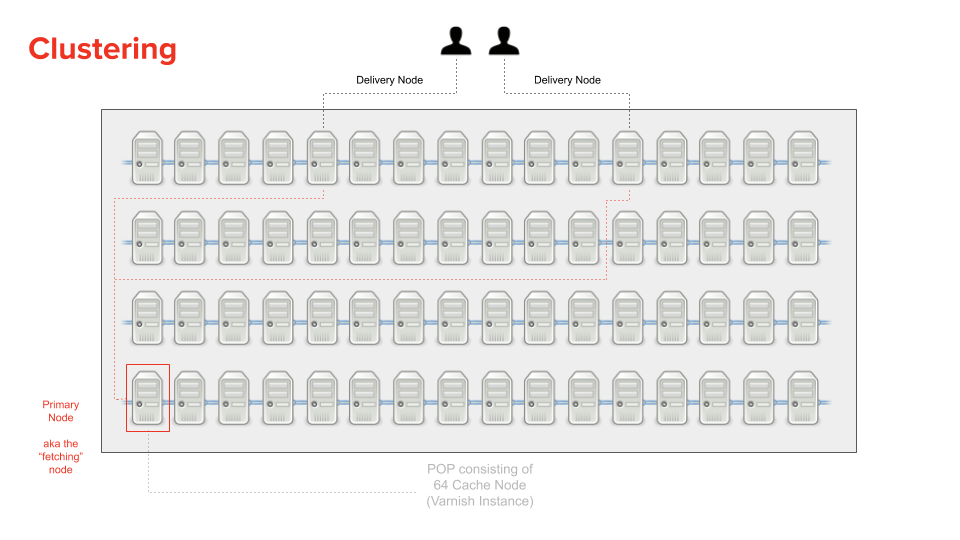
With clustering, the hash key for a requested resource is used, firstly to
lookup the content in the cache of the current server (e.g. the delivery node),
but also to identify a specific node that will be used for fetching the content
from origin (and is referred to as the "primary" node, or _fetching_ node) for
when the content cannot be found in the delivery node's cache.
This design means that multiple requests to different delivery nodes can all go
to the same "primary" cache node (e.g. the fetching node) to _fetch_ the content
from the origin if they themselves didn't have the requested resource cached.
This way, if we had ten requests for the same resource, and each request ended
up at a different delivery node (and each delivery node failed to locate the
resource in their cache) then only one of those ten requests would need to go to
the origin (via the fetching node).
When the fetching node gets the content from the origin, it sticks the response
in its cache and the response is sent back to the delivery node which also
caches the response but only in memory (not on disk!).
But how does the fetching node stop all ten requests from each delivery node
from reaching the origin, I hear you ask? Well, this is what's referred to as
"request collapsing". It's the process of blocking in-flight requests (for the
same resource) until at least one request for that resource has completed.
In _most_ cases the cache server that initially receives the request will not be
the "primary". But not always. Sometimes the cache server that initially handles
the incoming client request _IS_ the primary (e.g. what was the fetching node)!
Why is that you ask? It's because the server that the request is initially sent
to is picked at _random_. So what happens in that scenario?
This is where Fastly introduce the concept of a "secondary" node. It exists much
like the "primary" does, to act as a cache layer before a request reaches the
origin and exists for those specific times where the primary node is forced to
act as the delivery node (e.g. just because a primary node is acting as a
delivery shouldn't mean it goes directly to the origin; the "secondary" helps to
prevent that).
> [!INFO]
> for the most part you don't need to worry too much about primary and
> secondary nodes, and only really need to know about the general concept of
> clustering consisting of a delivery node and a fetching node.
### Fetching node request flow
Now go back to [the earlier 'request flow' diagram](#varnish-request-flow). Try
to imagine a request reaching a delivery node, and the node having an empty
cache.
You'd find the state changes would be `vcl_recv`, `vcl_hash`, `vcl_miss` (the
red one, which is an internal fastly operation that checks to see if A.
clustering is enabled, which it is by default and also B. is the current server
a fetching node).
In this case, clustering is enabled and we're not on the fetching node. So the
request flows from the delivery node to the fetching node where that server's
cache is checked and either the `vcl_hit` or `vcl_miss` states will be
triggered.
Also, because any node within the cluster can be selected as the delivery node,
it means there _could_ be an in-memory copy of the cached content existing
there. In that scenario the request would yield a cache HIT and thus only that
one cache server is handling the request (e.g. no need to then go to the
primary/fetching node).
### Why are there different states running on different nodes?
One other thing to be aware of is that when a request flows from a delivery node
to a fetching node (because the content isn't found in the cache on the delivery
node) the request will have to flow _back_ to the delivery node in order for the
client to receive a response!
Think about it, if the request is proxied from a delivery node to a fetching
node, then it isn't possible for the fetching node to respond to the client
because the caller wasn't the client but the delivery node.
This is why for most standard request flows you'll find that the `vcl_recv`,
`vcl_hash`, `vcl_pass`, `vcl_deliver` states are all handled by the delivery
node, while `vcl_miss`, `vcl_hit` and `vcl_fetch` are documented as being
executed on the fetching node.
This is because when the delivery node's cache lookup fails to find any cached
content, the request is proxied to the fetching node where it will again attempt
a cache lookup. From that point (let's say no content was cached there either)
the fetching node will execute a `vcl_miss`, then `vcl_fetch` and ultimately
it'll _have_ to stop there and return the response to the delivery node so it
can change to the `vcl_deliver` state in order to send the response to the
client.
Now as far as Fastly’s documentation is concerned (as of 2019.11.08) they A.)
don't document the fact that `vcl_hash` runs on the delivery node, and B.) is
incorrect with regards to `vcl_pass`, which they claim runs on the fetching node
(which it doesn't, for the most part, as it is designed to [break
clustering](#breaking-clustering)).
When I pointed Fastly to their documentation, their response was:
> [!CITE]
> “if you pass in recv, you’re saying no to cache lookup, and no to request
> collapsing, so there’s no reason to cluster the request”
Which was then followed with...
> [!CITE]
> “big sigh, ok, I’m filing an issue”
You definitely _can_ end up in `vcl_pass` on a fetching node, but admittedly it
happens less frequently because you would have to `return(pass)` from either
`vcl_hit` or `vcl_miss` (and that’s not a typical state change flow for most
people).

^^ whenever I learn something new about Fastly
### Breaking clustering
If we're on a delivery node and we have a state that executes a
`return(restart)` directive, then we actually _break_ 'clustering'.
This means the request will go back to the delivery node and that node will
handle the full request cycle. This is done for reasons of performance, such as
finding stale content in the `vcl_deliver` state on the delivery node and
wanting to serve that stale content †
> [!INFO]
> † we'll learn about [serving stale](#6) later.
Now go back to [the earlier 'request flow' diagram](#varnish-request-flow). Try
to imagine a request reaching a delivery node, and the node having an empty
cache, but also that clustering has been broken (due to a `return(restart)`
being triggered in `vcl_deliver` on the delivery node).
You'd find the state changes would be `vcl_recv`, `vcl_hash`, `vcl_miss` (the
red one, which is an internal fastly operation that checks to see if A.
clustering is enabled, which it is by default and also B. is the current server
a fetching node).
In this case, clustering is enabled and we're not on the fetching node. So the
request flows from the delivery node to the fetching node where that server's
cache is checked and either the `vcl_hit` or `vcl_miss` states will be
triggered. But ultimately the request will flow back to the delivery node, where
we'll reach its `vcl_deliver` state.
From there the `vcl_deliver` triggers a `return(restart)`, which as we now know
breaks clustering, and so we end up back in `vcl_recv` of the delivery node.
At this point the request will reach `vcl_hash` and we might find we again reach
`vcl_miss` (the 'internal' red one), but this time clustering is broken so we
now reach your own code's `vcl_miss` of the delivery node and thus the delivery
node will proxy the request onto the origin and then execute the `vcl_fetch`
state (instead of those steps happening on the fetching node).
### Avoid breaking clustering
So what if breaking clustering is something you want to avoid? Let me start by
saying I personally have never found a reason to avoid breaking clustering when
executing a `return(restart)` but that doesn't mean good reasons don't exist.
In order to avoid breaking the clustering process you'll need to utilize the
`Fastly-Force-Shield: 1` request header. This header will re-enable clustering
so that we again use multiple server nodes within a POP when executing the
different VCL subroutine states.
### Legacy terminology
Notice the naming of this header (`Fastly-Force-Shield`), it uses what's
considered by Fastly now to be _legacy_ terminology.
To explain: Fastly has historically used the term "shield" to describe the
fetching node, as per the concept we now refer to as "clustering". But it wasn't
always called clustering.
Long ago clustering was referred to as "shielding", but in more recent times
Fastly designed an extension to clustering which became a new feature also
called [Shielding](https://docs.fastly.com/guides/performance-tuning/shielding).
Fastly changed the old "shielding" terminology to "clustering", thus allowing
the new Shielding feature to be more easily distinguished (even though the
underlying concepts are closely related).
### The problem of persisting state
OK, so two more _really_ important things to be aware of at this point:
1. Data added to the `req` object _cannot_ persist across boundaries (except for
when initially moving from the edge to the cluster).
1. Data added to the `req` object _can_ persist a restart, but _not_ when they
are added from the cluster environment.
For number 1. that means: `req` data you set in `vcl_recv` and `vcl_hash` will
be available in states like `vcl_pass` and `vcl_miss`.
For number 2. that means: if you were in `vcl_deliver` and you set a value on
`req` and then triggered a restart, the value would be available in `vcl_recv`.
Yet, if you were in `vcl_miss` for example and you set `req.http.X-Foo` and
let's say in `vcl_fetch` you look at the response from the origin and see the
origin sent you back a 5xx status, you might decide you want to restart the
request and try again. But if you were expecting `X-Foo` to be set on the `req`
object when the code in `vcl_recv` was re-executed, you'd be wrong. That's
because the header was set on the `req` object while it was in a state that is
executed on a fetching node; and so the `req` data set there doesn't persist a
restart.
> [!IMPORTANT]
> Summary: modifications on the fetching node don't persist to the delivery node.
If you're starting to think: "this makes things tricky", you'd be right :-)
The [earlier diagram](#fastly-pop) visualizes the approach for how a request
inside of a POP will reach a specific cache node (i.e. "clustering") but it
doesn't cover how
"[shielding](https://docs.fastly.com/guides/performance-tuning/)" works, which
effectively is a _nested_ clustering process.
Let's dig into Shielding next...
## Shielding
Shielding is a designated POP that a request will flow through _before_ reaching
your origin.
As mentioned earlier, clustering is the coordination of two nodes within a POP,
and this 'clustering' happens within every POP. The shield POP is no different
from any other POP in its fundamental behaviour.
> [!INFO]
> when people start talking about shielding and its "Shield POP", you'll
> usually find the terminology of "POP" changes to "Edge POP" as a way to help
> distinguish that there are two separate POPs involved in the discussion. I
> personally don't do that. I just call an Edge POP a POP and when talking about
> shielding I'll say "Shield POP".
The purpose of shielding is to give extra protection to your origin, because
multiple users will arrive at different POPs (due to their locality) and so a
POP in the UK might not have a cached object, while a POP in the USA might have
a cached version of the resource. To help prevent the UK user from making a
request back to the origin, we can select a POP nearest the origin to act as a
single point of access.
Now when the UK request comes through and there is no cached content within that
POP, the request wont go to origin, it'll go to the shield POP which will
hopefully have the content cached (if not then the shield POP sends the request
onto the origin).
But ultimately the content either already cached at the shield (or is about to
be cached at the shield if it had no cache) will be bubbled back to the UK POP
where the content will be cached there as well.
> [!INFO]
> there isn't any real latency concern with using shielding because Fastly
> optimizes the network BGP routing between POPs. The only thing to ensure is
> that your shield POP is located next to your origin because Fastly can't
> optimize the connection from the shield POP to the origin (it can only
> optimize traffic within its own network).
This also gives us extra nomenclature to distinguish POPs. Before we learnt
about shielding, we just knew there were 'POPs' but now we know that with
shielding enabled we have 'edge' POPs and a singular 'shield' POP for a
particular Fastly service.
I'll link [here](https://fiddle.fastlydemo.net/fiddle/72e0d619) to a
Fastly-Fiddle (created by a Fastly engineer) that demonstrates the
clustering/shielding flow. If that fiddle no longer exists by the time you read
this then I've made a copy of it in a
[gist](https://gist.github.com/Integralist/c08b1ab3e9dd508b1ccc5fe768d1a9b0).
It's interesting to see how the various APIs for identifying a server node come
together.
Lastly we should be aware that if for some reason there is a network issue in
the region of your selected 'shield' POP, then Fastly will first (from the
'edge' POP) check the health of the shield POP before forwarding the request
there. If the shield is unhealthy (e.g. maybe there is a network outage in its
region), then the request will be forwarded directly to your origin.
### Caveats of Fastly's Shielding
First thing to note is that if your service has a `restart` statement, then be
warned that this doesn't just disable clustering but also shielding. To
re-enable clustering you can use `Fastly-Force-Shield` but there is no way to
re-enable shielding unless you manually copy/paste the relevant logic from
Fastly's generated VCL.
Be careful with changes you make to a request as they could result in the lookup
hash to change between the edge POP nodes and shield POP nodes (so it's likely
best you make changes to the `bereq` object in `vcl_miss` rather than the `req`
object within `vcl_recv`). Also the shield POP will be using the same
Domain/Host UI configuration and so if you change the Host header, then proxying
the request from the edge POP to the shield POP would result in a breakage as
the shield POP won't recognize the Host of the incoming request and thus will
not know which 'service' to direct the request onto.
Also, be aware that the "backend" will change when shielding is enabled.
Traditionally (i.e. without shielding) you defined your backend with a specific
value (e.g. an S3 bucket or a domain such as `https://app.domain.com`) and it
would stay set to that value unless you yourself implemented custom vcl logic to
change its value.
But with shielding enabled, the delivery node will dynamically change the
backend to be a shield node value (as it's effectively _always_ going to pass
through that node if there is no cached content found). Once on the delivery
node within the shield POP, _its_ "backend" value is set to whatever your actual
origin is (e.g. an S3 bucket).
So, if you dynamically set your backend in VCL, be sure to A.) set it before the
fastly recv macro is executed, and B.) be sure to only set it on the shield POP
otherwise your request will go from the edge POP direct to your origin and not
your shield POP.
> [!WARNING]
> be careful with 'shared code' (e.g. VCL code you reuse across multiple
> services) because if you add a conditional such as `if (req.backend.is_shield) { /* execute code on edge POP */ }` then this is fine when executing this code
> on a service with shielding enabled, but it won't work as intended on a
> service that _doesn't_ use shielding! Because a service without shielding will
> not have the backend set to a shield, so that conditional will fail to match.
It's probably best to only modify your backends dynamically whilst your VCL is
executing on the shield (e.g. `if (!req.backend.is_shield)`, maybe abstract in a
variable `declare local var.shield_node BOOL;`) and to also only `restart` a
request in vcl_deliver when executing on a node within the shield POP.
You might also need to modify vcl_hash so that the generated hash is consistent
with the edge POP's delivery node if your shield POP nodes happen to modify the
request! Remember that modifying either the host or the path will cause a
different cache key to be generated and so modifying that in either the edge POP
_or_ the shield POP means modifying the relevant vcl_hash subroutine so the
hashes are _consistent_ between them.
```
sub vcl_hash {
# we do this because we want the cache key to be identical at the edge and
# at the shield. Because the shield rewrites req.url (but not the edge), we
# need align vcl_hash by using the original Host and URL.
set req.hash += req.http.X-Original-URL;
set req.hash += req.http.X-Original-Host;
#FASTLY hash
return(hash);
}
```
> [!TIP]
> alternatively you could move rewriting of the URL to a state after the
> hash lookup, such as vcl_miss (e.g. modifying the `bereq` object).
Be careful with non-idempotent changes. For example, things like the `Vary`
header being modified on the shield POP and then again on the edge POP, as this
_could_ result in the edge POP getting a poor HIT ratio due to the fact that the
shield has appended a header and then that header is appended again as part of
the edge POP execution.

Consideration needs to be given to the use of `req.backend.is_shield` when you
get a 5xx (or any other uncacheable error code) back from the origin to the
shield POP, because it means an 'pass' state will be triggered. When the
response reaches the delivery node within the edge POP, the pass state will
cause clustering to be disabled and so the origin will no longer be the shield
POP (as it was at the start of the request flow).
Lastly, when enabling shielding, make sure to deploy your VCL code changes first
_before_ enabling shielding. This way you avoid a race condition whereby a
shield has old VCL (i.e. no conditional checks for either `Fastly-FF` or
`req.backend.is_shield`) and thus tries to do something that should only happen
on the edge cache node.
### Debugging Shielding
If you want to track extra information when using shielding, then use (in
combination with either `req.backend.is_origin` or `!req.backend.is_shield`) the
values from `server.datacenter` and `server.hostname` which can help you
identify the POP as your shielding POP (remember there is only one POP that is
designated as your shield, so this can come in handy).
> [!WARNING]
> remember that, although a statistically small chance, the edge POP that
> is reached by a client request could be the shield POP so your mechanism for
> checking if something is a shield needs to account for that scenario.
Additionally, there is [this](https://fiddle.fastlydemo.net/fiddle/d053c409)
Fastly-Fiddle which clarifies the `req.backend.is_cluster` API which actually is
different to similarly named APIs such as `req.backend.is_origin` and
`req.backend.is_shield`, so let's dig into that quickly...
### `is_cluster` vs `is_origin` vs `is_shield`
There are a few properties hanging off the `req.backend` object in VCL...
- `is_cluster`: indicates when the request has come from a clustering node (e.g.
fetching node).
- `is_origin`: indicates if the request will be proxied to an origin server
(e.g. your own backend application).
- `is_shield`: indicates if the request will be proxied to a shield POP (which
happens when shielding is enabled).
If you try to access `is_origin` from within the `vcl_recv` state subroutine,
for example, it will be cause a compiler error. This is because that API is only
available to fetching nodes (and specifically only states that would result in a
request being proxied, meaning although `vcl_hit` runs on a fetching node, that
state would not have access to `is_origin`).
So depending on what you're trying to verify, it might be preferable to use the
negated `is_shield` approach for checking if the request is going to be proxied
to origin or a shield pop node.
### Undocumented APIs
- `req.http.Fastly-FF`
- `fastly_info.is_cluster_edge`
- `fastly_info.is_cluster_shield`
- `fastly.ff.visits_this_service`
#### `req.http.Fastly-FF`
The first API we'll look at is: `req.http.Fastly-FF` which indicates if a
request has come from a Fastly server.
It's worth mentioning that it's not really safe to use `req.http.Fastly-FF`
because it can be set by a client making the request, and so there is no
guarantee of its accuracy.
Also, the use of `req.http.Fastly-FF` can become complicated if you have
multiple Fastly services _chained_ one after the other because it means
`Fastly-FF` could be set by a Fastly service not owned by you (i.e. the reported
value is misleading).
#### `fastly_info.is_cluster_edge` and `fastly_info.is_cluster_shield`
With regards to `is_cluster` there are also some additional _undocumented_ APIs
we can use:
- `fastly_info.is_cluster_edge`: `true` if the current `vcl_` state subroutine
is running on a delivery node.
- `fastly_info.is_cluster_shield`: `true` if the current `vcl_` state subroutine
is running on a fetching node.
It's important to realize that `is_cluster_edge` will only ever report true from
`vcl_deliver`, as (just like `req.backend.is_cluster`) we have to come _from_ a
clustering/fetching node first. The `vcl_recv` state can't know if it's going to
go into clustering at that stage of the request hence it reports as `false`
there.
With `vcl_fetch` it knows it has come from the delivery node and thus we've gone
into 'clustering' mode, hence it can report `is_cluster_shield` as `true`.
So as a more fleshed out example, if we tried to log all three cluster APIs in
all VCL subroutines (and imagine we have clustering enabled with Fastly, which
is the default behaviour), then we would find the following results...
- `vcl_recv`:
- `req.backend.is_cluster`: no
- `fastly_info.is_cluster_edge`: no
- `fastly_info.is_cluster_shield`: no
- `vcl_hash`:
- `req.backend.is_cluster`: no
- `fastly_info.is_cluster_edge`: no
- `fastly_info.is_cluster_shield`: no
- `vcl_miss`:
- `req.backend.is_cluster`: no
- `fastly_info.is_cluster_edge`: no
- `fastly_info.is_cluster_shield`: yes
- `vcl_fetch`:
- `req.backend.is_cluster`: no
- `fastly_info.is_cluster_edge`: no
- `fastly_info.is_cluster_shield`: yes
- `vcl_deliver`:
- `req.backend.is_cluster`: yes
- `fastly_info.is_cluster_edge`: yes
- `fastly_info.is_cluster_shield`: no
#### `fastly.ff.visits_this_service`
The last undocumented API we'll look at will be `fastly.ff.visits_this_service`
which indicates for each server node how many times it has seen the request
currently being handled. This helps us to execute a piece of code only once
(maybe authentication needs to happen at the edge only once).
Let's see what this looks like in a clustering scenario like shown a moment
ago...
- `vcl_recv`:
- `fastly.ff.visits_this_service`: `0` (we're on a delivery node and we've never seen this request before)
- `vcl_hash`:
- `fastly.ff.visits_this_service`: `0` (we're still on the same delivery node so the reported value is the same)
- `vcl_miss`:
- `fastly.ff.visits_this_service`: `1` (we've jumped to the fetching node so we know it's been seen once before somewhere)
- `vcl_fetch`:
- `fastly.ff.visits_this_service`: `1` (we're on the same fetching node so the value is reported the same)
- `vcl_deliver`:
- `fastly.ff.visits_this_service`: `0` (we're back onto the original delivery node so the value is reported as 0 again).
Even if you restart the request, the value of the variable will go back to zero
on the delivery node. See [this
fiddle](https://fiddle.fastlydemo.net/fiddle/913c397d) for an example.
> [!INFO]
> when you introduce shielding you'll find that the value increases to `2`
> when we reach `vcl_recv` on the delivery node inside the shield POP.
The following code snippet demonstrates how to run code either on the edge POP
or the shield POP whilst also protecting against the scenario where the code is
copy/pasted into a service that doesn't have shielding enabled (see also:
[Caveats of Fastly's Shielding](#caveats-of-fastly-s-shielding)).
```
if (req.backend.is_shield || fastly.ff.visits_this_service < 2) {
# edge POP
}
if (!req.backend.is_shield && fastly.ff.visits_this_service >= 2) {
# shield POP
}
# one liner for variable assignment
if(req.backend.is_shield, "edge", if(fastly.ff.visits_this_service < 2, "edge", "shield"))
```
> [!WARNING]
> be careful with shielding because if the shield POP got a 5xx from the
> origin then it'll trigger an internal PASS state and so once we're back at the
> delivery node inside the edge POP, if we try to check if the backend is the
> 'shield' using `req.backend.is_shield` then it won't match because the origin
> for the edge POP will no longer be the shield (clustering has been disabled
> because of the 'pass state').
## Breadcrumb Trail
Let's now consider a requirement for creating a breadcrumb trail of the various
states a request moves through (we'll do this by defining a `X-VCL-Route` HTTP
header). Implementing this feature is great for debugging purposes as it'll
validate your understanding of how your requests are flowing through the varnish
state machine.

First I'm going to show you the basic outline of the various vcl state
subroutines and a set of function calls. Next I'll show you the code for those
function calls and talk through what they're doing.
> [!INFO]
> the code examples will be simplified for sake of brevity and to
> highlight the calls related to the breadcrumb trail functionality.
In essence though, we're using the understanding we have for the delivery node
and fetching node _boundaries_ and ensuring that while on the fetching node we
track information in Varnish objects (e.g. things like `req`, `obj`, `beresp`
etc) that are able to persist crossing those boundaries.
This means when going from `vcl_fetch` to `vcl_deliver` we can't track
information on the `req` object because it'll be lost when we move over to
`vcl_deliver` and so we track it in the `beresp` object that `vcl_fetch` has
access to. We do this because we know that `beresp` is _copied_ over to
`vcl_deliver` and exposed inside of `vcl_deliver` as the `resp` object.
Similarly for `vcl_error`, we track information in its `obj` reference because
when we move over to `vcl_deliver` the `obj` reference will be copied over as
the `resp` object.
From `vcl_deliver` we're then free to copy the tracked information from the
`X-VCL-Route` header (stored in the `resp` object) into the `req` object (in
case we need to restart the request and keep tracking information after a
restart).
Remember that `vcl_pass` and `vcl_miss` both run on the fetching node and so
again tracking information on the `req` object won't persist when moving over to
`vcl_deliver`. That's why although we track information on the `req` object
within those state subroutines, we in fact (once we've reached `vcl_fetch`) copy
those tracked values into the `beresp` object available to `vcl_fetch` for the
reasons we described earlier.
OK, enough talking, let's see the code...
```
include "debug_info"
sub vcl_recv {
call debug_info_recv;
#FASTLY recv
return(lookup);
}
sub vcl_hash {
#FASTLY hash
set req.hash += req.url;
set req.hash += req.http.host;
call debug_info_hash;
return(hash);
}
sub vcl_miss {
#FASTLY miss
call debug_info_miss;
return(fetch);
}
sub vcl_pass {
#FASTLY pass
call debug_info_pass;
}
sub vcl_fetch {
#FASTLY fetch
call debug_info_fetch;
return(deliver);
}
sub vcl_error {
#FASTLY error
call debug_info_error;
return(deliver);
}
sub vcl_deliver {
call debug_info_deliver;
...other code...
call debug_info_send;
#FASTLY deliver
return(deliver);
}
```
The thing to look out for (in the above code) are the function calls that start
with `debug_info_` (e.g. `debug_info_recv`, `debug_info_hash` ...etc).
These functions are all defined within a VCL file called `debug_info.vcl`, which
we import at the top of the example code (i.e. `include "debug_info"`).
Once that file is imported we will have access to the various `debug_info_`
functions that the VCL state subroutines are calling.
The other thing you'll notice is that we have _two_ separate function calls
within `vcl_deliver`. We have the standard `debug_info_deliver` (as described a
moment ago), but we also have `debug_info_send`.
The `debug_info_send` isn't strictly necessary (e.g. the code within it could be
moved inside of `debug_info_deliver`) but I wanted to distinguish between
functions that _collected_ data and this function that was responsible for
_sending_ the collected data back within the response.
Let's now take a look at that `debug_info` VCL and then we'll explain what the
code is doing...
```
# This file sets a X-VCL-Route response header.
#
# X-VCL-Route has a baseline format of:
#
# pop: , node: , state: , host: , path:
#
# pop = the POP where the request is currently passing through.
# node = whether the cache node is a delivery node or fetching node
# state = internal fastly variable that reports state flow (req waited for collapsing or clustered).
# host = the full host name, without the path or query parameters.
# path = the full path, including query parameters.
#
# Additional to this baseline we include information relevant to the subroutine state.
sub debug_info_recv {
declare local var.context STRING;
set var.context = "";
if (req.restarts > 0) {
set var.context = req.http.X-VCL-Route + ", ";
}
set req.http.X-VCL-Route = var.context + "VCL_RECV(" +
"pop: " + if(req.backend.is_shield, "edge",
if(fastly.ff.visits_this_service < 2, "edge", "shield"))
+ " [" + server.datacenter + ", " + server.hostname + "], " +
"node: cluster_edge, " +
"state: " + fastly_info.state + ", " +
"host: " + req.http.host + ", " +
"path: " + req.url +
")";
}
sub debug_info_hash {
set req.http.X-VCL-Route = req.http.X-VCL-Route + ", VCL_HASH(" +
"pop: " + if(req.backend.is_shield, "edge",
if(fastly.ff.visits_this_service < 2, "edge", "shield"))
+ " [" + server.datacenter + ", " + server.hostname + "], " +
"node: cluster_edge, " +
"state: " + fastly_info.state + ", " +
"host: " + req.http.host + ", " +
"path: " + req.url +
")";
}
sub debug_info_miss {
set req.http.X-PreFetch-Miss = ", VCL_MISS(" +
"pop: " + if(req.backend.is_shield, "edge",
if(fastly.ff.visits_this_service < 2, "edge", "shield"))
" [" server.datacenter ", " server.hostname "], " +
"node: cluster_" + if(fastly_info.is_cluster_shield, "shield", "edge") + ", " +
"state: " + fastly_info.state + ", " +
"host: " + bereq.http.host + ", " +
"path: " + bereq.url +
")";
}
sub debug_info_pass {
set req.http.X-PreFetch-Pass = ", " if(fastly_info.state ~ "^HITPASS", "VCL_HIT", "VCL_PASS") "(" +
"pop: " + if(req.backend.is_shield, "edge",
if(fastly.ff.visits_this_service < 2, "edge", "shield"))
+ " [" + server.datacenter + ", " + server.hostname + "], " +
"node: cluster_" + if(fastly_info.is_cluster_shield, "shield", "edge") + ", " +
"state: " + fastly_info.state + ", " +
"host: " + req.http.host + ", " +
"path: " + req.url + ", " +
")";
}
sub debug_info_fetch {
set beresp.http.X-Track-VCL-Route = req.http.X-VCL-Route;
set beresp.http.X-PreFetch-Pass = req.http.X-PreFetch-Pass;
set beresp.http.X-PreFetch-Miss = req.http.X-PreFetch-Miss;
set beresp.http.X-PostFetch = ", VCL_FETCH(" +
"pop: " + if(req.backend.is_shield, "edge",
if(fastly.ff.visits_this_service < 2, "edge", "shield"))
+ " [" + server.datacenter + ", " + server.hostname + "], " +
"node: cluster_" + if(fastly_info.is_cluster_shield, "shield", "edge") + ", " +
"state: " + fastly_info.state + ", " +
"host: " + req.http.host + ", " +
"path: " + req.url + ", " +
"status: " + beresp.status + ", " +
"stale: " + if(stale.exists, "exists", "none") + ", " +
if(beresp.http.Cache-Control ~ "private", "cache_control: private, return: pass", "return: deliver") +
")";
}
sub debug_info_error {
declare local var.error_page BOOL;
set var.error_page = false;
set obj.http.X-VCL-Route = req.http.X-VCL-Route + ", VCL_ERROR(" +
"pop: " + if(req.backend.is_shield, "edge",
if(fastly.ff.visits_this_service < 2, "edge", "shield"))
+ " [" + server.datacenter + ", " + server.hostname + "], " +
"node: cluster_" + if(fastly_info.is_cluster_shield, "shield", "edge") + ", " +
"state: " + fastly_info.state + ", " +
"host: " + req.http.host + ", " +
"path: " + req.url + ", " +
"status: " + obj.status + ", " +
"stale: " + if(stale.exists, "exists", "none") + ", " +
")";
}
sub debug_info_deliver {
# only track the previous route flow if we've come from vcl_fetch
# otherwise we'll end up displaying the uncached request flow as
# part of this cache hit request flow (which would be confusing).
if (resp.http.X-Track-VCL-Route && fastly_info.state ~ "^(MISS|PASS)") {
set req.http.X-VCL-Route = resp.http.X-Track-VCL-Route;
if (resp.http.X-PreFetch-Pass) {
set req.http.X-VCL-Route = req.http.X-VCL-Route + resp.http.X-PreFetch-Pass;
}
if (resp.http.X-PreFetch-Miss) {
set req.http.X-VCL-Route = req.http.X-VCL-Route + resp.http.X-PreFetch-Miss;
}
if (resp.http.X-PostFetch) {
set req.http.X-VCL-Route = req.http.X-VCL-Route + resp.http.X-PostFetch;
}
} elseif (fastly_info.state ~ "^ERROR") {
# otherwise track in the request object any request flow information that
# has occurred from an error request flow
# which should include either the original vcl_fetch flow or the vcl_hit flow.
set req.http.X-VCL-Route = resp.http.X-VCL-Route;
} elseif (fastly_info.state ~ "^HIT($|-)") {
# otherwise track the initial vcl_hit request flow.
set req.http.X-VCL-Route = req.http.X-VCL-Route + ", VCL_HIT(" +
"pop: " + if(req.backend.is_shield, "edge",
if(fastly.ff.visits_this_service < 2, "edge", "shield"))
+ " [" + server.datacenter + ", " + server.hostname + "], " +
"node: cluster_shield, " +
"state: " + fastly_info.state + ", " +
"host: " + req.http.host + ", " +
"path: " + req.url + ", " +
"status: " + resp.status + ", " +
"cacheable: true, " +
"return: deliver" +
")";
}
# used to extend the baseline X-VCL-Route (set below)
declare local var.context STRING;
set var.context = "";
# there is one state subroutine that we have no way of tracking information
# for: vcl_hit # this is because the only object we have available with R/W access
# is the req object # and modifications to the req object don't persiste from
# cluster node to edge node (e.g. vcl_deliver) # this means we need to utilise
# fastly's internal state to see if we came from vcl_hit.
#
# we also use this internal state variable to help identify other states
# progressions such as
# STALE (stale content found in case of an error) and ERROR
# (we've arrived to vcl_deliver from vcl_error).
#
# Documentation (fastly_info.state):
# https://support.fastly.com/hc/en-us/community/posts/360040168391/comments/360004718351
if (fastly_info.state ~ "^HITPASS") {
set var.context = ", cacheable: uncacheable, return: pass";
} elseif (fastly_info.state ~ "^ERROR") {
set var.context = ", custom_error_page: " + resp.http.CustomErrorPage;
}
set req.http.X-VCL-Route = req.http.X-VCL-Route + ", VCL_DELIVER(" +
"pop: " + if(req.backend.is_shield, "edge",
if(fastly.ff.visits_this_service < 2, "edge", "shield"))
+ " [" + server.datacenter + ", " + server.hostname + "], " +
"node: cluster_edge, " +
"state: " + fastly_info.state + ", " +
"host: " + req.http.host + ", " +
"path: " + req.url + ", " +
"status: " + resp.status + ", " +
"stale: " + if(stale.exists, "exists", "none") +
var.context +
")";
}
# this subroutine must be placed BEFORE the vcl_deliver macro `#FASTLY deliver`
# otherwise the setting of Fastly-Debug within this subroutine will have no effect.
sub debug_info_send {
unset resp.http.X-Track-VCL-Route;
unset resp.http.X-VCL-Route;
unset resp.http.X-PreFetch-Miss;
unset resp.http.X-PreFetch-Pass;
unset resp.http.X-PostFetch;
if (req.http.X-Debug) {
# ensure that when Fastly's own VCL executes it will be able to identify
# the Fastly-Debug request header as enabled.
set req.http.Fastly-Debug = "true";
# other useful debug information
set resp.http.Fastly-State = fastly_info.state;
set resp.http.X-VCL-Route = req.http.X-VCL-Route;
}
}
```
So I've already summarized the basic approach (i.e. ensure we set tracking
information in Varnish objects that we know persist the boundary changes), but
there are some interesting bits to take away from this code still...
Within `debug_info_recv`, because a request can be restarted, the breadcrumb
trail may need to repeat the VCL states. So for example if a request was
restarted we would want to see `VCL_RECV(...)` twice in the output to indicate
that this was the flow of the request. To account for that I use a `var.context`
variable to prepend the information from _before_ the request to the new
`X-VCL-Route` header being created now the request has restarted.
Next you'll notice that we have a strange expression which we're assigning to a
`pop` field. This field represents whether the request is being executed at an
'edge' POP or a 'shield' POP (in the case that the Fastly service has shielding
enabled)...
```
if(req.backend.is_shield, "edge",
if(fastly.ff.visits_this_service < 2, "edge", "shield"))
```
We use the `req.backend.is_shield` API to tell us if the server is going to send
the request to a shield POP or not, but unfortunately it's not as straight
forward as just saying "ok `is_shield` is false so we must be on a node within
the shield POP already".
The reason being, if the Fastly service _doesn't_ have shielding enabled then
`req.backend.is_shield` will _always_ return false! So that's why we have that
nested conditional check...
```
if(fastly.ff.visits_this_service < 2, "edge", "shield")
```
Instead of just printing `shield` when `req.backend.is_shield` is false we will
now first check `fastly.ff.visits_this_service` (which we [discussed
earlier](#fastly-ff-visits-this-service)). This says "ok, if the returned value
is less than two we know that we must be running within an edge POP, because if
shielding was enabled and we were on a shield POP currently then the number of
'views' would be three or more at this point".
Although I don't demonstrate it here in this example code, `debug_info_hash`
might need an extra conditional header check added to it to prevent tracking the
`vcl_hash` execution. The reason you might want to do that is because `vcl_hash`
is _always_ executed (even though it can in some scenarios be a no-op!).
For example, in my own VCL code at work we have a process whereby we'll restart
a request if we have an error come back from the origin. The reason we restart
the request is so we can serve a custom error page synthetically from the edge
server. In order to do that we set a header in `vcl_deliver` before we restart
(e.g. `X-Error`) and then we check it from within `vcl_recv` only if the
`req.restarts == 1`. From that point in `vcl_recv` if `X-Error` is set we'll
trigger `vcl_error` by calling the `error` directive, and within `vcl_error`
we'll construct our synthetic custom error page.
Now the problem we have is that in the final `X-VCL-Route` sent back in the
response we'll see `vcl_hash` in the flow just after the second `vcl_recv`
(which happens because of the restart in order to handle the custom error page
logic), and that just ...looks weird because it suggests to a viewer that
`vcl_hash` had some sort of _purpose_ for running, but it doesn't!
So to avoid recording the `vcl_hash` execution I wrap the tracking code in a
check for the `X-Error` header (e.g. `if (!req.http.X-BF-Error) { track the execution }`).
In `debug_info_fetch` you'll see that I don't assign to a `X-VCL-Route` header
on the `beresp` object but a new `X-Track-VCL-Route` header. The reason for this
is because the `beresp` object is going to be placed into the Varnish cache
system once `vcl_fetch` has finished executing and we need to be careful about
setting `X-VCL-Route` there.
The reason for the concern is due to _new_ client requests. Imagine we set the
tracking information onto the actual `X-VCL-Route` header on the `beresp` (which
will be cached).
When a new request is received for that same resource we'll go to `vcl_hit`
because the resource is found in the cache and from there we'll end up at
`vcl_deliver` which would normally just check for a `X-VCL-Route` on the `resp`
object it has been passed.
But in this scenario the `resp` object is the object pulled from the Varnish
cache and so we might end up including the _uncached_ request flow in the final
`X-VCL-Route` header sent back for this secondary request!
That would be wrong because the secondary request should only report a `recv > hash > hit > deliver` and not `recv > hash > miss > fetch > recv > hash > hit > deliver` (which is what would happen otherwise!). See how easy it is for things
to get dangerous and confusing!
With that in mind if we look at `debug_info_deliver` we'll see that we only
track the 'uncached' request flow _if_ we can tell that we actually came from a
cache MISS state...
```
if (resp.http.X-Track-VCL-Route && fastly_info.state ~ "^MISS")
{ track the data that was stored in X-Track VCL-Route }
```
> [!TIP]
> If you want more information on `fastly_info.state` see [this community
> comment](https://community.fastly.com/t/useful-variables-to-log/303/3).
You'll also see in that same conditional block we then reconstruct a
`X-VCL-Route` from the various temporary headers, such as `X-PreFetch-Pass`,
`X-PreFetch-Miss` and `X-PostFetch`.
Remember that in `vcl_hit` we have no object that we can track information on
that will be persisted to the delivery node where `vcl_deliver` is executed.
This is because `vcl_hit` can go straight to `vcl_deliver` and there's no
inbetween state like `vcl_fetch` where we can borrow a Varnish object for
tracking purposes like we do with `vcl_miss` and `vcl_pass`.
So to solve that problem you'll see that we check to see if we came from a cache
HIT state...
```
fastly_info.state ~ "^HIT($|-)"
```
> [!INFO]
> this will catch multiple types of hit flows, such as `HIT` or
> `HIT-CLUSTER` or `HIT-STALE-CLUSTER`.
Finally, in `debug_info_send` you'll see that we make sure to `unset` any
temporary response headers (e.g. `X-Track-VCL-Route`) so it doesn't confuse
people scanning the response headers we send back. We also don't send this debug
information back to the client unless they ask for it, which they can do by
providing a `req.http.X-Debug` request header.
One interesting thing to note there is that in order to get Fastly to send back
its own debug information the user needs to provide a `Fastly-Debug` request
header, but to avoid having to rely on that knowledge we provide our own
`X-Debug` (which we tell our engineers about) so they only have to remember one
simpler request header to enable not only our own debugging information but
Fastly's as well.
In order then for the Fastly debug information to be included we have to do two
things:
1. manually `set req.http.Fastly-Debug = "true";` in our VCL code.
1. ensure our `debug_info_send` is executed _before_ the `#FASTLY deliver` macro
(which is where they execute their `Fastly-Debug` logic).
OK, let's go back and revisit `vcl_error`...
The `vcl_error` subroutine is a tricky one because it exists on _both_ the
delivery node and the fetching node.
Meaning if you execute `error 401` from `vcl_recv`, then `vcl_error` will
execute in the context of the delivery node; whereas if you executed an `error`
from a fetching node state like `vcl_fetch`, then `vcl_error` would execute in
the context of the fetching node.
Meaning, how you transition information between `vcl_error` and `vcl_deliver`
could depend on whether you're on a delivery node or a fetching node.
This is why when on what are typically considered the fetching nodes, I don't
hardcode them a such. I use the following conditional check...
```
"node: cluster_" + if(fastly_info.is_cluster_shield, "shield", "edge") + ", " +
```
...this check means if the request is restarted, which we know this causes
Fastly's clustering behaviour to stop and for the request to flow through the
same delivery node for all states, then we can change the reported node to be
the delivery node instead of a fetching node for states such as MISS/PASS/FETCH.
> [!TIP]
> this conditional check could be improved by also checking for the
> existence of the `Fastly-Force-Shield` header (which we talked about earlier).
> This is because if someone uses that header then it would force Fastly's
> clustering behaviour to not be stopped.
To help explain this I'm going to give another _real_ example, where I wanted to
lookup some content in our cache and if it didn't exist I wanted to restart the
request and use a different origin server to serve the content.
To do this I expected the route to go from `vcl_recv`, to `vcl_hash` and the
lookup to fail so we would end up in `vcl_miss`. Now from `vcl_miss` I could
have triggered a restart, but anything I set on the `req` object at that point
(such as any breadcrumb data appended to `X-VCL-Route`) would have been lost as
we transitioned from the fetching node back to the delivery node (where
`vcl_recv` is).
I needed a way to persist the "miss" breadcrumb, so instead of returning a
restart from `vcl_miss` I would trigger a custom error such as `error 901` and
inside of `vcl_error` I would have the following logic:
```
set obj.http.X-VCL-Route = req.http.X-VCL-Route;
if (fastly_info.state ~ "^MISS") {
set obj.http.X-VCL-Route = obj.http.X-VCL-Route ",VCL_MISS(" req.http.host req.url ")";
}
set obj.http.X-VCL-Route = obj.http.X-VCL-Route ",VCL_ERROR";
if (obj.status == 901) {
set obj.http.X-VCL-Route = obj.http.X-VCL-Route ",VCL_ERROR(status: 908, return: deliver)";
return(deliver);
}
```
When we trigger an error an object is created for us. On that object I set our
`X-VCL-Route` and assign it whatever was inside `req.http.X-VCL-Route` at that
time †
> [!INFO]
> † which would include `vcl_recv`, `vcl_hash` and `vcl_miss`. Remember the
> `req` object _does_ persist across the delivery node/fetching node boundaries,
> but _only_ when going from `vcl_recv`. After that, anything set on `req` is
> lost when crossing boundaries.
Now we could have arrived at `vcl_error` from `vcl_recv` (e.g. if in our
`vcl_recv` we had logic for checking Basic Authentication and none was found on
the incoming request we could decide from `vcl_recv` to execute `error 401`) or
we could have arrived at `vcl_error` from `vcl_miss` (as per our earlier
example). So we need to check the internal Fastly state to identify this, hence
checking `fastly_info.state ~ "^MISS"`.
After that we append to the `obj` object's `X-VCL-Route` header our current
state (i.e. so we know we came into `vcl_error`). Finally we look at the status
on the `obj` object and see it's a 901 custom status code and so we append that
information in order to know what happened.
But you'll notice we don't restart the request from `vcl_error`, because if we
did come from `vcl_miss` the data in `obj` would be lost because ultimately it
was set on a fetching node (as `vcl_error` would be running on the fetching node
when coming from `vcl_miss`).
Instead we `return(deliver)`, because all that data assigned to `obj` is
guaranteed to be copied into `resp` for us to reference when transitioning to
`vcl_deliver` on the delivery node.
Once we're at `vcl_deliver` we continue to set breadcrumb tracking onto
`req.http.X-VCL-Route` as we know that will persist a restart (as we're still
going to be executing code on the delivery node).
Phew! Well, that was NOT an easy task, and if you struggled to follow along.
That's OK because it's hard to learn about all this stuff at once. Just keep
coming back to this post as a reference point if you need to.
Thankfully by going through this process there will be very little about
Varnish's request flow that you won't now understand or have the ability to work
around in future if the right problem scenario presents itself.

### Header Overflow Errors
One final thing to note about building a 'breadcrumb trail' like I've detailed
above is that you'll need to be careful about how many times you restart your
request flow.
I've seen us restart our request up to three times (for multiple-backend
failover resiliency) and it has resulted in a raw Varnish error of `Header overflow` to be returned in the response (the client won't even record any
network data at all, it's as if the client compleletely flatlines).
Googling around I discovered some [Fastly
documentation](https://docs.fastly.com/en/guides/resource-limits#request-and-header-limits)
which makes reference to a `Header count`...
> [!CITE]
> Exceeding the limit results in a Header overflow error. A small portion of
> this limit is reserved for internal Fastly use, making the practical limit
> closer to 85.
To me this was quite an ambiguous statement and have the value set to `96`
didn't help elucidate the situation at all either. I had no idea what this
really meant.
Was Fastly saying the overall request header size of `X-VCL-Route` was too large
(hence a `400 Bad Request` would be the typical response expected for that type
of error) or did it mean that I could only set that specific header 96 times and
I was reaching that limit due to the number of restarts (surely not?)
> [!INFO]
> Even if I restarted the request flow three times, there's only a total of
> _eight_ VCL states and they don't all get executed in a single request flow,
> so that's only a maximum of 24 times I would have called set on the
> `X-VCL-Route` header (way under the 96 limit).
Turns out it's a bit more a broad range of possible problem causes than just
that.
The official Fastly response to my question about what this documentation means
was as follows...
> [!CITE]
> `header count = 96` specifically means 96 headers can be present for an object
> (this includes the request and response headers). The header overflow can be
> caused by exceeding _any_ of the limits defined in the documentation
> throughout the whole VCL process.
So it's more likely that we _were_ hitting the http header size limit, but it
was being transformed into this raw Varnish error instead.
At any rate this is something to keep in mind and be mindful of.
## Hit for Pass
You may notice in Varnish's built-in `vcl_fetch` the following logic:
```vcl
sub vcl_fetch {
if (!beresp.cacheable) {
return (pass);
}
if (beresp.http.Set-Cookie) {
return (pass);
}
return (deliver);
}
```
Now typically when you `return(pass)` you do that in `vcl_recv` to indicate to
Varnish you do not want to lookup the content in the cache and to skip ahead to
fetching the content from the origin. But when you `return(pass)` from
`vcl_fetch` it causes a slightly different behaviour. Effectively we're telling
Varnish we don't want to cache the content we've received from the origin.
> [!INFO]
> In the case of the VCL logic above, we're not caching this content because we
> can see there is a cookie set (indicating possibly unique user content).
You'll probably also notice in some organisation's own custom `vcl_fetch` the
following additional logic:
```vcl
if (beresp.http.Cache-Control ~ "private") {
return(pass);
}
```
This content isn't cached simply because the backend has indicated (via the
`Cache-Control` header) that the content is `private` and so should not be
cached.
But you'll find that even though you've executed a `return(pass)` operation,
Varnish will _still_ create an object and cache it.

The object it creates is called a "hit-for-pass" (if you look back at the Fastly
request flow diagram above you'll see it referenced) and it is given a ttl of
120s (i.e. it'll be cached for 120 seconds).
> [!TIP]
> the ttl can be changed using vcl but it should be kept small. Varnish
> implements a type known as a 'duration' and takes many forms: ms
> (milliseconds), s (seconds), m (minutes), h (hours), d (days), w (weeks), y
> (years). For example, `beresp.ttl = 1h`.
The reason Varnish creates an object and caches it is because if it _didn't_,
when `return(pass)` is executed and the content subsequently is not cached, then
if another request is made for that same resource, we would find "request
collapsing" causes a performance issue for users. What is 'request collapsing' I
hear you ask? Well...
### Request Collapsing
Request collapsing is where Varnish blocks requests for what looks to be the
same uncached resource. It does this in order to prevent overloading your
origin. So for example, if there are ten requests for an uncached resource,
it'll allow one request through to origin and block the other nine until the
origin has responded and the content has been cached. The nine requests would
then get the content from the cache.
But in the case of uncachable content (e.g. content that uses cookies typically
will contain content that is unique to the user requesting the resource) users
are blocked waiting for an existing request for that resource to complete, only
to find that as the resource is uncacheable the request needs to be made again
(this cycle would repeat for each user requesting this unique/uncacheable
resource).
i.e. out of 10 requests for a resource that is ultimately uncacheable, the first
request would go through while nine are blocked waiting for the first request to
complete. The first request completes and oh-no, it can't be cached, nevermind
let's unblock the second request (while the other eight are blocked). When the
second request comes back we again realise it can't be cached and the cycle
repeats until all ten requests have completed.
As you can imagine, this is very bad because the requests for this uncachable
content has resulted in sequential processing.
So when we "pass" inside of `vcl_fetch` Varnish prevents this bad sequential
processing. It does this by creating a "hit-for-pass" object which has a short
ttl of 120s, and so for the next 120s any requests for this same resource will
_not_ result in request collapsing (i.e. user requests to origin will not be
blocked waiting for an already "in-flight" origin request to complete). Meaning,
_all_ requests will be sent straight through to the origin.
In order for this processing to work, we need `vcl_hit` to check for a
"hit-for-pass" object. If we check Varnish's built-in logic we can see:
```vcl
sub vcl_hit {
if (!obj.cacheable) {
return (pass);
}
return (deliver);
}
```
What this does is it checks whether the object we found in the cache has the
attribute `cacheable` set to 'false', and if it does we'll not deliver that
cached object to the user but instead skip ahead to fetching the resource again
from origin.
By default this `cacheable` attribute is set to 'true', but when Varnish
executes `return(pass)` from inside of `vcl_fetch` it caches the "hit-for-pass"
object with the `cacheable` attribute set to 'false'.
The reason the ttl for a "hit-for-pass" object is supposed to be short is
because, for that period of time, your origin is susceptible to multiple
requests. So you don't want your origin to become overloaded by lots of traffic
for uncacheable content.
It's important to note that an object can't be _re-cached_ (let's say the origin
no longer sends a `private` directive) until either the hit-for-pass TTL expires
_or_ the hit-for-pass object is purged.
> [!TIP]
> See [this Varnish blog
> post](https://info.varnish-software.com/blog/hit-for-pass-varnish-cache) for
> the full details.
## Serving Stale
If we get a 5xx error from our origins we don't cache them.
But instead of serving that 5xx to the user (or even a custom 500 error page),
we'll attempt to locate a 'stale' version of the content and serve that to the
user instead (i.e. 'stale' in this case means a resource that was requested and
cached previously, but the object was marked as being something that could be
served stale if its 'stale ttl' has yet to expire).
The reason we do this is because serving old (i.e. stale) content is better than
serving an error.

stale content is always better, right! ^^
In order to serve stale we need to add some conditional checks into our VCL logic.
You'll typically notice in both `vcl_fetch` and `vcl_deliver` there are checks
for a 5xx status code in the response we got back from origin, and subsequently
a further check for `stale.exists` if we found a match for a 5xx status code. It
looks something like the following:
> [!TIP]
> you don't have to run this code only from `vcl_deliver`. It can be
> beneficial to do this via `vcl_error` as well because if your origin is
> unreachable, then it means you'll want to check for stale in `vcl_error` as
> well. Fastly gives an example of this in [their
> documentation](https://docs.fastly.com/en/guides/serving-stale-content#serving-stale-content-on-errors).
```vcl
if (