---
title: Bitwise Operations in Go
date: 2024-11-10
description: Using bitwise operators in Go to manipulate individual flags within a single integer for compact state management.
tags: [go]
js: [mermaid]
---
In the below Go file we use bitwise operators to manipulate individual flags (on/off switches) in a single integer, where each bit position represents a different status.
First we'll look at the code, and then we'll explain how it works:
```go
package main
import (
"fmt"
"strings"
)
// Define bit flags as constants, where each status is represented by a unique bit position
const (
StatusActive = 1 << iota // 1 << 0 which is 0001 (binary)
StatusAdmin // 1 << 1 which is 0010
StatusBanned // 1 << 2 which is 0100
StatusVerified // 1 << 3 which is 1000
)
// Stringify statuses for easier output
func stringifyStatus(status int) string {
statuses := []string{}
if status&StatusActive != 0 {
statuses = append(statuses, "Active")
}
if status&StatusAdmin != 0 {
statuses = append(statuses, "Admin")
}
if status&StatusBanned != 0 {
statuses = append(statuses, "Banned")
}
if status&StatusVerified != 0 {
statuses = append(statuses, "Verified")
}
return strings.Join(statuses, ", ")
}
func main() {
// Let's create a user status and use bitwise OR to combine different flags
var userStatus int
// Set the user as active and verified
userStatus |= StatusActive | StatusVerified
fmt.Println("Initial Status:", stringifyStatus(userStatus))
// Add "Admin" status
userStatus |= StatusAdmin
fmt.Println("After adding Admin:", stringifyStatus(userStatus))
// Remove "Verified" status using bitwise AND with NOT
userStatus &^= StatusVerified
fmt.Println("After removing Verified:", stringifyStatus(userStatus))
// Add "Banned" status
userStatus |= StatusBanned
fmt.Println("After adding Banned:", stringifyStatus(userStatus))
// Check if the user is an admin
if userStatus&StatusAdmin != 0 {
fmt.Println("User is an admin.")
} else {
fmt.Println("User is NOT an admin.")
}
// Remove "Admin" status using bitwise AND with NOT
userStatus &^= StatusAdmin
fmt.Println("After removing Admin:", stringifyStatus(userStatus))
// Check if the user is banned
if userStatus&StatusBanned != 0 {
fmt.Println("User is banned.")
} else {
fmt.Println("User is NOT banned.")
}
// Check if the user is an admin
if userStatus&StatusAdmin != 0 {
fmt.Println("User is an admin.")
} else {
fmt.Println("User is NOT an admin.")
}
}
```
## Visualising Bits
In case you need a reminder of what bit alignment and shifting look like, take a
look at the following diagram: which shows a byte consists of `8` bits:
```mermaid
graph TD
%% Define Styles
classDef byteContainer fill:#f9f9f9,stroke:#333,stroke-width:2px;
classDef bitOn fill:#d4edda,stroke:#28a745,stroke-width:2px,color:#155724;
classDef bitOff fill:#e2e3e5,stroke:#6c757d,stroke-width:2px,color:#383d41;
classDef labelText fill:none,stroke:none,font-weight:bold;
style Byte fill:#fff,stroke:#333,stroke-width:2px;
style Total fill:#fff,stroke:#333,stroke-width:2px;
subgraph Byte [A Single Byte = 8 Bits]
direction TB
subgraph B0 [Bit 0]
v0["Value: 1
(ON)"]:::bitOn
d0["2^0 = 1
DESC: 2/2 = 1"]:::labelText
end
subgraph B1 [Bit 1]
v1["Value: 1
(ON)"]:::bitOn
d1["2^1 = 2
ASC: 2*1 = 2
DESC: 4/2 = 2"]:::labelText
end
subgraph B2 [Bit 2]
v2["Value: 0
(OFF)"]:::bitOff
d2["2^2 = 4
ASC: 2*2 = 4
DESC: 8/2 = 4"]:::labelText
end
subgraph B3 [Bit 3]
v3["Value: 1
(ON)"]:::bitOn
d3["2^3 = 8
ASC: 2*2*2 = 8
DESC: 16/2 = 8"]:::labelText
end
subgraph B4 [Bit 4]
v4["Value: 1
(ON)"]:::bitOn
d4["POWER: 2^4 = 16
ASC: 2*2*2*2 = 16
DESC: 32/2 = 16"]:::labelText
end
subgraph B5 [Bit 5]
v5["Value: 0
(OFF)"]:::bitOff
d5["2^5 = 32
ASC: 2*2*2*2*2 = 32
DESC: 64/2 = 32"]:::labelText
end
subgraph B6 [Bit 6]
v6["Value: 0
(OFF)"]:::bitOff
d6["2^6 = 64
ASC: 2*2*2*2*2*2 = 64
DESC: 128/2 = 64"]:::labelText
end
subgraph B7 [Bit 7]
v7["Value: 0
(OFF)"]:::bitOff
d7["2^7 = 128
ASC: 2*2*2*2*2*2*2 = 128
DESC: 256/2 = 128"]:::labelText
end
end
subgraph Total [if all bits 'enabled']
subgraph subtotal
128+64+32+16+8+4+2+1
d8["255"]:::labelText
end
end
%% Invisible link to force Total under Byte
Byte ~~~ Total
```
If diagrams aren't your thing, then here's a traditional image representation:
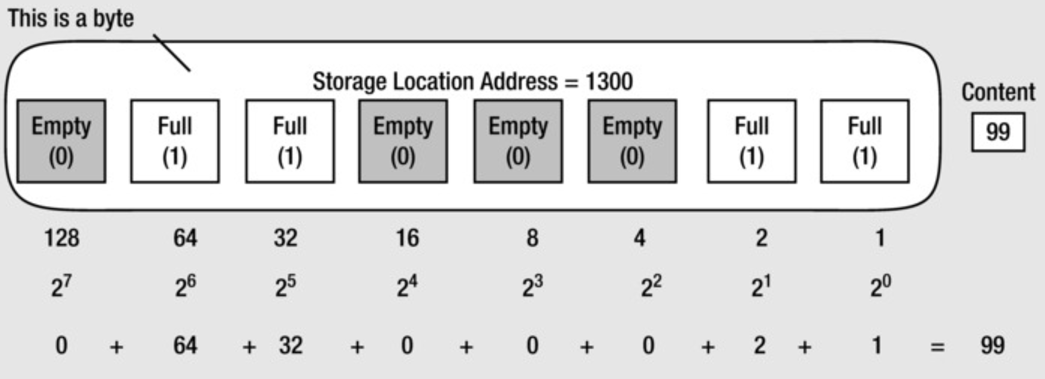
Think of a byte as a small control panel containing a row of eight individual
light switches, and each of those switches is a bit. A bit can only ever be in
one of two states: turned off (represented by a `0`) or turned on (represented
by a `1`). By flipping different combinations of these eight switches on and
off, a single byte can create `256` unique patterns. In computer engineering, we
use these distinct patterns to represent everything from letters and numbers to
specific status flags in a program.
> [!INFO]
> You might wonder why we say a byte holds `256` values but the maximum is
> `255`. The reason the sum of all bits equals `255` while `2^8` equals `256`
> comes down to how computers count. A single byte has eight bits, yielding
> `2^8` (or `256`) **total unique** combinations of ones and zeros, meaning it
> can store exactly `256` _distinct_ values.
>
> However, because digital systems must use the very first combination
> (`00000000`) to represent the number `0`, the remaining `255` combinations map
> to the numbers `1` through `255`. Mathematically, the sum of any binary
> sequence is always exactly one less than the value of the next positional
> power of two, meaning the maximum value of an 8-bit byte tops out at `256 - 1`,
> allowing it to span a range from `0` to `255`.
## Defining Bit Flags
You can utilize the bitwise `OR` assignment operator (`|=`) to selectively flip
these individual bit switches 'ON' (setting them to `1`). We can then use this "bit
shifting" approach to combine multiple status flags within a single integer.
So for our example, each status was assigned a unique power of 2 using bit
shifting (`1 << iota`). This ensured each flag only affected a single bit:
- `StatusActive` has the binary value `0001` (`1 << 0` == 1 in decimal).
- `StatusAdmin` has the binary value `0010` (`1 << 1` == 2 in decimal).
- `StatusBanned` has the binary value `0100` (`1 << 2` == 4 in decimal).
- `StatusVerified` has the binary value `1000` (`1 << 3` == 8 in decimal).
## Setting Statuses
The following example combines two separate status flags:
```
userStatus |= StatusActive | StatusVerified
```
> [!INFO]
> In Go (and many other languages like C, C++, Java, and Python), `|=` is a
> compound assignment operator. It combines a bitwise `OR` operation (`|`) with
> an assignment operation (`=`).
>
> So it's a shorter way of writing:\
> `userStatus = userStatus | StatusActive | StatusVerified`
>
> Which due to left-to-right evaluation associativity means:
> `userStatus = (userStatus | StatusActive) | StatusVerified`
>
> If you're unsure of what associativity means:\
> In mathematics and logic, bitwise OR is associative. Just like addition
> (`2+3+4` is the same whether you do `(2+3)+4` or `2+(3+4)`), it doesn't matter
> which bits you combine first.
>
> No matter how you group them, you are ultimately just taking all the 1 bits
> from `userStatus`, `StatusActive`, and `StatusVerified` and smashing them
> together into a single value.
In binary, this combination (`0001` + `1000`) results in `1001` (or `9` in
decimal; the earlier diagram/image showed a byte and its first bit is `1` and
its fourth bit is `8`: `1+8` is `9`), which means both the "active" and
"verified" flags are set.
## Adding and Removing Flags
The following example sets the "admin" bit without affecting the other bits, resulting in `1011` (11 in decimal):
```
userStatus |= StatusAdmin
```
## Comparing Statuses
Once `userStatus` has combined flags we can use the `&` operator to perform a bitwise `AND` operation, which means it compares each bit of two integers. For each bit position, if both bits are 1, the result at that position will be 1; otherwise, it will be 0.
So what happens when we compare `userStatus&StatusAdmin != 0`?
Well, `StatusAdmin` is a bit flag defined as `1 << 1`, which results in `0010` in binary. This means that `StatusAdmin` occupies the second bit position in the binary representation of an integer. When we do `userStatus&StatusAdmin`, we're effectively "masking" all bits except for the one represented by StatusAdmin (this is known as **bit masking**).
When we perform `userStatus&StatusAdmin`, we get a result where only the bit corresponding to `StatusAdmin` remains (and is set to `1` if that bit was already set in `userStatus`). If this result is non-zero (`!= 0`), it means the `StatusAdmin` bit is set in `userStatus`. If it's zero, then `StatusAdmin` is not set in `userStatus`.
If we look at the code in `bitwise.go` we'll see `userStatus` is initially set to include `StatusActive` and `StatusVerified`, so `userStatus` is `1001` in binary (which is `9` in decimal). Remember `StatusActive` occupied the first bit position (`0001`), while `StatusVerified` occupied the fourth bit position (`1000`) so if setting both flags we get the combined `1001`.
Next, we add the `StatusAdmin` flag with `userStatus |= StatusAdmin`, making `userStatus` now `1011` in binary (which is 11 in decimal). When we check if `StatusAdmin` is set using `userStatus&StatusAdmin != 0` we get back `2` from `userStatus&StatusAdmin` (which is `0010` in binary) because we've bit masked the other bits that might have been turned on (if you recall, using `&` turns each bit to zero except for those bits that were 1 in both numbers being compared), in order to _reveal_ whether the `StatusAdmin` bit was set on or not (i.e. `0` != `2` so we know this person is an admin).