---
title: Bits and Bytes
date: 2016-11-16
description: A tour through bits, bytes, RAM, base number systems, and binary encoding fundamentals for newcomers to computing.
tags: [networking]
---
## Introduction
So this is a bit of a random journey through some different computer based subjects. Things that I felt I should try to better understand. Some of it will be very basic, but hopefully it'll be useful to those who are new to tech, and are interested in learning these things (or old dogs like me who should know better).
## Bit
The word _bit_ is short for _binary digit_.
A bit is either a `1` (true) or a `0` (false).
Computers only understand the binary format (i.e. base-2)
> [!TIP]
> We discuss 'base' numbers [below](#8)
## Byte
A grouping of eight _bits_ is called a _byte_.
> [!TIP]
> Read the next section to realise why I mention this tidbit of information
## RAM
The word _ram_ is an acronym for _random access memory_.
It's non-persistent memory.
Meaning it is lost when your machine is restarted, and persists only for the lifetime of the program using it.
RAM consists of bits, but each _segment_ of memory is actually a grouping of eight bits (which we already know is called a _byte_).
So in short we would say RAM is made up of bytes.
Bytes are uniquely numbered to allow easy lookup of their contents.
A byte's unique number is also referred to as its _address_.
## Bit and RAM Visualisation
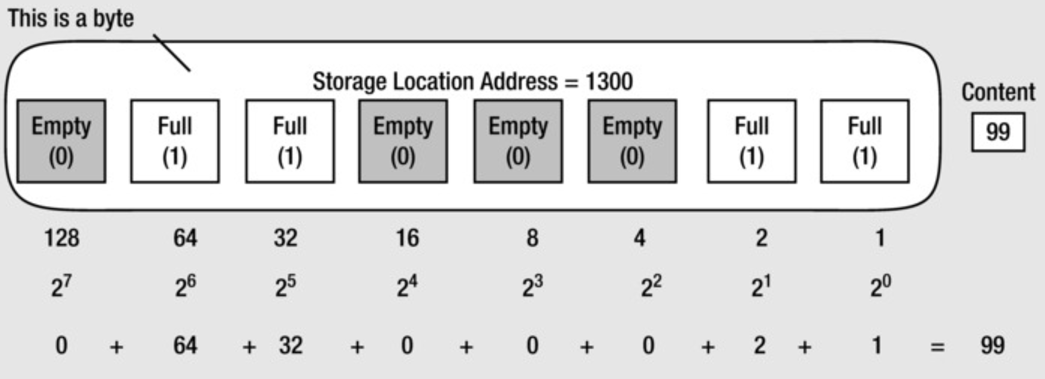
We can see that each bit has an associated value which is calculated using the power of base-2 (we'll cover [base numbers](#8) shortly).
So:
- 20 = 1
- 21 = 2
- 22 = 4 (i.e. `2 * 2`)
- 23 = 8 (i.e. `2 * 2 * 2`)
- 24 = 16 (i.e. `2 * 2 * 2 * 2`)
- 25 = 32 (i.e. `2 * 2 * 2 * 2 * 2`)
- 26 = 64 (i.e. `2 * 2 * 2 * 2 * 2 * 2`)
- 27 = 128 (i.e. `2 * 2 * 2 * 2 * 2 * 2 * 2`)
With this information we can identify the value assigned by adding up the numbers associated with the ones and zeros.
So in the image we can see four of the bits are given `1` (on) and the rest are `0` (off), meaning if we add up all the associated values of the bits that are 'on' we get `99` (e.g. `64 + 32 + 2 + 1`).
### Basic Bit Operators
You may have seen bit operators like `<<` or `>>` and wondered what they mean (generally referred to as 'bitwise operators'). Essentially they manipulate bits.
Here are some examples:
```
64 >> 1 = 32
1 << 3 = 8
1 << 7 = 128
1 << 15 = 32768
```
So if we keep in mind the earlier image of our 8 bits in a byte memory representation, and that each bit had its own value (as described above), we can see (for example) that if we started at `64` and moved to the right by `1` bit, the next bit would be the one assigned the value `32`. Hence, `64 >> 1` results in the value `32`.
Similarly, if we start with the bit value `1` and move to the left by `15` bits we'll get back the result of `32768` because although we've only shown eight bit spaces above, you can just keep moving to the left (`64 * 2 = 128`, `128 * 2 = 256`, now keep going seven more places until you reach the fifteenth bit... `256 * 2 = 512`, `512 * 2 = 1024`, `1024 * 2 = 2048`, `2048 * 2 = 4096`, `4096 * 2 = 8192`, `8192 * 2 = 16384`, `16384 * 2 = 32768`).
For more bitwise operators, refer to these posts: https://wiki.python.org/moin/BitwiseOperators and https://medium.com/learning-the-go-programming-language/bit-hacking-with-go-e0acee258827
## Bits and ASCII
ASCII is a set of codes where each 'code point' represents a textual character such as a `1`, `a`, `z`, `!`, `?` etc.
Each code point has an associated binary number. For example, `a` has the binary number `0110 0001` which if we add up the values associated with those specific bits we'll find it'll yield the code point number `97`. In ASCII the character `a` is code point `97`.
## Bits and Numbers
1 kilobyte (or 1KB) is 1,024 bytes.
1,024 bytes is 8192 bits (`8192/8` or `8*1024`, whichever you prefer)
The following explanation is taken from "Beginning C" by Apress Publishing...
> [!CITE]
> You might be wondering why we don’t work with simpler, more rounded numbers, such as a thousand, or a million, or a billion. The reason is this: there are 1,024 numbers from 0 to 1,023, and 1,023 happens to be 10 bits that are all 1 in binary: 11 1111 1111, which is a very convenient binary value. So while 1,000 is a very convenient decimal value, it’s actually rather inconvenient in a binary machine—it’s 11 1110 1000, which is not exactly neat and tidy. The kilobyte (1,024 bytes) is therefore defined in a manner that’s convenient for your computer, rather than for you.
So if we add up `512+256+128+64+32+16+8+4+2+1` (notice this takes the existing 8 bit calculation from the above image and continues it for another two bits) we get `1023`.
## IPs
Here is an example IPv4 IP:
```
216.27.61.137
```
IPv4 IPs are expressed in decimal format.
> [!INFO]
> IPv6 IPs are eight 4-character hexadecimal numbers,\
> which represent 16 bits each (for a total of 128 bits)\
> e.g. `2001:0db8:0a0b:12f0:0000:0000:0000:0001`
To translate the above IP into binary form (for the sake of a computer to process it), we could use the above visualisation image to help us. The end result of which would look like this:
```
11011000.00011011.00111101.10001001
```
Which breaks down into:
- `11011000`: 128 + 64 + 16 + 8 = 216
- `00011011`: 16 + 8 + 2 + 1 = 27
- `00111101`: 32 + 16 + 8 + 4 + 1 = 61
- `10001001`: 128 + 8 + 1 = 137
This explains why each of the four numbers within the decimal formatted version (i.e. `216.27.61.137`) are called octets, as they represent eight bits (or a 'byte' as we learned earlier) when viewed in binary form.
This also explains why IPv4 IPs are considered 32-bit numbers, because if you add each of the bits together (i.e. the number of total bits, not the value assigned to each bit) you'll find there are a total of 32 bits that make up the IP.
Each bit can have two different states (1 or zero), meaning the total number of potential combinations per octet can be either 28 or 256. Meaning each octet can contain a potential value between zero and 255. Meaning if we were to combine the four octets, we could potentially have 4,294,967,296 variations.
We can see the decimal represenation of an IPv4 IP is made up of four base-10 numbers (216, 27, 61, 137). Where each of those four numbers represent the binary equivalent (216=11011000, 27=00011011, 61=00111101, 137=10001001), which is a base-2 representation of a byte (or octet).
> [!TIP]
> If you're unsure of what base numbers are and how they work, then read on...
## Base Numbers
It's worth quickly covering what base numbers are as they help us understand the other different protocols we use on a regular basis, such as binary and things like IPs.
Any number can be represented in multiple ways using a different base numbering system.
There are many numbering systems, but the typical ones we're used to are:
- Base 10 (Decimal)
- Base 2 (Binary)
- Base 8 (Octal)
- Base 16 (Hexadecimal)
The standard number system we (as humans) are most familiar with is called base-10 and it consists of the following numbers:
```
0,1,2,3,4,5,6,7,8,9
```
> [!INFO]
> Notice there are ten numbers, hence it is called the base-10 system
If we were to look at a number like `66`, then this would tell us the number is made up of 6 tens and six units.
These numbers (0-9) represent 'whole numbers', while in the base-10 system we can also use a decimal point to represent decimal fractions of a number (e.g. `1.2`).
Below is an image, credit to Jenny Eather, that helps us visualise this model:
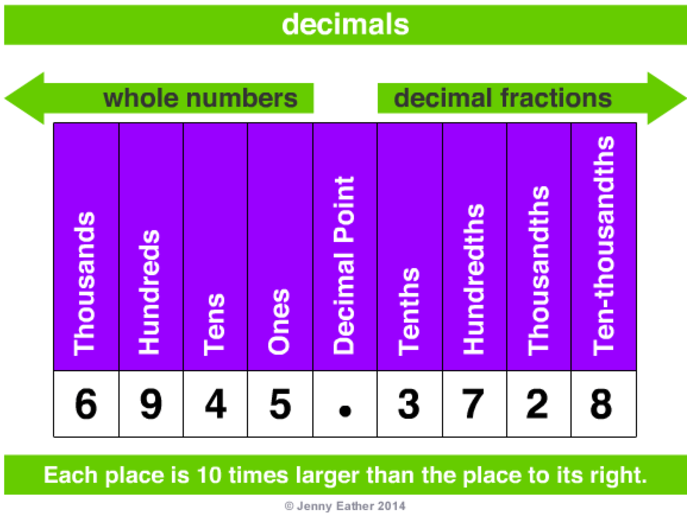
The 'base number' is the number of numbers within the system. So base-10 has 10 numbers (0,1,2,3,4,5,6,7,8,9) whereas binary is base-2 because it uses two numbers only (0, 1).
If you want to know the unit each number in a system represents (we'll use base-10 as the example, thanks to the following visualisation credited to Jenny Eather), then you calculate this using the power of the base number.

So, as per the above visualisation, we can see:
- 103: `10*10*10`: 1000 (thousands)
- 102: `10*10`: 100 (hundreds)
- 101: `10`: 10 (tens)
- 100: `1`: 1 (unit)
So in practical terms, if you have a number like `75` and want to represent it as base-10:
- 5 (100: 5 units)
- 7 (101: 7 tens)
Similarly, if we had a number like `675` and want to represent it as base-10:
- 5 (100: 5 units)
- 7 (101: 7 tens)
- 6 (102: 6 hundreds)
You can indicate what base you wish to represent a number like so:
nb
Where `n` is the number and `b` is the base you wish to state it is in.
For example:
7510
This is the number `75` and we're stating the base it represents is `10`.
This is useful when you've converted a number like `75` into a different base (let's say base-8, which would be `113`) and you want to give that number in the proper context to someone else. You could write it as 1138.
### Convert Base-10 into Base-2/8
> [!INFO]
> the steps are the same for converting to base-2 and base-8
Now let's consider how to convert the number `75` into another base, like base-8. To do so, follow these steps
1. divide the number (75) by the desired base (8) (take note of the remainder: 3)
1. take the result (9) and do the same (i.e. divide by the base and take note of the remainder)
1. keep doing this until the result of dividing the previous answer by the base is zero
1. now write out the remainders bottom to top, and that's the number in base-8
In long form this looks like this:
- 75 (number) / 8 (base) = 9 (rounded) with a remainder of 3
- 9 (previous answer) / 8 (base) = 1 (rounded) with a remainder of 1
- 1 (previous answer) / 8 (base) = 0 (rounded) with a remainder of 1
Meaning 75 evaluated in base-8 would be `113` (all the remainders concatenated together, 'bottom up')
### Convert Base-10 into Base-16
The algorithm for converting from base-10 into base-2 and base-8 works basically the same for converting into base-16. But there is one caveat whereby a remainder can be in the double digits, and apparently (for reasons I don't completely understand) we don't want that, and so the number system was designed to replace the six instances where this can occur (the remainders being: 10, 11, 12, 13, 14, 15) with a alpha-numeric equivalent:
- 10-A
- 11-B
- 12-C
- 13-D
- 14-E
- 15-F
So if we want to convert 11010 into a hexadecimal, the outcome of the algorithm would be:
- 110 (number) / 16 (base) = 6 (rounded) with a remainder of 14
- 6 (previous answer) / 16 (base) = 0 (rounded) with a remainder of 6
We know that we need to replace `14` (a double digit remainder) with the letter `E` (see above mapping).
Meaning 110 evaluated in base-16 would be `6E`
Let's try it again, but with the number 41110:
- 411 (number) / 16 (base) = 25 (rounded) with a remainder of 11
- 25 (previous answer) / 16 (base) = 1 (rounded) with a remainder of 9
- 1 (previous answer) / 16 (base) = 0 (rounded) with a remainder of 1
We know that we need to replace `11` with the letter `B`.
Meaning 411 evaluated in base-16 would be `19B`
### Convert Any Base to Base-10
What if you want to convert a base-8 number (let's say `113`, why not) into base-10? The algorithm is to multiple the individual numbers by their associated power of the base and then add the numbers together.
So here are the base-8 powers:
- 3: 80
- 1: 81
- 1: 82
And here is the algorithm:
- 3 x 80 = 3
- 1 x 81 = 8 (i.e. `1*8`)
- 1 x 82 = 64 (i.e. `1*(8 * 8)`)
- 3 + 8 + 64 = 75
If you're dealing with base-16, then again it's the same but the difference is you're translating the letter back into the corresponding number.
Let's convert `19B` from base-16 back into base-10:
- B x 160 (11 x 160) = 11
- 9 x 161 = 144
- 1 x 162 = 256
- 11 + 144 + 256 = 411
Let's try one more conversion between base-16 to base-10. The number is `1A4`:
- 4 x 160 = 4
- A x 161 (10 x 161) = 160
- 1 x 162 = 256
- 4 + 160 + 256 = 420
## CIDR
A CIDR is a range of IP addresses. We can use our understanding of bits, bytes and octets to understand the format of a CIDR.
A CIDR typically resembles something like:
```
10.0.0.0/n
```
Where `n` is given the value 8, 16, 24, or 32 and these represent each of the 8-bit blocks that make up the IP.
If we want an IP range between `10.0.0.0` and `10.255.255.255`, we'd specify the CIDR as `10.0.0.0/8`.
What `8` states is that the last 8 bits of the 32-bit number is accounted for (this being the `10` we've specified in our example). Meaning the rest of the 8-bit segments can be added up to their max of 255 (meaning the last IP in this CIDR range would be `10.255.255.255`).
Similarly if we want an IP range between `10.0.0.0` and `10.0.255.255`, we'd specify the CIDR as `10.0.0.0/16`.
Again, `16` states that the next 8-bits segment of the 32-bit number is now accounted for (this being the `0` we've specified in our example `10.0`). Meaning the rest of the 8-bit segments can be added up to their max of 255 (meaning the last IP in this CIDR range would be `10.0.255.255`).
And so on...
So `10.0.0.0/24` gives us an ip range of `10.0.0.0` to `10.0.0.255` (256 IPs).
Whereas `10.0.0.0/32` gives us an ip range of 1 ip (`10.0.0.0` to `10.0.0.0`).
> [!TIP]
> you can use a tool such as [http://www.ipaddressguide.com/cidr](http://www.ipaddressguide.com/cidr) to help you generate CIDRs
We can use the earlier [byte visualisation](#visualisation) table matrix to help us manually calculate a CIDR range.
I've reproduced it below with a HTML table:
> [!TIP]
> you'll likely need to scroll to the right to see the start of the 32-bit
| IP |
10 |
0 |
0 |
1 |
| 8 Bit Blocks |
8 bits [24-31] |
8 bits [16-23] |
8 bits [08-15] |
8 bits [00-07] |
| 32 Bit # |
31 |
30 |
29 |
28 |
27 |
26 |
25 |
24 |
23 |
22 |
21 |
20 |
19 |
18 |
17 |
16 |
15 |
14 |
13 |
12 |
11 |
10 |
09 |
08 |
07 |
06 |
05 |
04 |
03 |
02 |
01 |
00 |
| Decimal |
128 |
64 |
32 |
16 |
8 |
4 |
2 |
1 |
128 |
64 |
32 |
16 |
8 |
4 |
2 |
1 |
128 |
64 |
32 |
16 |
8 |
4 |
2 |
1 |
128 |
64 |
32 |
16 |
8 |
4 |
2 |
1 |
| Binary |
0 |
0 |
0 |
0 |
1 |
0 |
1 |
0 |
0 |
0 |
0 |
0 |
0 |
0 |
0 |
0 |
0 |
0 |
0 |
0 |
0 |
0 |
0 |
0 |
0 |
0 |
0 |
0 |
0 |
0 |
0 |
1 |
## Conclusion
There you go. A whirlwind ride through different basic computer tech topics. As always, if I've gotten anything wrong then just let me know on twitter.