---
title: Authentication with AWS Cognito
date: 2018-06-15
description: A deep dive into AWS Cognito covering user pools, identity pools, and building an authentication system for web applications.
tags: [aws, security]
---
## Introduction
In this post I would like to introduce you to the [AWS
Cognito](https://aws.amazon.com/cognito/) service, and to explain its various
moving pieces and how they fit together.
If you're interested in a very high-level view of what I was working on, then
[this architecture diagram](#updated-architecture) should give you the basic
idea.
Effectively I co-designed and implemented a new authentication system (using AWS
Cognito) for BuzzFeed's existing community users to utilize and which opened the
doors for new BuzzFeed services to also be able to offer additional features
built upon authentication to their users.
Cognito is tricky to get up and running with (for a variety of reasons which
I'll explain as we go), and to make things worse there aren't many reference
points outside of the official documentation to help you. Hence this blog post
now exists for those weary travellers looking for answers.
> [!INFO]
> this post was written approximately five months into a year long project
> and so a lot has changed in the design of the system and the implementation.
> But this post is still very relevant and useful for those looking to
> understand Cognito. This post also was fed back to various internal AWS teams
> and has resulted in work being carried out to improve various aspects of their
> services mentioned here.
Let's start at the beginning...
## What is Cognito?
According to [the official blurb](https://aws.amazon.com/cognito/)...
> [!CITE]
> Amazon Cognito lets you add user sign-up, sign-in, and access control to your
> web and mobile apps quickly and easily.
In essence, Cognito provides features that let you _authenticate_ access to your
services, while also providing features to let you _authorize_ access to your
AWS resources.
## Authentication vs Authorization
It's important to clarify that in this blog post we're only really discussing
authentication, and not _authorization_. They are two different concepts.
- **Authentication** is the process of verification that an individual, entity
or website is who it claims to be.
- **Authorization** is the function of specifying access rights to resources,
which is different to (and commonly confused with) the process of
authentication.
> [!TIP]
> if you're new to these types of security concepts, then take a look at
> [this glossary
> document](https://docs.google.com/document/d/1qs3jEIQvocdVhSxCSPLF1BoLnp91aLnuUIasvl-maYo/edit#)
> I put together which covers the various terminology.
## User Pools vs Identity Pools
In order for you to be able to _authenticate_ and _authorize_ access, Cognito
provides two separate services:
1. User Pools
1. Identity Pools
User Pools deal with 'authentication', whereas Identity Pools deal with
'authorization' (and specifically that means AWS based resources only).
For the purposes of this post I'll only be focusing in on User Pools, as our
project requirements did not involve authorizing access for AWS resources to an
authenticated user (which is where Identity Pools would typically come into
play).
Now, with _that_ said (and what makes this oh the more confusing, due to the
design of the mobile SDKs), mobile applications do utilize Identity Pools for
authentication, but the Identity Pool would be configured with a 'provider'
which happened to be our User Pool.
> [!TIP]
> If you're interested in the various Identity Pool concepts, then please refer
> to [the official
> documentation](https://docs.aws.amazon.com/cognito/latest/developerguide/authentication-flow.html).
## Implementation Options
There are fundamentally three options available for implementing User Pools:
1. Client SDK
1. Server SDK
1. AWS Hosted UI
### Client SDK
The client SDK has a bit of a jagged history, which makes reading the AWS docs a
bit confusing at times (or indeed when Googling for help), as you may notice
references to '[Amazon Cognito Identity SDK for
JavaScript](https://github.com/amazon-archives/amazon-cognito-identity-js)'
which is now a deprecated library.
What you'll want to use instead is their new
'[Amplify](https://aws.github.io/aws-amplify/)' SDK, which you'll also find AWS
has a strong bias towards (or at least their 'solution architects' push it
_really_ hard).
> [!INFO]
> I get the feeling AWS put a lot more time into Amplify and having it be
> able to abstract away a lot of the Cognito complexity, that they're keen for
> consumers to utilise it.
Based on this I decided I would trust their opinion and just try and spin up
something that works using Amplify, which unfortunately took a long time and
ultimately I ended up dropping the work in favour of a server-side solution.
I don't keep up with the constant changes to the JavaScript landscape, and so
I'm not familiar with React (or Angular) which were the two examples the AWS
docs (and most example repos) used the majority of the time. So using Amplify
required me to first do some reading up on React, Babel, WebPack and a whole
host of other tools. It was painful.
In the end we just had too much trouble trying to deal with Node and the various
build systems that we decided to drop the work we had done and pivot to a new
solution (see next section).
### Server SDK
The server-side solution we chose was to use the [Python
SDK](https://boto3.readthedocs.io/en/latest/).
This ended up being a bit of a double edged sword. We were happier with the move
to Python, but we really struggled with both the AWS documentation and also the
boto3 library documentation that the Python SDK is built upon.
In order to get up and running we initially opted to use a 3rd party abstraction
library called '[Warrant](https://github.com/capless/warrant)', which also
incidentally helped us to understand the AWS documentation because we were able
to reverse-engineer the Warrant code to better understand the boto3 API calls
that needed to be made.
> [!INFO]
> I think that says a lot about AWS documentation. If people need to read
> through how an abstraction library is using your API, then your documentation
> must be pretty bad. I would be the first to suggest maybe I'm just too dumb to
> understand Cognito, but a _lot_ of people across the internet were having the
> same problems.
Ultimately, Warrant didn't provide all the functionality we needed and so we
eventually refactored out Warrant and were back to using the underlying boto3
Python SDK.
It's worth me taking a moment to also explain that some APIs require you to
define a specific type of 'authentication flow' which is a security feature, and
as far as I understand it, is supposed to help you to more safely access data
provided by these APIs.
What I didn't know originally, and was one of the reasons we decided to use a
library such as Warrant, was that the code involved with some of these auth
flows can be quite complex (I still now struggle to follow exactly what the code
does within Warrant when it uses one of these 'flows').
Just to give you an example of the type of code AWS Cognito would expect you to
write, take a look at the
[`InitiateAuth`](https://docs.aws.amazon.com/cognito-user-identity-pools/latest/APIReference/API_InitiateAuth.html)
API call with the `USER_SRP_AUTH` auth flow.
First of all I don't think it's very clear what is expected to be provided in
that documentation alone, but also, take a look at [Warrant's
implementation](https://github.com/capless/warrant/blob/master/warrant/aws_srp.py)
and specifically how to generate an `SRP_A`, which also doesn't appear to be
explained anywhere (no where obvious at least).
> [!INFO]
> it wasn't until much later, we discovered that we could (in the case of
> `InitiateAuth` at least) have avoided writing all the SRP generation code and
> instead used the _admin_ version of that API, called
> [`AdminInitiateAuth`](https://docs.aws.amazon.com/cognito-user-identity-pools/latest/APIReference/API_AdminInitiateAuth.html)
> which allows you to skip SRP in favour of implicitly trusting the caller --
> which was fine for our use case as we were building a centralized
> authentication API service.
### AWS Hosted UI
AWS Cognito offers a 'hosted ui', where by you redirect a user to an endpoint
such as:
```
https://{...}.auth.us-east-1.amazoncognito.com/login?\
response_type={...}&client_id={...}&redirect_uri={...}&state={...}`
```
> [!INFO]
> a custom domain can also be configured, but it requires you use [AWS
> Certificate Manager](https://aws.amazon.com/certificate-manager/) for the TLS
> cert.
The hosted ui option gives you all the interactions in a fully functioning
interface, which includes: sign-in, sign-up, forgotten username, forgotten
password, social logins.
But there are some caveats:
- Very limited controls over the ui (_very_ basic font colors and css).
- Custom domains only work with TLS certificates via [ACM](https://aws.amazon.com/certificate-manager/).
- State parameter overloading
- Can't access new signup passwords †
> [!INFO]
> † this was necessary for my use case as I needed to co-support a legacy system
> that wasn't ready to migrate over to Cognito
There are other issues still that I have with the hosted ui, but in a lot of
cases it does the job well enough to put up with them.
The 'state' parameter overloading is an interesting issue and I'll come back to
that later on when I discuss a little bit about sign-ins with social providers.
## Stateless Authentication
The thing we liked about Cognito was that it would allow us to build a
'stateless' authentication system. Due to the use of [JWT](https://jwt.io/)s we
could pass these tokens around (†) and know that if the user had these tokens
that they would be valid and untampered with (because when decoding the tokens
we could verifiy this using the public signing key AWS uses to sign the tokens
at point of generation).
> [!IMPORTANT]
> † we only ever pass tokens around 'server-side', using secure cookies (with
> HttpOnly and Secure attributes set) to avoid replay attacks that might occur
> if we exposed the tokens to the client.
The problem we then stumbled across was: what happens if a user authenticates on
a public computer but doesn't log out (or they authenticate on their laptop but
have no password to prevent someone from stealing it and thus their existing
authenticated session tokens)?
Well, we would still decode the ID JWT we got back from Cognito (to ensure there
was no tampering of the token), but we would then make a simple API call to AWS
(specifically the
[`GetUser`](https://docs.aws.amazon.com/cognito-user-identity-pools/latest/APIReference/API_GetUser.html))
as it required us to provide the ACCESS JWT we get back from Cognito.
The reason I mention this is because, we needed a way to invalidate a session,
and the only way to do that was to call the
[`GlobalSignOut`](https://docs.aws.amazon.com/cognito-user-identity-pools/latest/APIReference/API_GlobalSignOut.html)
API.
We originally though that would invalidate all tokens ID/Access/Refresh, but we
were wrong. Only the Access and Refresh tokens are invalidated. But that was
fine as our system was already being passed the Access token and so once we
invalidated the session, if that user tried to reuse the tokens at one of our
protected endpoints, we could be sure that it would now fail to give them access
as we not only verified the ID token but attempted to use the Access token to
call an AWS API to see if it suceeded or not.
Our use case is probably quite unconventional, but otherwise the whole point of
having a stateless system was in danger of being made redundant by the fact that
_if_ (for _whatever_ reason) we had a set of compromised users we'd otherwise
have no way to invalidate their sessions (and we didn't want to have to build
our own session state datastore to track all this).
## Logic Processing with AWS Lambda
With the hosted ui option you'll likely also need to utilise [AWS
Lambda](https://aws.amazon.com/lambda/) in order to do some logic processing.
The following diagram demonstrates how we were initially using the hosted ui:
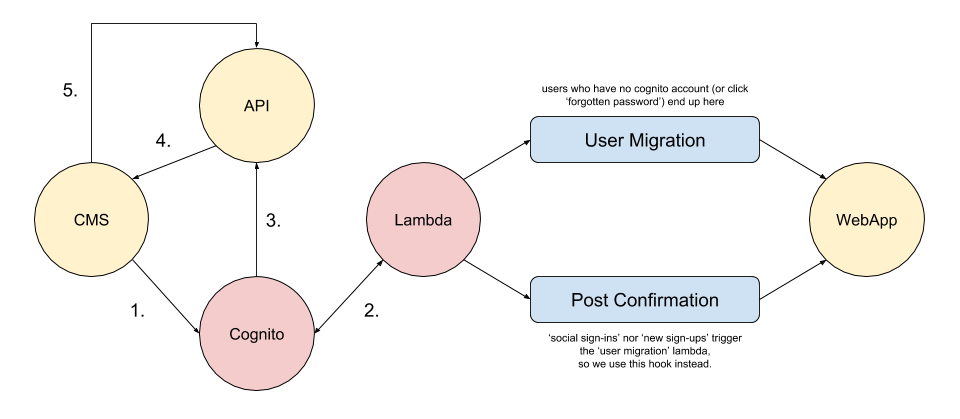
1. We redirect an unauthenticated user to Cognito.
1. Once the user attempts to sign-in we trigger some additional
'[hooks](https://docs.aws.amazon.com/cognito/latest/developerguide/cognito-user-identity-pools-working-with-aws-lambda-triggers.html)'.
1. Cognito redirects the authenticated user to our API service †
1. Our API service redirects the user back to the CMS (with user tokens).
1. The CMS asks the API service to validate the tokens.
> [!INFO]
> † this service exchanges the given Cognito auth code for the user's Cognito
> User Pool tokens.
Once the tokens are validated, the CMS will allow the user to view the relevant
page.
## Beware the Lambdas
It's worth noting the second half of the above diagram (the section _after_ the
lambda is triggered). What we have there are two separate lambda's, and which
one is triggered depends on the scenario.
If the user has tried to authenticate using a username/password set of
credentials, and those don't match an existing user within the Cognito User
Pool, then the "User Migration" lambda is triggered. In that lambda we attempt
to authenticate the user within our legacy system (that is the call over to the
"WebApp" in the diagram).
If the authentication with the legacy system is successful, then we'll modify
the user's User Pool record (which hasn't actually been created yet) to include
auth related details we've pulled from their legacy account. We then return the
'event' object provided to Lambda, which let's Cognito know it can now create
the user within its User Pool (not returning the lambda event object indicates
an error occurred and the whole request flow fails).
> [!INFO]
> with the 'user migration' for users from our legacy system over to
> Cognito, before we return the event in the lambda, we make sure to mark the
> new Cognito user as 'verified/confirmed' -- that way they don't need to enter
> a verification code that gets emailed or sent via SMS (that's because the user
> would've already verified themselves originally in our legacy system).
The reason I say "beware the lambdas" is because yes, code errors can cause it
to bomb out, but more importantly they don't always fire when you think they
will (this is a user error thing, not an AWS bug).
To clarify, let me explain what we saw when testing the migration path of a
legacy user account to Cognito, when the user was signing into Cognito using
their social provider details.
We had hoped the 'User Migration' lambda hook would have been triggered by both
a Cognito User Pool account login and also a Social Provider account login, but
it doesn't.
> [!INFO]
> when a user signs-in with a social account, they have an account created
> within the Cognito User Pool, but they are also added to a specific group
> (such as a Facebook group or a Google group).
We _eventually_ discovered that the 'Post Confirmation' hook would fire at the
right interval for us to do the processing we needed for users signing in with a
Social Account. But that wasn't immediately obvious.
Before settling on the 'Post Confirmation' hook, we originally started using
'Post Authentication' for handling first time social logins (the hook sounded
reasonable enough), but when we were testing this hook we already had the social
account stored in our User Pool (this was from earlier testing, before we
decided to do some 'post-login' processing).
The reason I mention this is because a week later we decided to clear out our
User Pool and start testing our various scenarios again from scratch, and we
noticed the 'post authentication' hook was no longer firing 🤔
Turns out social accounts only trigger 'post migration' hooks when they already
exist in the User Pool. In order to do the 'first time login' modification we
were looking for, we needed the 'post confirmation' hook.
Using this hook wasn't _obvious_ to us because 'post confirmation' makes it
sounds like an event that happens once a username/password user has entered
their 'verification code' for the first time (and thus become marked as
'confirmed' within the User Pool). Well, turns out social provider logins are
automatically considered _confirmed_ once they authenticate for the first time
(hence why that event would trigger when we needed it to).
## Useful Lambdas
There are some useful lambda's though, for example, the [Custom Message Lambda
Trigger](https://docs.aws.amazon.com/cognito/latest/developerguide/user-pool-lambda-custom-message.html)
is great for intercepting the emails (or SMS) messages that are sent to your
users, and allowing you to configure them however you like.
Take a look at the following code for an example...
```
def lambda_handler(event, context):
domain = 'https://your.domain.com'
username = event.get('userName', '')
code = event['request'].get('codeParameter', '')
print(event)
if event['triggerSource'] == "CustomMessage_SignUp":
event['response']['emailSubject'] = "Validate your account"
event['response']['emailMessage'] = "Hi " + username + "!
" \
"Thank you for signing up.
" \
"Click here " \
"to validate your account."
elif event['triggerSource'] == "CustomMessage_ForgotPassword":
event['response']['emailSubject'] = "Reset your password"
event['response']['emailMessage'] = "Hi " + username + "!
" \
"Click here " \
"to reset your password."
elif event['triggerSource'] == "CustomMessage_UpdateUserAttribute":
event['response']['emailSubject'] = "Validate your new email"
event['response']['emailMessage'] = "Hi " + username + "!
" \
"Click here " \
"to validate your new email."
if event['triggerSource'] == "CustomMessage_AdminCreateUser":
user_attr = event['request'].get('userAttributes', {})
user_status = user_attr.get('cognito:user_status')
if user_status == 'FORCE_CHANGE_PASSWORD':
event['response']['emailSubject'] = "Validate your account"
event['response']['emailMessage'] = "Hi " + username + "!
" \
"You attempted to signin, but your account is 'unverified'.
" \
"Your temporary password is " + code + ".
" \
"Click here."
return event
```
What's good about this lambda is that we're able to improve the user's flow a
little bit. Otherwise if we relied on AWS to generate the email/SMS we'd have to
create a separate UI that allowed (for example, when verifying an account using
a code) the user to copy paste their code into the UI and then submit that code
to our server to process.
By controlling the email content ourselves we can construct an endpoint that has
the verification code as a query param and make a GET request to an endpoint
that will process that code for the user (saving them from having to manually
enter anything).
Just something to consider when using Cognito: can I use lambda triggers to
_improve_ the user flow?
## Social Logins
One thing that might not be clear when opting for a server-side solution is how
to handle social logins (e.g. users signing in/up using facebook or google).
It might sound a bit strange, but in order to implement social logins you'll
need to make a call to the hosted ui endpoint (mentioned earlier):
```
https://{...}.auth.us-east-1.amazoncognito.com/login?response_type={...}\
&client_id={...}&redirect_uri={...}&state={...}
```
The specific endpoint you call will be based upon those supported in Cognito's
[User Pools Auth
API](https://docs.aws.amazon.com/cognito/latest/developerguide/cognito-userpools-server-contract-reference.html).
For example, to attempt to sign-in a user with facebook you would provide a
button that links to:
```
https://{...}.auth.us-east-1.amazoncognito.com/oauth2/authorize?\
response_type={...}&client_id={...}&redirect_uri={...}&state={...}&identity_provider={...}
```
The value we use for the `response_type` parameter is `code`. What this does,
once the user has authenticated with their social provider (defined by the
`identity_provider` param), is redirect the user back to your service (specified
via the `redirect_uri` param) and then your service is responsible for
exchanging the code for the user's User Pool Tokens (see the following section
on [JWTs](#jwts)).
The values you can assign to `identity_provider` are:
- `Facebook`
- `Google`
- `LoginWithAmazon`
> [!INFO]
> if you were planning on handling authentication at a very low level
> (instead of an SDK), then for a User Pool login you would provide the value
> `COGNITO`.
### Overloading the State Parameter
The `state` param is used for
[CSRF]()
protection, and is the only parameter that is persisted when the user is
redirected to `redirect_uri`.
A common problem for people using Cognito is that they need more than one
redirect. In my case (see the earlier 'hosted ui' architecture diagram) I need
to redirect the signed-in user to an API service so we can handle the exchanging
of the AWS 'code' for the Cognito User Pool tokens before needing to then
redirect the user back to our actual origin service.
The only way we can do this is to overload the `state` param so it has a value
like:
```
state=123_redirect=https://www.example.com
```
The value `123` is the nonce (for CSRF) and the `_` gives us a way to split the
query param server-side to extract the secondary redirect endpoint.
> [!WARNING]
> it's recommended you do validation on that input (e.g. a whitelist of
> accepted URIs) so hackers can't manipulate the endpoint a user is sent to once
> they've authenticated.
### Scope
One thing I stumbled across, and which took a while to figure out, was when I
tried to call the
[GlobalSignOut](https://docs.aws.amazon.com/cognito-user-identity-pools/latest/APIReference/API_GlobalSignOut.html)
API operation.
It worked fine for users authenticated against the Cognito User Pool, but not
for users authenticated via their social provider.
Turns out I needed to enable the right scope within the Cognito User Pool UI
console (within "App Integration -> App Client Settings", and under "Allowed
OAuth Scopes"): `aws.cognito.signin.user.admin` needed to be ticked.
But also, when making the request to the Auth API endpoint (e.g.
`/oauth2/authorize`), I needed to append a `scope` query parameter:
`&scope=scope=openid+aws.cognito.signin.user.admin`.
> [!TIP]
> See [the API
> docs](https://docs.aws.amazon.com/cognito/latest/developerguide/authorization-endpoint.html)
> and the [UI
> docs](https://docs.aws.amazon.com/cognito/latest/developerguide/cognito-user-pools-app-idp-settings.html)
> for more information on the reasoning.
## JWTs
When you exchange the cognito 'code' for a user pool 'token', you'll actually be
returned _three_ tokens:
1. ID token
1. Access token
1. Refresh token
> [!TIP]
> see documentation for more details on [these three
> tokens](https://docs.aws.amazon.com/cognito/latest/developerguide/amazon-cognito-user-pools-using-tokens-with-identity-providers.html).
The ID token provides details about the user, and the access token indicates the
access allowed to that user's attributes stored within the Cognito User Pool.
Both the ID token and access token will expire after one hour. To use them after
that you'll need the refresh token to refresh the access/id tokens for another
hour. The refresh token expires after 30 days.
We use the ID token for verifying the user is authenticated, and we do this by
passing the token to an internal service that verifies the token hasn't been
manipulated by checking it against the AWS
[JWK](https://docs.aws.amazon.com/cognito/latest/developerguide/amazon-cognito-user-pools-using-tokens-with-identity-providers.html#amazon-cognito-identity-user-pools-using-id-and-access-tokens-in-web-api)
that cryptographically signed the token.
The JWK is a set of keys that are the public equivalent of the private keys used
by AWS to digitally sign the tokens. We acquire these via a standard format
endpoint:
```
https://cognito-idp.{region}.amazonaws.com/{userPoolId}/.well-known/jwks.json.
```
> [!IMPORTANT]
> the JWK's are rotated every 24hrs (approx), and so you need to ensure
> (if you're caching the response) your code gets a fresh copy of the JWK. You
> can check this by inspecting the `Cache-Control` header set on the JWK
> response.
## API Limits
One issue we stumbled across recently was the API limits, which meant we
couldn't make any further API requests (and for an indeterminate amount of time)
🤔
Seems there is a [Cognito API
limits](https://docs.aws.amazon.com/cognito/latest/developerguide/limits.html)
reference page, but it's still unclear how long you have to wait before you can
start making requests again.
## Logout Issues
AWS provides a
[`/logout`](https://docs.aws.amazon.com/cognito/latest/developerguide/logout-endpoint.html)
endpoint that when visited allows a user to clear any session tracking AWS might
have on their browser.
This is different to the 'signout' API functionality in that the user can call
the `/logout` endpoint without any special tokens †
> [!TIP]
> you have to provide quite specific query params (e.g. `client_id` and
> `logout_uri` -- so AWS can redirect back to a pre-configured logout page that
> you host) and so it's likely you'll want to wrap that long and ugly URL within
> an `click to logout` link.
This endpoint is useful because if you have a social user in your user pool, and
you delete that user (something we would do regularly while we were testing in
our stage environment), you would find that AWS is tracking your browser via
session and so if you tried to sign-up or sign-in again using that same social
user you would get an `invalid grant` exception back from AWS (this was _super_
confusing behaviour and took a long time to figure out).
So for our use case, we would have a social user (e.g. facebook or google)
sign-in for the first time, Cognito would (once the user had authenticated with
their social provider) automatically create a social user account in our user
pool ...BUT we have other post-processing steps and if any of those fail we want
to delete the social user and tell the user what went wrong.
But again, we _need_ to now call the `/logout` endpoint so if that user decides
they want to try and sign-up again they don't get a more confusing
`invalid_grant` error message thrown at them (and we don't have to translate
that message into something that shouldn't even be a concern for them in the
first place).
This brings us to the problem we have with the `/logout` endpoint...
Our intention, for when we were getting an error from an AWS API operation,
would be to catch the error, then make a request to `/logout` and have it
redirect to a failure page we host (the redirection is a built-in feature that
AWS provides via a `logout_uri` query param).
Our `logout_uri` value (a URL) would itself have a query param specified of
`err_msg=` so that our failure page could use that param to indicate
the original error to the user. Problem was in Cognito you can only specify a
logout url that matches what's predefined in your user pool.
Meaning if we wanted to redirect to `https://example.com/failure?err_msg=foo`
then that's exactly what needs to be defined in Cognito (even down to the query
param). We didn't realise this and we only had `https://example.com/failure`
defined as a valid `logout_uri`.
To solve this issue we could have explicitly specified the `err_msg` param but
we have lots of error types to handle and so it wasn't practical to list each
and every variant URL.
So to work around the fact that we can't specify a query param (because there
are too many value variants to be practical for us to explicitly list all of
them in the UI) we now catch the original API error and redirect the user to our
failure page with the `err_msg` param passed so we can indicate the error back
to the user.
At this point we still need to call the AWS `/logout` endpoint so we can clear
any session tracking. So along with the error message we display to the user, we
also show a message to say we will redirect them automatically (via JavaScript)
back to another part of our site in N seconds time (enough time for the user to
read the error we're displaying).
Before we redirect the user to that page we first redirect them to the AWS
`/logout` endpoint, this time specifying our failure page as the value for the
`logout_uri` query param but just without an `err_msg` query param provided.
Our failure page is configured with a conditional check that says "if an
`err_msg` param is passed then show error page with the JS redirect to
`/logout`, otherwise if no `err_msg` provided just immediately redirect to our
`/signin` page".
So that's how we're resolving this issue currently. It's not elegant for sure
but it works.
## Other Concerns?
It's worth me mentioning a few other concerns we had, the first of which wasn't
directly related to Cognito but was specific to the system we were designing,
and that was 'atomic operations'.
We had to make changes to Cognito and then sync some behaviours back to our
legacy system. If there was a network (or other) fault then we needed both
systems to be tolerant and to undo any data modifcations in case of failure.
Other than that we would be storing off the JWT tokens we received from AWS into
secure cookies (+Secure +HttpOnly attributes), and this caused us issues because
our cookies needed to be scoped to the right domains to prevent overloading the
HTTP request header limit.
Due to the JWTs being large in size, and the fact that BuzzFeed has many
services/properties for users to interact with, we noticed that some users would
end up seeing a `400 Bad Request` caused by the large cookies. The routing
services in front of these upstreams are generally nginx instances and so we
would use `large_client_header_buffers` to allow an increased size until such a
time we could figure out an appropriate solution.
## Which is the right solution?
The answer: it depends.
For me the server-side solution made the most sense, and although difficult in
the beginning (primarily due to documentation and general mis-understandings
about the difference between User Pools and Identity Pools) we found it worked
the best for our requirements, and gave us the most flexibility.
## Updated Architecture
If you're interested the updated architecture looked something like this...
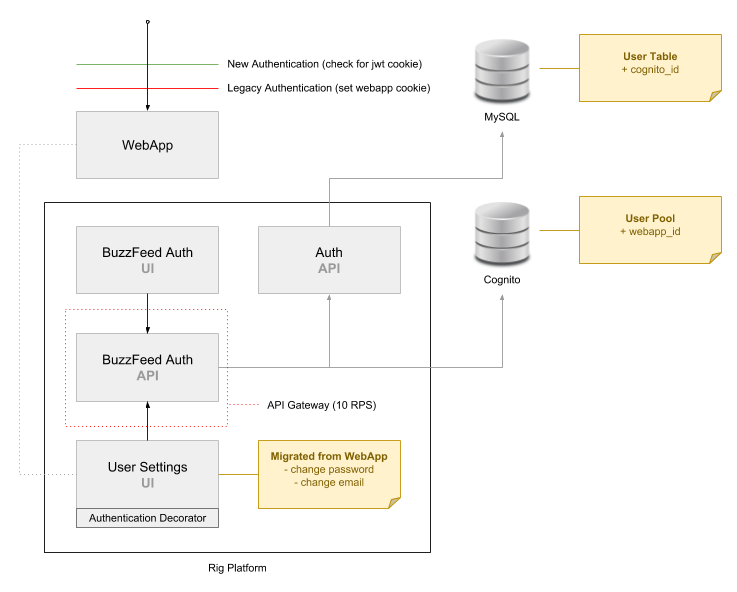
None of the listed services are public, they're all internal. The "API Gateway"
is an internal tool that allows upstreams (such as the `buzzfeed_auth_api` to
control concurrency and rate limiting) of downstream consumers (such as
`buzzfeed_auth_ui` and `user_settings`).
The reason we migrated certain 'user settings' functionality out of our
monolithic webapp and not other user features is because we only wanted to move
behaviours that interacted with fields that needed sync'ing between Cognito and
our legacy datastore. As times goes on, we'll start to migrate more and more
functionality out into separate services.
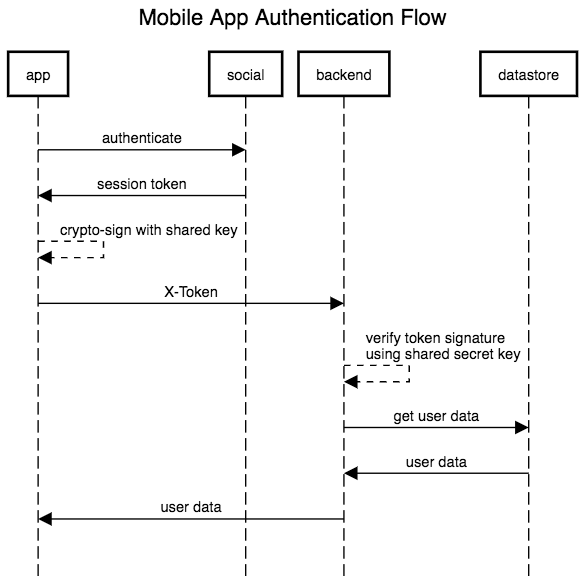
## Native Mobile Social Sign-ins
We discovered that the social sign-in for native mobile apps doesn't work as
well as the web SDK's. Mobile apps need to instead do things differently as
their SDK's aren't as 'integrated' like web.
## User Pool Configuration
As far as the User Pool is concerned you'll need a few things:
> [!INFO]
> this is based on a server-side solution.
- **Application Client**: this will generate a client 'id' and 'secret', which
your application(s) will need to use when making certain API calls †
- **Federated Identity Providers**: this is where you tell Cognito about your
social providers (facebook, google etc).
- **IAM User**: some API calls require AWS credentials (access/secret key), so
you'll need to create an IAM user and define the various Cognito APIs you want
it to have access to.
> [!INFO]
> † even if you opt for the 'hosted ui' solution, you'll still need an
> application client (for two reasons). Firstly you'll configure which
> 'providers' you want your client app to support, and this will affect what the
> hosted ui will display to your users. Secondly, the client app id is used as
> part of the hosted ui uri; meaning you can have _different_ hosted ui's (all
> configured slightly differently).
## IAM User
The IAM _user_ is necessary as we have to provide some credentials to the [boto
client](https://boto3.readthedocs.io/en/latest/reference/services/cognito-idp.html)
([boto](https://boto3.readthedocs.io/en/latest/reference/core/boto3.html) is the
Python SDK) in order for it to make certain API calls. Below is an example of
the code to instantiate a client:
```
client = boto3.client('cognito-idp', **{'aws_access_key_id': access_key,
'aws_secret_access_key': secret_key,
'region_name': region})
```
Notice the service name is `cognito-idp` and not `cognito-identity`. I mention
this as the docs specify two different services "CognitoIdentity" and
"CognitoIdentityProvider", which when we were first learning about Cognito we
presumed the latter "CognitoIdentityProvider" was something associated with
Cognito Identity Pools.
As we were only interested in the User Pool functionality, we found it strange
that the small number of examples we found online all referenced `cognito-idp`.
So we struggled for a bit to understand the difference, and although we used the
"CognitoIdentityProvider" service (i.e. `cognito-idp`), we were confused for a
long time as to why that was the case.
Turns out that Cognito's "User Pool" is itself fundamentally a _identity
provider_ (idp), and because of that you can configure a "Identity Pool" to have
a "User Pool" associated within it (along with more common external identity
providers such as Facebook and Google).
So with that understanding firmly in place, the fact the SDK uses `cognito-idp`
for interacting with a User Pool makes total sense (because the User Pool _is_
an "idp"), and the Identity Pool is just a tool for handling "identities" via
many different providers (whether that be a User Pool or a social 'provider'
such as Facebook or Google), and so the SDK using `cognito-identity` for
interating with AWS Identity Pools also makes perfect sense.
It's the little details that can really make a difference to even the simplest
aspects of using an SDK/API, and why Amazon's atrocious documentation is a real
detriment to its users.
## Lambda IAM Role
Below is an example IAM role policy you can use for AWS Lambda (if you're using
the hosted ui option and need lambda for logic processing):
```
{
"Version": "2012-10-17",
"Statement": [
{
"Effect": "Allow",
"Action": [
"logs:CreateLogGroup",
"logs:CreateLogStream",
"logs:PutLogEvents"
],
"Resource": "arn:aws:logs:*:*:*"
},
{
"Effect": "Allow",
"Action": [
"cognito-idp:AdminUpdateUserAttributes"
],
"Resource": "arn:aws:cognito-idp:us-east-1:{aws_account_id}:userpool/{user_pool_id}"
}
]
}
```
It simply sets up CloudWatch logs access, and allows us (as an 'admin') to
update user attributes within our User Pool.
> [!IMPORTANT]
> if you're 'copying and pasting', don't forget to update `aws_account_id`
> and `user_pool_id` in the code snippet.
## Example Python API code
This is a small slice of some Python code I wrote for abstracting away the API
interactions with Cognito. Some readers might find it useful for understanding
parts of Cognito (apologies if it's a bit ambiguous, as it's taken out of
context).
```
# standard library modules
import json
import re
from functools import reduce
from typing import Dict, List, Optional, Tuple
# application modules
import app.exceptions as exceptions
import app.network
import app.security
# external modules
from bf_auth.utility import extract_status_code, instr_exc
import boto3
from botocore.exceptions import ClientError
# configuration
aws_access_key = config.get('aws_application_access_key')
aws_region = config.get('cognito_region')
aws_secret_key = config.get('aws_application_secret_key')
client_id = config.get('app_client_id')
client_secret = config.get('app_secret_key')
cognito_domain = config.get('cognito_domain')
default_redirect = config.get('default_redirect')
credentials = {'aws_access_key_id': aws_access_key, 'aws_secret_access_key': aws_secret_key, 'region_name': aws_region}
sdk = boto3.client('cognito-idp', **credentials)
user_pool_id = config.get('cognito_user_pool_id')
user_pool_jwk = f'https://cognito-idp.{aws_region}.amazonaws.com/{user_pool_id}/.well-known/jwks.json'
def attr_adapter(attributes: dict) -> List[Dict[str, str]]:
"""Convert dictionary into a Cognito compatible structure."""
return [{'Name': key, 'Value': value} for key, value in attributes.items()]
def create_user(username: str,
password: str,
verified: bool,
email: str,
user_info_id: str) -> Optional[dict]:
"""Create the user, then authenticate them to acquire their tokens.
If the record is created successfully, we'll return user tokens.
We use the 'Server Side Authentication Flow' for authenticating and
migrating users with Cognito (this means no need for generating an SRP)
Documentation:
https://docs.aws.amazon.com/cognito-user-identity-pools/latest/APIReference/API_AdminCreateUser.html
https://docs.aws.amazon.com/cognito-user-identity-pools/latest/APIReference/API_AdminInitiateAuth.html
https://docs.aws.amazon.com/cognito-user-identity-pools/latest/APIReference/API_AdminRespondToAuthChallenge.html
"""
# default to forcing user to validate
message_action = {} # type: ignore
cognito_password = app.security.random()
user_verified = False
if verified:
message_action = {'MessageAction': 'SUPPRESS'}
cognito_password = password
user_verified = True
attributes = {'email': email,
'email_verified': str(verified).lower(),
'custom:user_info_id': str(user_info_id)}
cognito_attributes = attr_adapter(attributes)
# we use admin_create_user so that we can choose to either suppress or
# trigger the sending of a 'verify your account' email.
#
# but in using this api call, cognito requires us to set a temporary
# password for the user.
#
# so in the case of a verified user we set their password to their actual
# password (so they notice no difference), where as with an unverified user
# we will generate them a random password as they'll then reset that
# password when cognito sends them the account verification email.
try:
sdk.admin_create_user(**{'UserPoolId': user_pool_id,
'UserAttributes': cognito_attributes,
'Username': username,
'TemporaryPassword': cognito_password,
**message_action})
except Exception as exc:
msg = 'USER_CREATE_FAILED'
instr_exc(exc, msg,
metric_name='create.user',
context='normal',
scope='cognito',
state='failed',
verified=user_verified,
user_info_id=user_info_id)
raise exceptions.CognitoException(msg, code=extract_status_code(exc))
# also for a verified user we'll try to authenticate and acquire their user
# pool tokens, which will be returned to the caller of this function.
if user_verified:
auth_params = {'USERNAME': username,
'PASSWORD': password,
'SECRET_HASH': app.security.hash(username)}
challenge_responses = {'USERNAME': username,
'NEW_PASSWORD': password,
'SECRET_HASH': auth_params['SECRET_HASH']}
try:
auth_response = sdk.admin_initiate_auth(UserPoolId=user_pool_id,
ClientId=client_id,
AuthFlow='ADMIN_NO_SRP_AUTH',
AuthParameters=auth_params)
challenge_name = auth_response.get('ChallengeName')
session = auth_response.get('Session')
response = sdk.admin_respond_to_auth_challenge(UserPoolId=user_pool_id,
ClientId=client_id,
ChallengeName=challenge_name,
ChallengeResponses=challenge_responses,
Session=session)
result = response.get('AuthenticationResult', {})
tokens = {'id_token': result.get('IdToken'),
'access_token': result.get('AccessToken'),
'refresh_token': result.get('RefreshToken'),
'token_type': result.get('TokenType')}
return tokens
except Exception as exc:
msg = 'USER_AUTH_FAILED'
instr_exc(exc, msg,
metric_name='create.user',
context='normal',
scope='cognito',
state='failed',
verified=user_verified,
user_info_id=user_info_id)
raise exceptions.CognitoException(msg, code=extract_status_code(exc))
# if we haven't returned some tokens already, then that means we
# successfully created a cognito account for an unverified user, and now we
# can raise the relevant exception that will be served back to the
# application JS to handle (i.e. display a message to the user)
msg = 'USER_MIGRATE_UNVERIFIED'
gen_exc = exceptions.CognitoException(msg, code=201)
raise gen_exc
def delete_user(username) -> bool:
"""Delete user record associated with the given username.
If the record is deleted successfully, we'll return True.
Documentation:
https://docs.aws.amazon.com/cognito-user-identity-pools/latest/APIReference/API_AdminDeleteUser.html
"""
try:
sdk.admin_delete_user(**{'UserPoolId': user_pool_id,
'Username': username})
except ClientError as exc:
error = exc.response.get('Error', {})
error_code = error.get('Code')
msg = 'USER_DELETE_FAILED'
exc_tags = {'metric_name': 'user.delete',
'state': 'failed',
'scope': 'cognito'}
if error_code == 'UserNotFoundException':
instr_exc(exc, msg, **exc_tags)
raise exceptions.CognitoException(msg, code=404)
else:
instr_exc(exc, msg, **exc_tags)
raise exceptions.CognitoException(msg, code=extract_status_code(exc))
except Exception as exc:
msg = 'USER_DELETE_FAILED'
exc_tags = {'metric_name': 'user.delete',
'state': 'failed',
'scope': 'cognito'}
instr_exc(exc, msg, **exc_tags)
raise exceptions.CognitoException(msg, code=extract_status_code(exc))
return True
@app.network.cache
async def get_keys(endpoint=user_pool_jwk) -> dict:
"""Retrieve JWK (for verifying tokens).
If successful we return a dict consisting of the cache-control response
header value and the actual list of JWKs.
If unsuccessful we return the standard dictionary error format.
"""
response = await app.network.http_client.fetch(endpoint)
cache_control = response.headers.get('Cache-Control')
match = re.search(r'max-age=(\d+)', cache_control)
if not match or response.code != 200:
msg = 'JWK_RESPONSE_INVALID'
gen_exc = exceptions.AsyncFetchException(msg, code=response.code)
instr_exc(gen_exc, msg, cache_control=cache_control, scope='cognito')
raise gen_exc
try:
response_data = json.loads(response.body)
except Exception as exc:
msg = 'JSON_PARSING_FAILED'
instr_exc(exc, msg, endpoint=endpoint, body=response.body, scope='cognito')
return {'state': 'error',
'code': 500,
'message': msg}
return {'state': 'success',
'cache_control': match.group(1),
'response_body': response_data.get('keys', [])}
async def get_key(kid: str) -> str:
"""Extract signing key from JWK (for verifying tokens)."""
response = await get_keys()
keys = response.get('response_body')
key = list(filter(lambda x: x.get('kid') == kid, keys))
if len(key) < 1:
raise exceptions.NoJWK('JWK_FILTER_FAILED')
return key[0]
def global_signout(access_token) -> bool:
"""Sign out user from all devices.
If the user is signed out successfully, we'll return True.
Documentation:
https://docs.aws.amazon.com/cognito-user-identity-pools/latest/APIReference/API_GlobalSignOut.html
"""
try:
sdk.global_sign_out(AccessToken=access_token)
except Exception as exc:
msg = 'USER_GLOBAL_SIGNOUT_FAILED'
instr_exc(exc, msg, metric_name='user.global_signout.failed', scope='cognito')
raise exceptions.CognitoException(msg, code=extract_status_code(exc))
return True
def admin_signout(username) -> bool:
"""Sign out user from all devices as an administrator.
If the user is signed out successfully, we'll return True.
Documentation:
https://docs.aws.amazon.com/cognito-user-identity-pools/latest/APIReference/API_AdminUserGlobalSignOut.html
"""
try:
sdk.admin_user_global_sign_out(**{'UserPoolId': user_pool_id,
'Username': username})
except Exception as exc:
msg = 'USER_SIGNOUT_FAILED'
instr_exc(exc, msg, metric_name='user.signout.failed', scope='cognito')
raise exceptions.CognitoException(msg, code=extract_status_code(exc))
return True
def get_attribute(key, user_attrs) -> Optional[str]:
"""Recursively search user attributes for given key."""
return reduce(lambda x, y: x if x.get('Name') == key else y, user_attrs)
async def exchange_code_for_tokens(code, redirect_host, code_verifier=None) -> dict:
"""Exchange the Facebook/Google authorization code for user tokens.
Documentation:
https://docs.aws.amazon.com/cognito/latest/developerguide/token-endpoint.html
Example response:
{
"access_token":"123",
"refresh_token":"456",
"id_token":"789",
"token_type":"Bearer",
"expires_in":3600
}
"""
# Note: the `redirect_uri` field isn't used for redirecting, but for verification.
# the value needs to match what is configured within the allowed cognito
# callback endpoints
data = {'code': code,
'grant_type': 'authorization_code',
'client_id': client_id,
'redirect_uri': f'{redirect_host}/auth/signin/callback'}
if code_verifier:
data['code_verifier'] = code_verifier
metric_tags = {'metric_tags': {'scope': 'cognito', 'context': 'social', 'name': 'token_exchange'}}
endpoint = f'{cognito_domain}/oauth2/token'
headers = {'Content-Type': 'application/x-www-form-urlencoded'}
response = await app.network.fetch(endpoint, post_data=data,
headers=headers,
auth_username=client_id,
auth_password=client_secret,
**metric_tags)
if response.get('state') == 'error':
gen_exc = exceptions.AsyncFetchException(response.get('message'),
code=response.get('code'))
raise gen_exc
return response
async def resend_confirmation_code(username) -> bool:
"""Resend account confirmation email
Documentation:
https://docs.aws.amazon.com/cognito-user-identity-pools/latest/APIReference/API_ResendConfirmationCode.html
"""
try:
sdk.resend_confirmation_code(**{'ClientId': client_id,
'SecretHash': app.security.hash(username),
'Username': username})
except Exception as exc:
msg = 'CONFIRMATION_RESEND_FAILED'
instr_exc(exc, msg, metric_name='user.confirmation_resend.failed', scope='cognito')
return False
return True
```
## Example Cognito App Settings
This isn't meant to be an exhaustive example, but it gives you an idea of some
of the configuration you'll need.
- **Callback URL(s)**:\
https://auth-api.example.com/auth/signin/callback
- **Sign out URL(s)**:\
https://auth-api.example.com/auth/signout
- **Allowed OAuth Flows**:\
Authorization code grant\
Implicit grant
- **Allowed OAuth Scopes**:\
email\
openid\
profile\
aws.cognito.signin.user.admin
## Example Cognito User Pool "Federation: Identity Providers"
For each provider there is a "Authorize Scope" section.
- **Facebook**:\
public_profile,email
- **Google**:\
profile email openid
### Facebook Attribute Mappings
- fb: `id` --> user_pool: `Username`
- fb: `email` --> user_pool: `Email`
- fb: `name` --> user_pool: `Name`
### Google Attribute Mappings
- google: `email` --> user_pool: `Email`
- google: `name` --> user_pool: `Name`
- google: `sub` --> user_pool: `Username`
## Example Facebook App Configuration
https://developers.facebook.com/apps
- **App Domains**:\
https://your-organisation.auth.us-east-1.amazoncognito.com
- **Privacy Policy URL**:\
https://www.example.com/about/privacy
- **Site URL**:\
https://your-organisation.auth.us-east-1.amazoncognito.com/oauth2/idpresponse
### Product Added: "Facebook Login"
- **Client OAuth Login**:\
Yes
- **Web OAuth Login**:\
Yes
- **Enforce HTTPS**:\
Yes
- **Valid OAuth Redirect URIs**:\
https://your-organisation.auth.us-east-1.amazoncognito.com/oauth2/idpresponse\
https://auth-api.example.com/auth/signin/callback
## Example Google App Configuration
https://console.developers.google.com/
- **Enabled API(s)**:\
Google+ API
- **Credentials Type**:\
OAuth client ID
- **Application Type**:\
Web application
- **Authorized JavaScript origins**:\
https://your-organisation.auth.us-east-1.amazoncognito.com
- **Authorized redirect URIs**:\
https://your-organisation.auth.us-east-1.amazoncognito.com/oauth2/idpresponse\
https://auth-api.example.com/auth/signin/callback
## Terraform Example
```
# Examples for Cognito User Pools can be found here:
# https://github.com/terraform-providers/terraform-provider-aws/blob/master/examples/cognito-user-pool/main.tf
####################################################
# main.tf
####################################################
# TODO: split this file up into separate modules
# e.g.
#
# user_pool/
# identity_pool/
provider "aws" {
region = "${var.aws_region}"
assume_role {
role_arn = "${var.aws_role_arn}"
}
}
resource "aws_cognito_user_pool" "pool" {
name = "${var.environment}_${var.name}_user_pool"
alias_attributes = ["email", "preferred_username", "phone_number"]
auto_verified_attributes = ["email", "phone_number"]
admin_create_user_config {
allow_admin_create_user_only = false
}
# container for the AWS Lambda triggers associated with the user pool.
# https://www.terraform.io/docs/providers/aws/r/cognito_user_pool.html#lambda-configuration
lambda_config {
custom_message = "${aws_lambda_function.custom_message_lambda.arn}"
}
mfa_configuration = "OPTIONAL"
sms_configuration {
external_id = "${var.environment}_${var.name}_sns_external_id"
sns_caller_arn = "${aws_iam_role.cognito_sns_role.arn}"
}
password_policy {
minimum_length = 6
require_lowercase = false
require_numbers = false
require_symbols = false
require_uppercase = false
}
/*
# email was a required field, but it ended up causing issues for any social
# users whose identity is actually their mobile number. So to avoid problems
# authenticating those users, we no longer require an email to be provided.
schema {
name = "email"
attribute_data_type = "String"
developer_only_attribute = false
mutable = true
required = true
string_attribute_constraints {
min_length = 1
max_length = 2048
}
}
*/
schema {
name = "some_custom_attribute"
attribute_data_type = "Number"
developer_only_attribute = false
mutable = true
required = false
number_attribute_constraints {
min_value = 1
max_value = 50000000
}
}
tags {
"environment" = "${var.environment}"
"service" = "${var.name}"
}
depends_on = [
"aws_iam_role.cognito_sns_role",
]
}
resource "aws_cognito_user_pool_client" "pool_client" {
# Federation > Identity providers
depends_on = [
"aws_cognito_identity_provider.facebook_provider",
"aws_cognito_identity_provider.google_provider",
]
# General settings > App clients
user_pool_id = "${aws_cognito_user_pool.pool.id}"
name = "${var.environment}_${var.name}_user_pool_client"
generate_secret = true
refresh_token_validity = 30
explicit_auth_flows = ["ADMIN_NO_SRP_AUTH", "USER_PASSWORD_AUTH"]
# this flag is automatically set to true when creating the user pool using the AWS console.
# however, when creating the user pool using Terraform, this flag needs to be set explicitly.
allowed_oauth_flows_user_pool_client = true
# issue: https://github.com/terraform-providers/terraform-provider-aws/issues/4476
read_attributes = ["email", "preferred_username", "profile", "custom:some_custom_attribute"]
write_attributes = ["email", "preferred_username", "profile", "custom:some_custom_attribute"]
# App integration > App client settings
supported_identity_providers = ["COGNITO", "Facebook", "Google"]
callback_urls = "${var.callback_urls}"
logout_urls = "${var.logout_urls}"
allowed_oauth_flows = ["code"]
allowed_oauth_scopes = [
"aws.cognito.signin.user.admin",
"email",
"openid",
"profile",
]
}
# aws cert configured in certs.tf
resource "aws_cognito_user_pool_domain" "pool_domain" {
domain = "${var.domain}.${var.root_domain}"
certificate_arn = "${aws_acm_certificate.certificate.arn}"
user_pool_id = "${aws_cognito_user_pool.pool.id}"
}
# bug in https://github.com/terraform-providers/terraform-provider-aws/issues/4807 that keep showing changes in plan
resource "aws_cognito_identity_provider" "google_provider" {
user_pool_id = "${aws_cognito_user_pool.pool.id}"
provider_name = "Google"
provider_type = "Google"
provider_details {
authorize_scopes = "profile email openid"
client_id = "${var.google_provider_client_id}"
client_secret = "${var.google_provider_client_secret}"
}
attribute_mapping {
username = "sub"
email = "email"
}
}
# bug in https://github.com/terraform-providers/terraform-provider-aws/issues/4807 that keep showing changes in plan
resource "aws_cognito_identity_provider" "facebook_provider" {
user_pool_id = "${aws_cognito_user_pool.pool.id}"
provider_name = "Facebook"
provider_type = "Facebook"
provider_details {
authorize_scopes = "public_profile,email"
client_id = "${var.facebook_provider_client_id}"
client_secret = "${var.facebook_provider_client_secret}"
}
attribute_mapping {
username = "id"
email = "email"
}
}
# The identity pool(s) are used by our mobile apps, and allows them to authenticate
# their users via our Cognito 'user pool'.
#
# Note: we're not sure if we need to configure anything else in facebook/google ui's?
# we're also not sure what `server_side_token_check` (set below) really means.
resource "aws_cognito_identity_pool" "apps_identity_pool" {
identity_pool_name = "${var.environment}_${var.name}_identity_pool"
allow_unauthenticated_identities = false
cognito_identity_providers {
client_id = "${aws_cognito_user_pool_client.pool_client.id}"
provider_name = "cognito-idp.us-east-1.amazonaws.com/${aws_cognito_user_pool.pool.id}"
server_side_token_check = false
}
supported_login_providers {
"graph.facebook.com" = "${var.facebook_provider_client_id}"
"accounts.google.com" = "${var.google_provider_client_id}"
}
depends_on = [
"aws_cognito_user_pool.pool",
]
}
# an identity pool (used by mobile apps) requires a role to be assigned to both
# authenticated and unauthenticated access (even if the identity pool is configured
# to not allow unauthenticated access, it still requires a role to be assigned)
#
# https://www.terraform.io/docs/providers/aws/r/cognito_identity_pool_roles_attachment.html
resource "aws_iam_role" "apps_identity_pool_authenticated" {
name = "${var.environment}_${var.name}_identitypool_authenticated"
assume_role_policy = < aws_lambda_function -> aws_iam_role -> aws_cognito_user_pool
So to avoid that we could have made the policy not depend on that
specific user pool resource, using: "arn:aws:cognito-idp:*:*:*"
but we opted to create a separate policy, which we then attach to
the existing role, and tell the policy it can't be attached until
the user pool has been created.
*/
resource "aws_iam_role_policy" "cognito_lambda_policy" {
depends_on = [
"aws_cognito_user_pool.pool",
]
name = "send_user_email_policy"
role = "${aws_iam_role.iam_for_lambda.id}"
policy = <